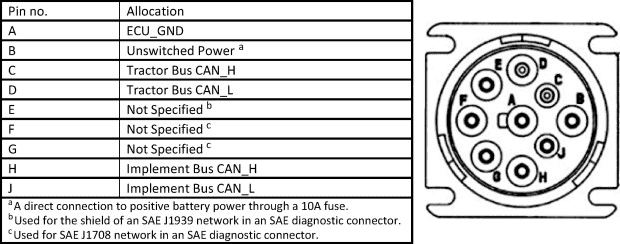
6.4 | Tractor CAN Connection (Optional)
Overview
COMMAND can be connected to a 250 or 500kbps Tractor CANBUS if present, allowing the ECU to read tractor data directly from tractor systems including parameters such as engine load, hydraulic oil temperature, wheel speed and instantaneous fuel usage. This data can then be displayed in the widgets in in real-time, and is also used in the background for certain control features.
Connecting to an incorrect CANBUS, or having COMMAND's Tractor CAN port set to the incorrect baud rate may cause tractor system errors.
Required Parts
A port replicator is included on the T3H-M001 adapter so that other devices may be connected to the diagnostic connector when necessary without removal of COMMAND harnessing.
If the tractor has a Type I diagnostic connection, T3H-X004 should be added to maintain the Type I connection for the tractor.
Type I J1939 Diagnostic Connection (Black)
- T3H-M001 - COMMAND J1939 Diagnostic Adapter (Green)
- T3H-X004 - J1939 Type I-Type II diagnostic adapter
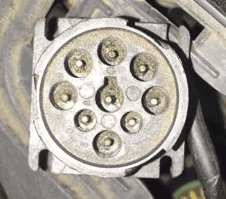
Type II J1939 Diagnostic Connection (Green)
- T3H-M001 - COMMAND J1939 Diagnostic Adapter (Green)
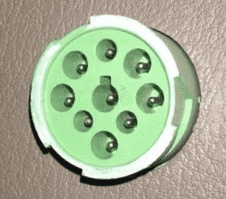
Connection Process
- Connect the T3H-M001 adapter to the appropriate diagnostic plug in the cab of the tractor.
- Connect the T3H-M001 adapter to the T3H-C006 Cab Breakout Adapter.
- If appropriate tractor data is present on the tractor bus, COMMAND will begin reading the data and providing it to Level COMMAND software.
- Check whether any new widgets have appeared with new data in the Widgets menu of Level COMMAND.