
3.9 | Validating System Operation
Status Validation Checks
Item | Expected Result |
|---|---|
ECU Status | Connected and operating normally |
GNSS Status | Fixed RTK solution |
Position Accuracy | Within expected limits |
Inertial Sensors | Reporting valid data |
Valve Outputs | Available and responding |
Machine Configuration | Correct implement selected |
Active Faults | None present |
If any item fails, correct the issue before proceeding.
Manual Hydraulic Validation
Verify hydraulic operation before engaging automatic control.
- Raise and lower the implement using manual controls.
- Confirm smooth movement.
- Confirm correct movement direction.
- Confirm full travel can be achieved.
- Verify no unexpected hydraulic behaviour occurs.
Expected Result:
- Implement responds immediately.
- Movement direction matches commanded direction (Up/Down/Left/Right).
- No instability or oscillation is present.
Automatic Control Engagement Validation
Verify Automatic Control can engage correctly.
- Position the machine in a safe operating area.
- Load a valid design surface.
- Satisfy all engagement requirements.
- Engage Automatic Control.
Expected Result:
- Automatic Control engages successfully.
- No engagement warnings are generated.
- Control outputs become active.
Control Response Validation
Verify control outputs produce the expected machine response.
- Introduce a known elevation error.
- Engage Automatic Control.
- Observe implement movement.
Expected Result:
- Implement moves toward the design surface.
- Movement direction is correct.
- Correction occurs without hesitation.
- No excessive overshoot occurs.
This is where dealers often discover:
- reversed cylinders
- incorrect valve assignments
- incorrect sign conventions
- calibration issues
Grade Tracking Validation
Operate the machine under normal working conditions. Navigate to "More" > "COMMAND Settings" > "Tuning".
Observe:
- Current Error
- Commanded Output %
- Dynamic Performance Factor (DPF)
Expected Result:
- Current Error remains stable and controlled.
- Commanded Output % changes smoothly.
- DPF remains low and consistent.
- Automatic Control maintains the design surface without oscillation.
Commissioning Acceptance Checklist
This is the section I think is missing from most OEM manuals and would make yours stand out.
Something like:
Validation Item | Pass |
|---|---|
ECU communicating | ☐ |
GNSS | ☐ |
| ☐ |
Hydraulic outputs verified | ☐ |
Cylinder calibration completed | ☐ |
Automatic Control engages correctly | ☐ |
Control direction verified | ☐ |
Tracking Sensitivity tuned | ☐ |
DPF indicates acceptable performance | ☐ |
Grade tracking validated | ☐ |
No active faults present | ☐ |
System Ready For Operator Use ☐
'GPS thresholds' - allows you to set GPS-related configuration values.
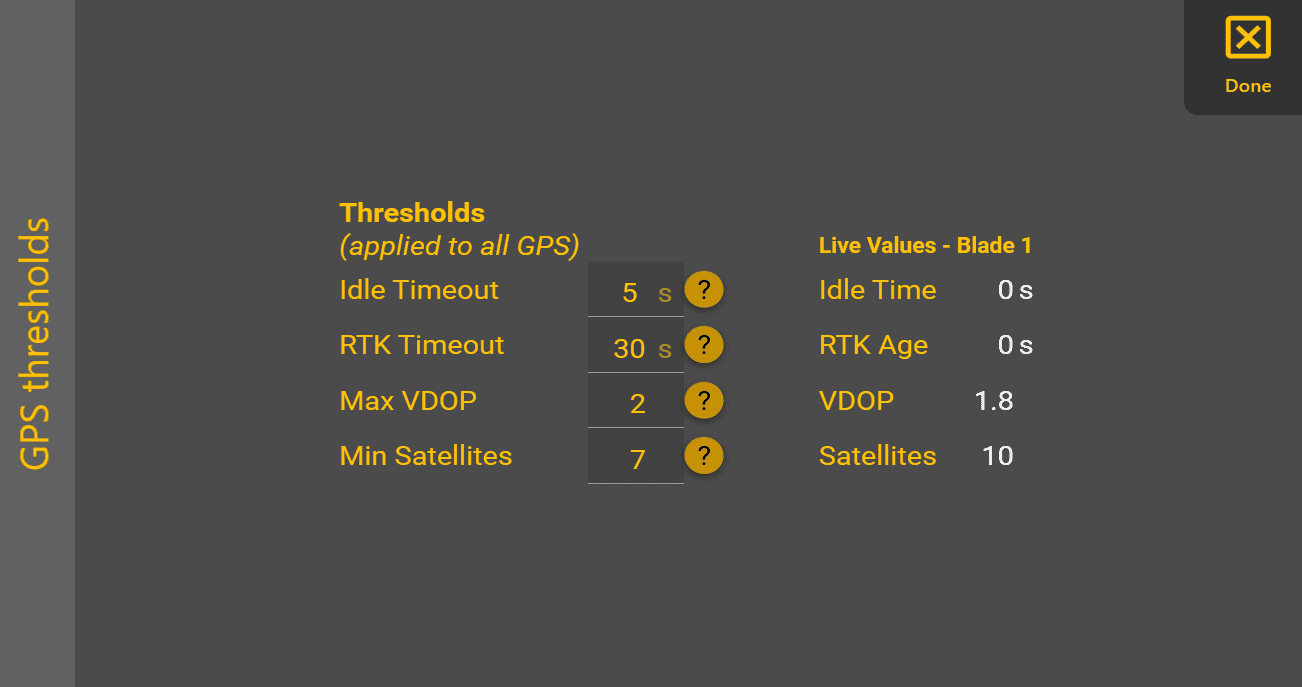
'Idle Timeout' | The maximum allowable time for a GPS data to not be received. |
'RTK Timeout' | The maximum acceptable age of GPS RTK corrections. |
'Max VDOP' | The maximum allowed Vertical Dilution of Precision (VDOP). Recommended to be below 2. |
'Min Satellites' | The minimum required number of satellites. A warning will be triggered if below this threshold. Note: due to how some receivers report the number of satellites in use, a maximum of 12 satellites may be displayed when in fact the receiver is using more satellites from multiple constellations (e.g. GPS, GLONASS, BeiDou, Galileo, etc.). |
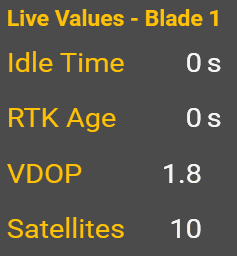
The 'Live values' section to the right shows the current values that are compared to the thresholds. Seeing what the current values are should allow you to tune your thresholds. It's also an easy way to check their current values. But if you want to monitor them while working, you can instead use the Widget Interface.