
How T3RRA Software Works with John Deere iGrade™
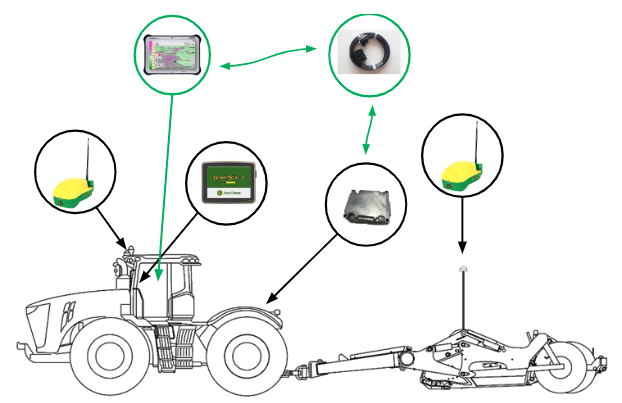
John Deere iGrade™ is an integral part of the T3RRA machine-control solution. While T3RRA software provides terrain design, guidance and implementation functionality, John Deere iGrade™ performs the hydraulic machine control required to operate the implement.
Because both systems work together, the performance of T3RRA software is directly dependent on iGrade™ being correctly installed, configured and calibrated. If iGrade™ is not operating correctly, T3RRA software will not be able to achieve reliable machine control.
John Deere provides comprehensive documentation covering the installation, configuration and operation of iGrade™. Rather than duplicate that information, this chapter explains how T3RRA software interfaces with iGrade™ and highlights the settings required for reliable operation. For detailed information regarding iGrade™ operation, configuration or troubleshooting, always refer to the official John Deere iGrade™ documentation or contact your local John Deere dealer.
Verify iGrade™ First
ItAlthough mightT3RRA seemsoftware obvious,relies buton itiGrade™, the reverse is importantnot to note that true—iGrade™ willcan workoperate withoutindependently of T3RRA software.software.
When settingcommissioning upor T3RRA,troubleshooting besta practice is tosystem, first test iGradetm in isolation. Only once you have confirmedconfirm that iGrade™ is workingoperating properlycorrectly shouldon youits startown. toOnce troubleshootnormal iGrade™ operation has been verified, configure and test T3RRA software. This approach greatly simplifies fault finding and helps isolate whether an issue originates within iGrade™ or the T3RRA software.
For
Communication allBetween informationT3RRA on how to correctly make adjustments toand iGrade™
T3RRA refersoftware tocommunicates your iGrade™ user manual or contact your localwith John Deere representative.
T3RRA software “talks” to iGrade™ overthrough the “iGrade™ Remote Control Harness”Harness. For iGrade™ and T3RRA softwarecommunication to communicate,operate correctly, the serial portcommunication settings of eachboth systems must match.
If an iGrade™ UCC1 unitcontroller is beingused, usedconfigure:
If an iGrade™ UCC2 unitcontroller is beingused, usedconfigure:
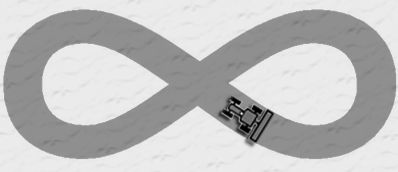
Important: Ensure that the hydraulic threshold setup, and TCM calibrations on iGrade™ have been completed correctly. If not done this will directly impact the performance of the system and the implementation of your field designs. Make sure to carefully follow the instructions in the iGrade™ user's manual. Perform the figure 8 calibration to make sure that everything is running smoothly. If in doubt, consult your dealer.
Configuring Remote Control
iGrade™ controls hydraulic implement activityfunctions using hydraulic pluginsthrough SCV1 and SCV3. In order toTo allow T3RRA software to take control itthese is important to tellfunctions, iGrade™ must be configured to accept remote commandscontrol forcommands.
Configure andthe SCV3. ToSCV control an implement with a single control surface (suchmodes as afollows:
When using cross-slope control, ensure the Cross Slope SetupSetpoint makeSource sureis thatconfigured as Remote Control.
(Configuration screenshots here.)
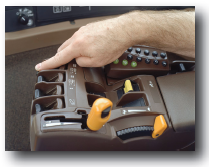
To ensure hydraulic commands are accepted, the setpointcorresponding sourceSCV islevers setin tothe ‘Remotemachine Control’.cab must also be placed in the Detent position.
 To make sure that the SCVs will receive the commands correctly also ensure that their switches in the cab are set to ‘Detent’.
Connection Status
If iGrade™ does not receive remote control commands for approximately 5 seconds, it will “timeautomatically out” approximately 5 seconds after the tractor stops receivingdisengage remote commands.control It will thenand display '"No Remote Commands'.Commands."
Under normal operation, T3RRA software continuously transmits remote control messages to maintain communication. If this happensmessage itappears willduring needoperation, to be re-engaged. T3RRA software attempts to keepinvestigate the connectioncommunication alivelink bybetween continuouslythe sendingtablet dataPC and you should not normally see the timeiGrade™ out message.controller.
GNSS Connectivity
T3RRA software is not limited to receiving GPS messages solely from iGrade™. Although only T3RRA Cutta and T3RRA Ditch sendtransmit remote control messagescommands to iGrade™, all T3RRA software (including T3RRA Plane, Levee and Survey)applications can connect to both iGrade™ and any other GPS to receive GPSGNSS messages.position data.
T3RRA software may obtain GNSS data either from John Deere iGrade™ or directly from another compatible GNSS receiver, depending on the system configuration.
Important
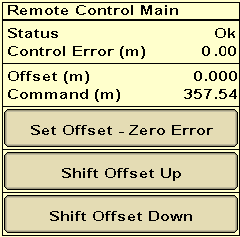
Before implementingbeginning makean sureimplementation tooperation, use Zero Error in iGrade™ to set Zero tothe current blade height inas zero. Whenever zero is reset within T3RRA software, the corresponding iGrade™. Youoffsets should zeroalso iGrade™be Offsetsreset wheneverto youensure setboth Zerosystems inremain yoursynchronised.