
How T3RRA Software Works with John Deere iGrade™
John Deere iGrade™ hasis aan comprehensiveintegral manual.part We do not try to replicate it here. We strongly recommend readingof the iGrade™T3RRA manualmachine-control priorsolution. toWhile reading this one. This chapter only seeks to inform you of how we interact with iGrade™ If you have any questions regarding the operation of iGrade™ please refer to the iGrade™ Manual.
T3RRA software operatesprovides interrain conjunctiondesign, withguidance and implementation functionality, John Deere’sDeere iGrade™ system.performs the hydraulic machine control required to operate the implement.
Because both systems work together, the performance of T3RRA reliessoftware is directly dependent on iGrade™ performingbeing accuratelycorrectly itinstalled, is important that iGrade™ is installedconfigured and configured correctly.calibrated. If iGrade™ is not workingoperating properly,correctly, thenT3RRA neithersoftware will not be able to achieve reliable machine control.
John Deere provides comprehensive documentation covering the installation, configuration and operation of iGrade™. Rather than duplicate that information, this chapter explains how T3RRA software.software interfaces with iGrade™ and highlights the settings required for reliable operation. For detailed information regarding iGrade™ operation, configuration or troubleshooting, always refer to the official John Deere iGrade™ documentation or contact your local John Deere dealer.
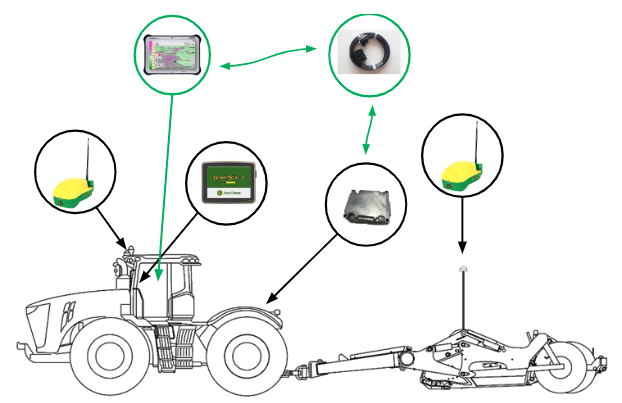
It might seem obvious, but it is important to note that iGrade™ will work without T3RRA software. Before setting up T3RRA, best practice is to first test iGradetm in isolation. Only once you have confirmed that iGrade™ is working properly should you start to troubleshoot the T3RRA software.
For all information on how to correctly make adjustments to iGrade™ please refer to your iGrade™ user manual or contact your local John Deere representative.
T3RRA software “talks” to iGrade™ over the “iGrade™ Remote Control Harness”. For iGrade™ and T3RRA software to communicate, the serial port settings of each must match. If an iGrade™ UCC1 unit is being used we recommend setting the baud rate to 38400 and NMEA - GGA & GSA and a rate of 5Hz. If an iGrade™ UCC2 unit is being used we recommend setting the baud rate to 115200 with NMEA set to ALL at a rate of 5Hz.
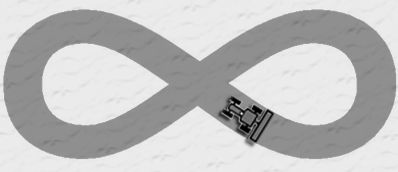
Important: Ensure that the hydraulic threshold setup, and TCM calibrations on iGrade™ have been completed correctly. If not done this will directly impact the performance of the system and the implementation of your field designs. Make sure to carefully follow the instructions in the iGrade™ user's manual. Perform the figure 8 calibration to make sure that everything is running smoothly. If in doubt, consult your dealer.
iGrade™ controls implement activity using hydraulic plugins SCV1 and SCV3. In order to allow T3RRA software to take control it is important to tell iGrade™ to accept remote commands for SCV1 and SCV3. To control an implement with a single control surface (such as a scraper with only up/down control) ensure that iGrade™ has SCV1 control type set to ‘Remote Control’. If using dual scrapers make sure to set both SCV1 and SCV3 control type to ‘Remote Control’. If you are using a single scraper with cross-slope capability then set SCV1 control type to ‘Remote Control’ and SCV3 control type to ‘Cross Slope Control’. Additionally, in Cross Slope Setup make sure that the setpoint source is set to ‘Remote Control’.
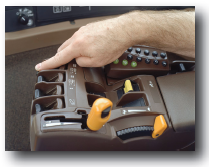
 To make sure that the SCVs will receive the commands correctly also ensure that their switches in the cab are set to ‘Detent’.
iGrade™ will “time out” approximately 5 seconds after the tractor stops receiving remote commands. It will then display 'No Remote Commands'. If this happens it will need to be re-engaged. T3RRA software attempts to keep the connection alive by continuously sending data and you should not normally see the time out message.
T3RRA software is not limited to receiving GPS messages solely from iGrade™. Although only T3RRA Cutta and T3RRA Ditch send control messages to iGrade™, all T3RRA software (including T3RRA Plane, Levee and Survey) can connect to both iGrade™ and any other GPS to receive GPS messages.
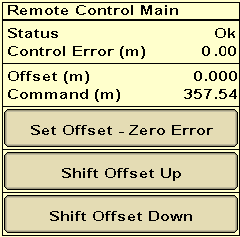
Before implementing make sure to use Zero Error to set Zero to current blade height in iGrade™. You should zero iGrade™ Offsets whenever you set Zero in your T3RRA™ software.