
Setting Zero
Zeroing is the process of removing any difference from when the design was originally created to now. The design might have been surveyed using a different implement, or there might have been some GPS drift. Zeroing will solve this.
When should one Zero
It can be better to avoid zeroing, as you must be very precise to get the best value. It can be that the blade wasn't quite put on the ground fully, or it was put in too far and dug in a bit. It could be that the blade is off-target to the left or right, shifting the field. This is why it's only recommended to zero if
- The file hasn't ever been zeroed to before
- The base-station has moved
- The blade isn't properly cutting - ie it's consistently too high or too low
What is a benchmark/Where should it be?
A benchmark is a known point that allows you to calibrate your phyical machine witht the digitial world.
Benchmarks should be in locations that are repeatable and easily accessible. Ideally they want to be on a stable location (ie a concrete pad) where the blade can be reliably placed. It should also allow the lat/lon position to be reliably recreated, ie if there's a mark on the concrete that the center of the blad needs to be over.
Sometimes surveyors/designers provide benchmarks on fence posts or other locations that the blade can't reach, in that case the FAQ below.
Should your design not have any benchmarks Level Command will create "Auto-Benchmarks". Auto-benchmarks are placed on flat areas of zero-cut fill. This is less ideal than using a known benchmark as normal traffic or water could affect the exact height of the location which is why it's recommended to have one included in the design. When using auto-benchmarks several will be provided. Choose the one that will be least likely to be driven over and most convient to use as once you've used one the others will be removed.
How should one Zero
When zeroing it's important to be as precise as possible as that will likely lead to a better outcome in the implementation. Any deviation from the original survey will mean the entire design will be offset by that amount.
Open the zero window by clicking on "More" then "Zero To Benchmark"
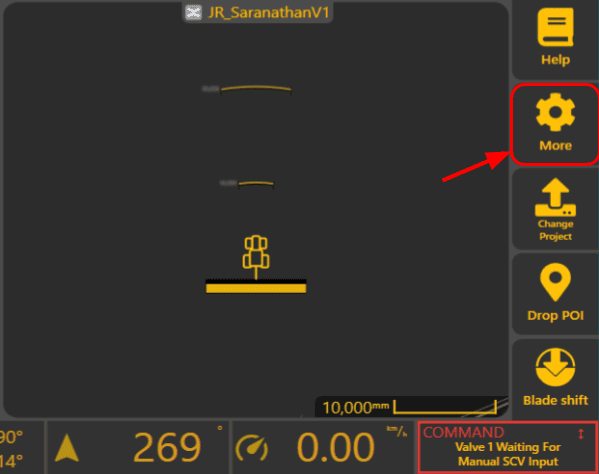
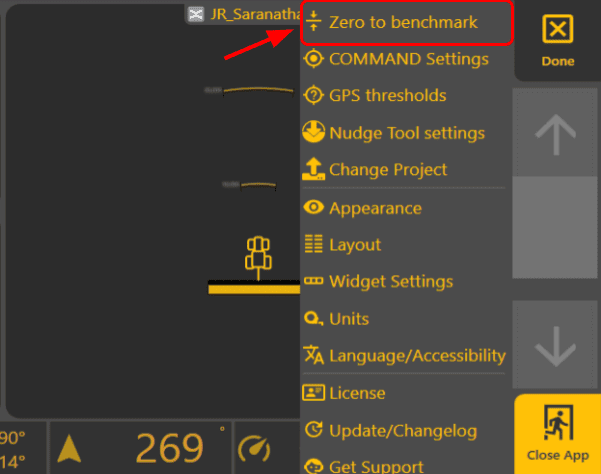
Select the marker you wish to zero to and then drive the implement/blade over the exact location of the marker. You will see a dashed line highlighting the location of the marker. Carefully place it down on the ground. If zeroing on dirt it should be touching the ground but not digging into it.
FAQs:
The benchmark is on a fence post/some other inaccessible area. How can that benchmark be used.
Ideally, request the designer to provide a benchmark on an accessible area. If not, then talk to one of our support team to assist you as this process is faily involved.