
COMMAND Settings - Valve Calibration
Finding The Calibration Menu
The COMMAND valve calibration can be accessed using the navigation path: More > COMMAND Settings > Valve Cal.

Calibration Interface
The interface will present the current calibration values for each function, which will depend on the selected machine profile.
Min. Threshold
By default the minimum threshold for each direction of each function is 0%. This parameter determines the lowest signal output that the ECU will send to the valve if the height error is greater than X centimetres.
Max. Threshold
By default the minimum threshold for each direction of each function is 100%. This threshold can be used to reduce the maximum output of the ECU down from 100% (i.e. 100% valve flow), which would have a similar effect to reducing the hydraulic flow output of the hydraulic valve using tractor controls; however, this will generally only affect automatic control speeds, or manual control speeds if an Analog or CANBUS joystick is being used with COMMAND.
For proportional solenoids, the max. % is used to ensure the commanded output signal is no greater than 1800 mA, otherwise overcurrent protection may be triggered by the ECU when extending or retracting at 100%.
Swap Extend / Retract
Used to reverse the direction of the function in a similar way to swapping hydraulic hoses around at the back of the tractor.
Calibration Test Buttons
The "+", "-" and "TEST" buttons are used during the calibration process to incrementally increase or reduce a given threshold, which can then be tested using the process in the next section.

General Calibration Process
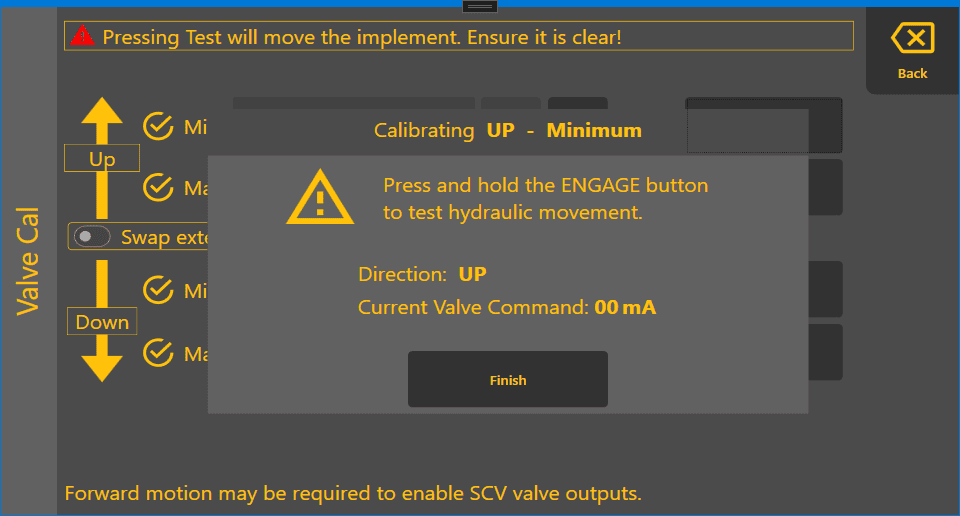
Press the "TEST" button corresponding to the function to be calibrated. A new dialog will open displaying instructing to press the physical "ENGAGE" button to test the hydraulic movement. The function being calibrated and the current valve command value will be displayed.
Pressing Test will move the implement. Ensure it is clear!
Proportional Solenoid Calibration Process
Testing Calibration Values
Press the "TEST" button corresponding to the function to be calibrated. A new dialog will open displaying instructing to press the physical "ENGAGE" button to test the hydraulic movement. The function being calibrated and the current valve command value in milliamps (mA) will be displayed.
Pressing Test will move the implement. Ensure it is clear!
Min. Threshold
By default the minimum threshold will be 0%. Increase the min. value by a small amount e.g. 5% and then perform a testing as mentioned above and observe the commanded output milliamps increasing.
The goal is to set Min. % to a value that just barely causes the hydraulic valve to open for a very slow gradual movement. This is sometimes referred to as the valve's "cracking point". We recommended increasing in increments of 5% until gradual movement is seen, then reduce by 1% at a time to find the threshold.
Max. Threshold
This threshold can be used to reduce the maximum output of the ECU, which would have a similar effect to reducing the hydraulic flow output of the hydraulic valve using tractor controls; however, this will usually only affect automatic control speeds. If a joystick is being used with COMMAND for manual control, then this max. value will also reduce the maximum output from the joystick.
For proportional solenoids, the max. % must be set such that the commanded output signal is no greater than 1800 mA, or overcurrent protection may be triggered by the ECU when extending or retracting at 100%.
Adjust Max. % downward from 100 until the commanded output is roughly 1800mA to provide some padding for changes is solenoid temperature and environmental factors.