
7.7 | Diagnostics / Advanced
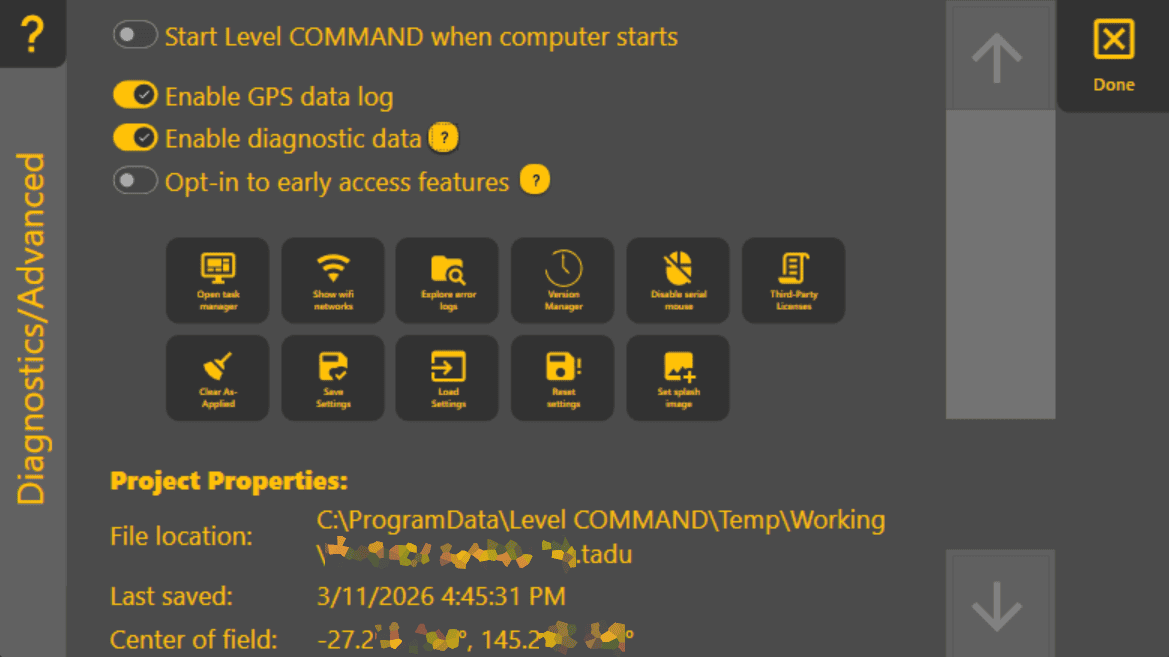
AccessThe Diagnostics & Advanced page provides access to advanced application settings, diagnostic tools and project information.
To open this page, press More → Diagnostics / Advanced.

Most options on this page byare goingintended to:for Moredealers, >advanced Diagnostics/Advanced.users It'sor neartroubleshooting with the bottomassistance of T3RRA Support. Unless instructed otherwise, the default settings list.are recommended.
Application Settings
ThisSeveral pageapplication allowsbehaviours youcan tobe checkconfigured somefrom lesserthis neededpage, details and tweak some things that you shouldn't need to change often. They include:including:
Turn on/off startingStart Level COMMAND whenyourthe computer starts – Automatically launches Level COMMAND when Windows starts.Enable/disableEnable GPS Data Log – Records GNSS data for later analysis and troubleshooting.
Project earlyInformation
The updates.lower
This information can be useful when locating project files or assisting with technical support.
Diagnostic Tools
Additional utilities are available for advanced troubleshooting and system maintenance, including:
These functions are typically used only during commissioning or when troubleshooting with T3RRA Support.
Look Ahead,Ahead
The Look Ahead value can also be adjusted from this page.
Look Ahead compensates for the delay between calculating a control command and the machine responding hydraulically. Correct adjustment can improve grading performance, particularly at higher operating speeds.
This setting should normally remain at its default value unless tuning is usedbeing toperformed compensateby foran controlexperienced loopdealer delay.or under the guidance of T3RRA Support.
For more information, seerefer Howto control6.7 works| Predictive Control & Look Ahead.
Operator Tip: The default settings on the Diagnostics & Advanced page are suitable for almost all installations. If a change is made while troubleshooting, record the original value so it can be restored if required.