
9.9 | Diagnostics / Advanced
Access this page by going to: More > Diagnostics/Advanced. It's near the bottom of the settings list.
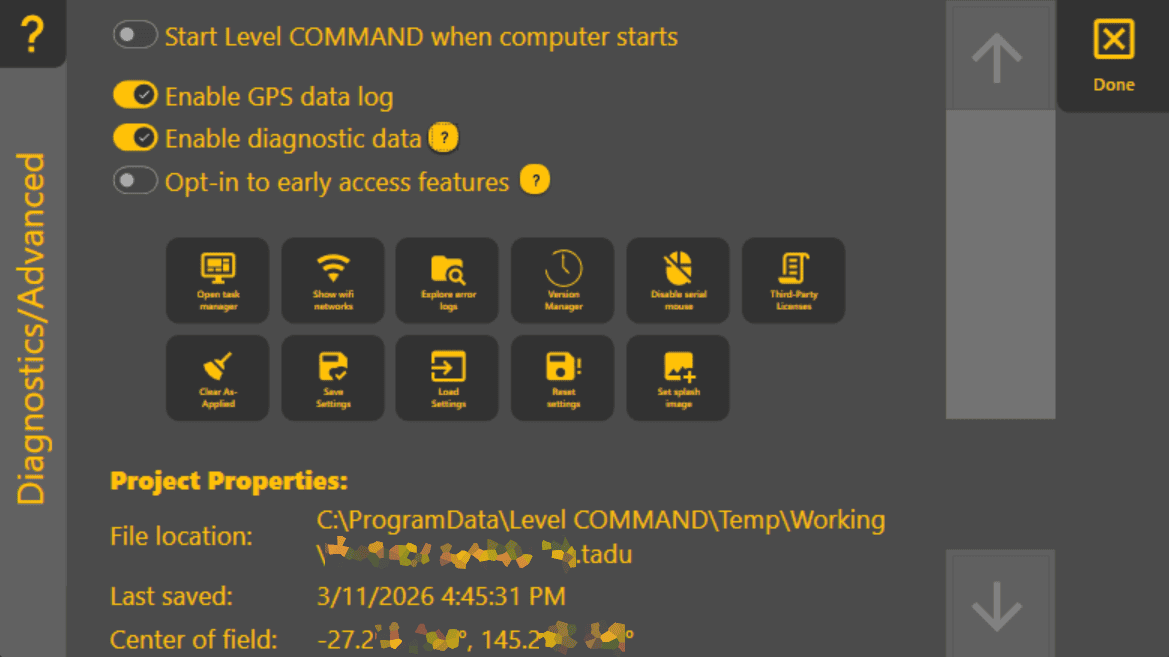
This page allows you to check some lesser needed details and tweak some things that you shouldn't need to change often. They include:
- Turn on/off starting Level COMMAND when your computer starts.
- Enable/disable GPS and diagnostic logging. Diagnostic data is sent when possible to help us improve Level COMMAND, and GPS logs are included
inin Reports and very helpful when fixing issues, should they arise with your system. - Opt into early access updates.
- Backup your settings or restore to defaults.
- View the full path to your project folder.
- View the project location and direction to it from your current location.
- Edit Look Ahead, which is used to compensate for control loop delay. For more information, see How control works.