
4.2 | Understanding COMMAND Status
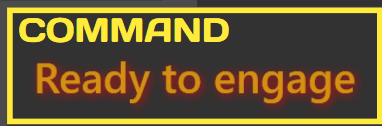
The COMMAND Status area is shown at the bottom-right of the Apply View and provides a quick indication of the current operating state of the COMMAND ECU.
Operators should check COMMAND Status before attempting to engage Automatic Control. The status message indicates whether the system is ready to engage, currently engaged, waiting for an operator action, or unable to operate due to a warning, fault or incomplete setup condition.
Status Colours
The coloured frame around the COMMAND Status area provides a quick visual indication of the current system state:
- Green indicates that Automatic Control is currently engaged.
- Yellow indicates that all requirements have been satisfied and the system is ready for Automatic Control engagement.
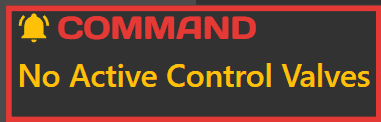
- Red indicates that operator action, further setup or fault correction is required before Automatic Control can operate normally.


Typical Workflow
Before engaging Automatic Control:
- Confirm GNSS has achieved RTK fix.
- Confirm the correct project or design surface is loaded.
- Check COMMAND Status.
- Resolve any warnings or required actions.
- Engage Automatic Control only when COMMAND Status shows Ready to Engage.
Green Statuses - Automatic Control Engaged
Green statuses indicate that Automatic Control is currently engaged.
| Status | Meaning | Operator Action |
|---|---|---|
| Engaged - Active | Automatic Control is engaged and COMMAND may move the implement automatically. | Continue operating normally. |
| Engaged - Low Speed | Automatic Control is engaged, but the machine is moving too slowly for COMMAND to move the implement. | Increase machine speed above 0.2 km/h to allow automatic implement movement. |
| Engaged - Calibrating | COMMAND is controlling the implement as part of a calibration process. | Continue the calibration procedure shown on screen. |
Yellow Statuses - Ready for Engagement
Yellow statuses indicate that the system is ready for Automatic Control, but Automatic Control is not currently engaged.
| Status | Meaning | Operator Action |
|---|---|---|
| Ready to Engage | The system is ready for Automatic Control. | Press the engage button when ready to begin. |
Red Statuses - Operator Attention Required
Red statuses indicate that operator action, additional setup or fault correction is required before Automatic Control can operate.
| Status | Meaning | Operator Action |
|---|---|---|
| Waiting for RTK | The GNSS receiver does not have RTK correction yet. | Wait for RTK. Check GNSS corrections and receiver setup if RTK is not achieved after several minutes. |
| No Connection to ECU | Level COMMAND cannot communicate with the COMMAND ECU. | Check ECU power, wiring and connections. |
| Blade Width Unset | The selected machine profile has not been fully configured. | Contact your dealer or complete machine setup before continuing. |
| Waiting for Manual SCV Input | The tractor requires the hydraulic control lever to be moved before Automatic Control can operate. | Briefly move the required hydraulic control lever. |
| System Not Armed | Automatic Control has not been armed. | Turn the arm/engage switch on, or cycle it off and back on if required. |
| SCV Locked | The tractor hydraulic valve is locked and cannot be controlled by COMMAND. | Unlock the required hydraulic valve using the tractor controls. |
| Speed Too Fast | Machine speed is above the maximum allowed Automatic Control speed. | Reduce machine speed before engaging Automatic Control. |
| Waiting for IMU Data | COMMAND is not receiving data from the IMU sensor. | Check IMU power, wiring and configuration. |
| Unstable GPS / IMU | GNSS or IMU data is changing too quickly or appears invalid. | Stop and allow the system to stabilise. Check sensor mounting and signal quality if the warning remains. |
| NMEA Low Rate | GNSS position updates are arriving slower than expected. | Check GNSS receiver settings and connections. |
| T3 Timeout | COMMAND has stopped receiving control information from Level COMMAND. | Check the tablet, software and ECU connection. |
| No Active Control Valves | No hydraulic valves have been assigned to the active control function. | Complete machine setup or contact your dealer. |
| Check Calibration | Hydraulic calibration has not been completed. | Complete the calibration process before continuing. |
| Valve Error | A hydraulic valve or valve output has reported an error. | Check valve wiring, configuration and hydraulic hardware. |
| No Main License | Level COMMAND is not licensed for operation. | Enter a valid software unlock code. |
| Var Reset Required | The ECU requires additional setup after a firmware update. | Contact your dealer or T3RRA Support. |
Ready to Continue
Once COMMAND Status shows Ready to Engage, the system is ready for Automatic Control engagement.
Continue to 4.3 | Loading or Importing a Project if a project has not yet been loaded, or continue to 4.5 | Engaging Automatic Control if the project and zero reference are already prepared.