
John Deere StarFire
Harnessing Layout Overview
For use with COMMAND, the John Deere StarFire can be set up with typical John Deere implement harnessing.
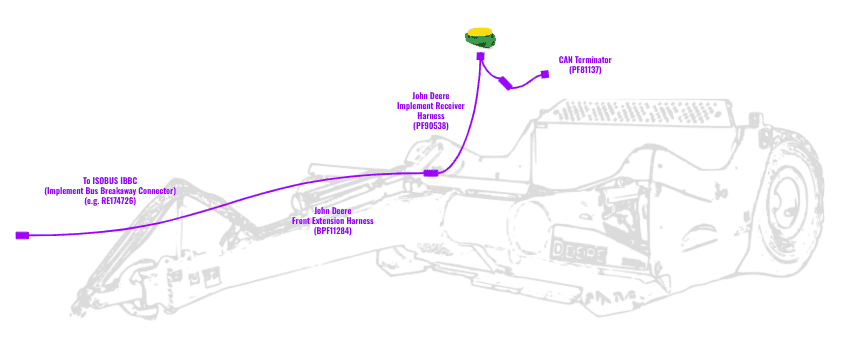
Parts Required
- Existing or aftermarket ISOBUS IBBC (Implement Bus Breakaway Connector) e.g. RE174726
- BPF11284 - John Deere Front Extension Harness (10m)
- PF90538 - John Deere Implement Receiver Wiring Harness Kit
- PF81137 - John Deere Implement Pigtail Terminator Wiring Harness
Connection Process
- Connect the John Deere Front Extension Harness to the IBBC route along the hosing/implement making sure to leave some slack wherever the hitch might flex but also paying close attention to any objects that could get caught on the harnessing.
- Connect the Implement Receiver Wiring Harness to the Front Extension Harness and route the cabling up toward the receiver mast.
- Connect the Implement Pigtail Terminator to the Implement Receiver Wiring Harness and secure the terminator to the implement receiver wiring harness.
- Connect the Implement Receiver Wiring Harness to the Starfire receiver 12-pin DT connector.
- Check that the receiver powers correctly and that its ISOBUS terminal appears correctly on the in-cab John Deere display.