# Tractor position icon does not adjust when you zero against a benchmark.

<span dir="ltr" style="font-size: 14pt; font-family: Helvetica, sans-serif; color: rgb(0, 0, 0); font-weight: 400;">**Symptoms**:</span>

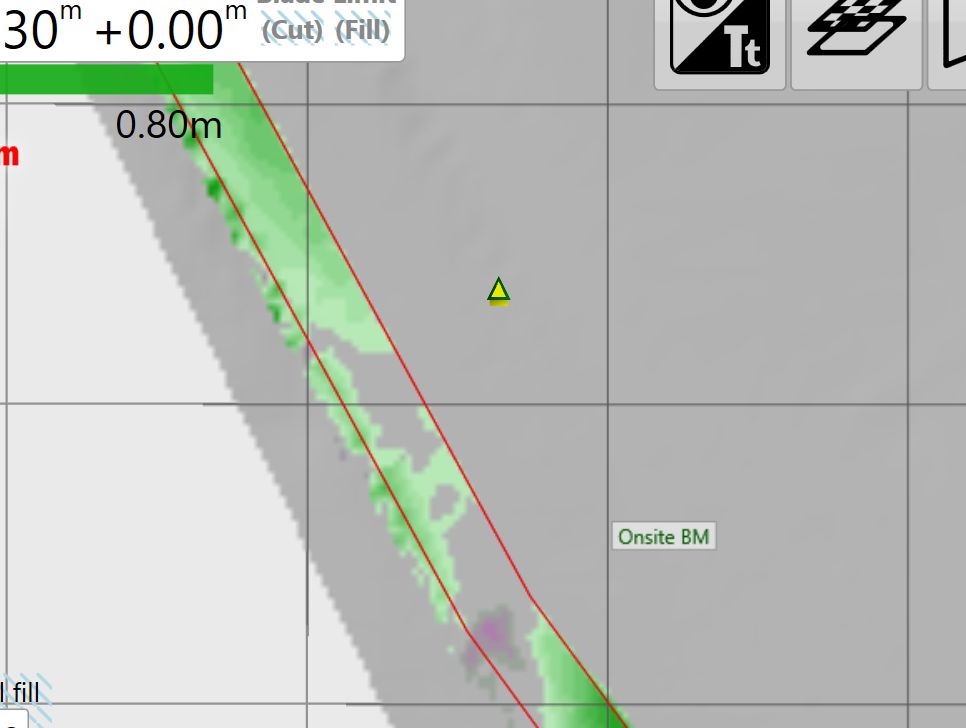
<span style="font-family: Helvetica,sans-serif;"><span style="font-size: 14pt; color: rgb(0, 0, 0); font-weight: 300;">You are parked over a physical benchmark and want to adjust the map location so that the related on-screen benchmark icon matches the location on the tractor icon. However when you perform the “Zero using a marker” action nothing changes. The icons for the benchmark and the tractor remain separated.</span></span>

![](https://docs.t3rra.com/uploads/images/gallery/2025-03/scaled-1680-/q-9dcbmkl1stbh74odxmb9e8hmpna2byda-png.png)

<span style="font-family: Helvetica,sans-serif;">  
</span>

<span style="font-family: Helvetica,sans-serif;"><span style="font-size: 14pt; color: rgb(0, 0, 0); font-weight: 400;">**Cause**:</span></span>

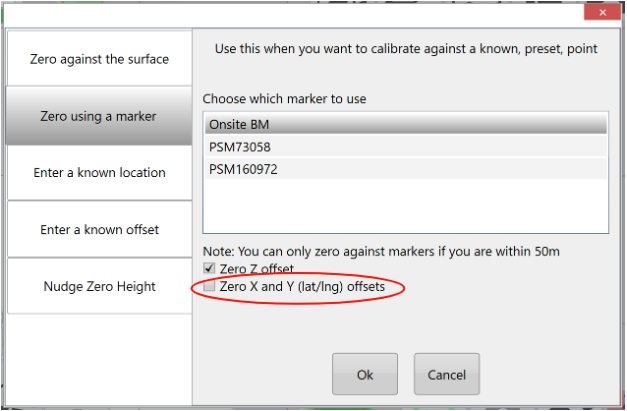
<span style="font-family: Helvetica,sans-serif;"><span style="font-size: 14pt; color: rgb(0, 0, 0); font-weight: 300;">You have forgotten to check the “Zero X and Y (lat/lng) offsets” box.</span></span>

<span style="font-family: Helvetica,sans-serif;">  
</span>

<span style="font-family: Helvetica,sans-serif;"><span style="font-size: 14pt; color: rgb(0, 0, 0); font-weight: 400;">**Solution**:</span></span>

<span style="font-family: Helvetica,sans-serif;"><span style="font-size: 14pt; color: rgb(0, 0, 0); font-weight: 300;">Check the “Zero X and Y (lat/lng) offsets” box before pressing the Ok button.</span></span>

![](https://docs.t3rra.com/uploads/images/gallery/2025-03/scaled-1680-/x9is56tsov7dd95lgzz-mbwzxiouukfdhw-png.png)