# Tablet is in ‘Tablet Mode’ and you can’t find the desktop icon for your T3RRA Software

<span dir="ltr" style="font-size: 14pt; font-family: Helvetica, sans-serif; color: rgb(0, 0, 0); font-weight: 400;">**Symptoms**:</span>

<span style="font-family: Helvetica,sans-serif;"><span dir="ltr" style="font-size: 14pt; color: rgb(0, 0, 0); font-weight: 300;">The screen on your tablet when T3RRA Cutta is not running appears different from what you expect. It does not display the regular Windows desktop. You are unable to find the T3RRA software icon to activate your T3RRA software.</span></span>

![](https://docs.t3rra.com/uploads/images/gallery/2025-03/scaled-1680-/pkzetek94cvi1eisubq6bz17lrkpynck2w-png.png)

<span style="font-family: Helvetica,sans-serif;"><span style="font-size: 14pt; color: rgb(0, 0, 0); font-weight: 400;">**Cause**:</span></span>

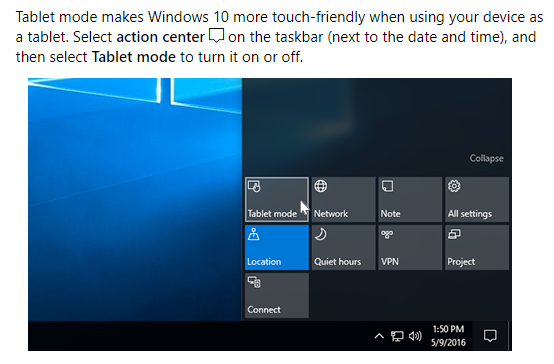
<span style="font-family: Helvetica,sans-serif;"><span style="font-size: 14pt; color: rgb(0, 0, 0); font-weight: 300;">Your tablet has been somehow placed in ‘Tablet’ mode.</span></span>

<span style="font-family: Helvetica,sans-serif;">  
</span>

<span style="font-family: Helvetica,sans-serif;"><span style="font-size: 14pt; color: rgb(0, 0, 0); font-weight: 400;">**Solution**:</span></span>

<span style="font-family: Helvetica,sans-serif;"><span style="font-size: 14pt; color: rgb(0, 0, 0); font-weight: 300;">Turn off tablet mode.</span></span>

<span dir="ltr" style="font-size: 14pt; font-family: Helvetica, sans-serif; color: rgb(0, 0, 0); font-weight: 300;">![](https://docs.t3rra.com/uploads/images/gallery/2025-03/scaled-1680-/fazdspc7zipcv6qppkflub8wa7ed6eylka-png.png)</span>