# T3RRA software crashes without an error message

<span dir="ltr" style="font-size: 14pt; font-family: Helvetica, sans-serif; color: rgb(0, 0, 0); font-weight: 400;">**Symptoms**:</span>

<span style="font-family: Helvetica,sans-serif;"><span dir="ltr" style="font-size: 14pt; color: rgb(0, 0, 0); font-weight: 300;">The T3RRA software will suddenly close with no warning or error message. It is not clear what has caused the program to do this. Alternatively, the program will freeze with the splash screen showing or not start at all.</span></span>

<span style="font-family: Helvetica,sans-serif;">  
</span>

<span style="font-family: Helvetica,sans-serif;"><span style="font-size: 14pt; color: rgb(0, 0, 0); font-weight: 400;">**Cause**:</span></span>

<span style="font-family: Helvetica,sans-serif;"><span style="font-size: 14pt; color: rgb(0, 0, 0); font-weight: 300;">Some unhandled error is causing the program to suddenly halt. </span></span>

<span style="font-family: Helvetica,sans-serif;">  
</span>

<span style="font-family: Helvetica,sans-serif;"><span dir="ltr" style="font-size: 14pt; color: rgb(0, 0, 0); font-weight: 400;">**Solution**:</span></span>

<span style="font-family: Helvetica,sans-serif;"><span dir="ltr" style="font-size: 14pt; color: rgb(0, 0, 0);">*If the issue occurs on startup, or you are on an old version*, updating can help. Sometimes an older version will run well enough to access the update function. To 'downgrade', right-click on the desktop shortcut and choose "Open file location". In that folder there should be two or more folders starting with "app-" (e.g. "app-2024.9.2"). In older products, there will be a "v" folder containing two or more folders with numbers for names (e.g. "0" and "2.233"). The larger the folder number, the more recent the release. Move the most recent release folder to a temporary location (e.g. Desktop) and restart the program. If it starts normally, open "Settings" and click "Download updates". Don't forget to delete the folder from the temporary location (or restore it if it doesn't help). If the issue persists, try rerunning the installer.</span></span>

<span style="font-family: Helvetica,sans-serif;"><span dir="ltr" style="font-size: 14pt; color: rgb(0, 0, 0); font-weight: 300;">*If a certain action by you causes the crash*, try to avoid that action. Normally this type of error requires our software developers to develop a fix and release an updated version of the software. However, this type of error is difficult to reproduce and hence difficult to fix. Follow the following steps to send the information the developers will need.</span></span>

<span style="font-family: Helvetica,sans-serif;">  
</span>

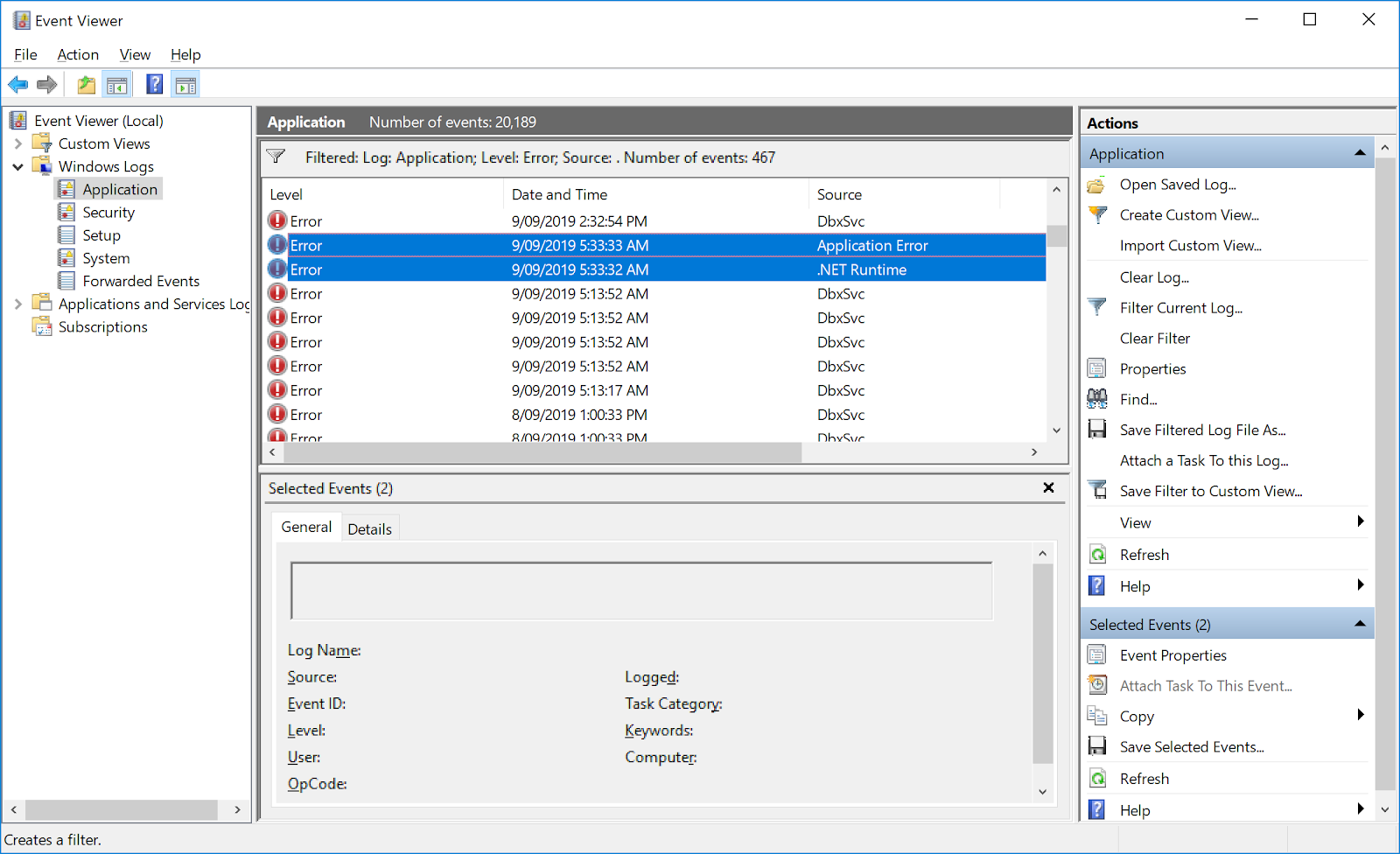
1. <span style="font-family: Helvetica,sans-serif;"><span style="font-size: 14pt; color: rgb(0, 0, 0); font-weight: 300;">Open the Windows ‘Event Viewer’ program </span></span>
2. <span style="font-family: Helvetica,sans-serif;"><span style="font-size: 14pt; color: rgb(0, 0, 0); font-weight: 300;">In the left pane navigate to “Windows Logs &gt; Application”</span></span>
3. <span style="font-family: Helvetica,sans-serif;"><span style="font-size: 14pt; color: rgb(0, 0, 0); font-weight: 300;">Find the most recent errors in the right pane that are related to the crash</span></span>
    1. <span style="font-family: Helvetica,sans-serif;"><span dir="ltr" style="font-size: 14pt; color: rgb(0, 0, 0); font-weight: 300;">Normally these errors will occur in pairs with the first one having the source “Application Error” and the second having the source “.NET Runtime”. It is the second one that is of interest normally.</span></span>
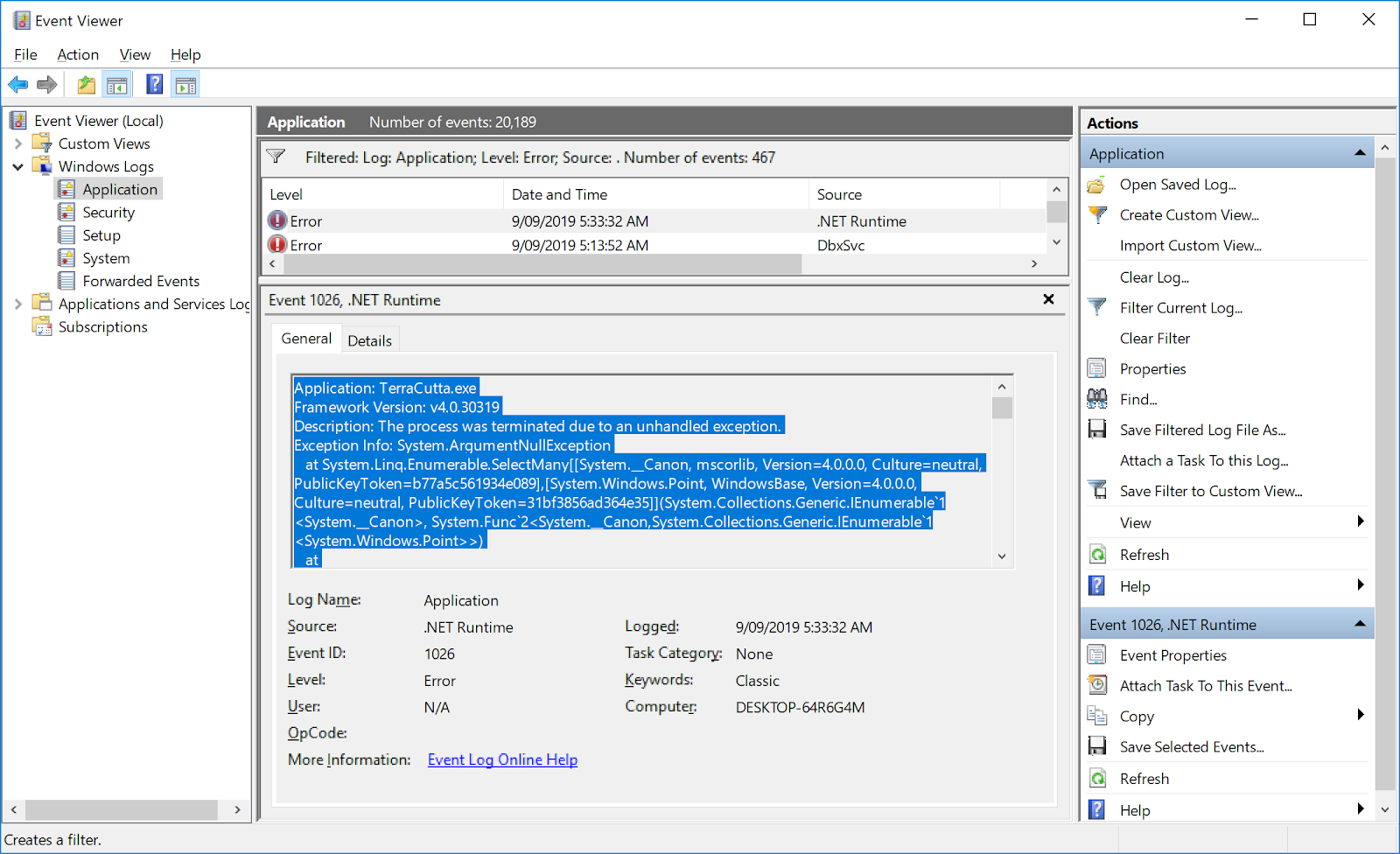
    2. <span style="font-family: Helvetica,sans-serif;"><span dir="ltr" style="font-size: 14pt; color: rgb(0, 0, 0); font-weight: 300;">Copy the contents to the “.NET Runtime” error into an email and send it to support@t3rra.com</span></span>

![](https://docs.t3rra.com/uploads/images/gallery/2025-03/scaled-1680-/w-yr4hdpp3mu6gtrtxblff1mnntdvgvhva-png.png)

<span style="font-family: Helvetica,sans-serif;"><span dir="ltr" style="font-size: 14pt; color: rgb(0, 0, 0); font-weight: 300;"> (image above: finding the errors in windows logs.)</span></span>

![](https://docs.t3rra.com/uploads/images/gallery/2025-03/scaled-1680-/jzikg-dqgx1bp9wgyb2whpnb8rssntmorw-png.png)

<span dir="ltr" style="font-size: 14pt; font-family: Helvetica, sans-serif; color: rgb(0, 0, 0); font-weight: 300;"> (Image above: highlighted contents that should be sent to T3RRA.)</span>