# Project has moved N/S or E/W.

<span dir="ltr" style="font-size: 14pt; font-family: Helvetica, sans-serif; color: rgb(0, 0, 0); font-weight: 400;">**Symptoms**:</span>

<span style="font-family: Helvetica,sans-serif;"><span style="font-size: 14pt; color: rgb(0, 0, 0); font-weight: 300;">When you return to an existing job the map is no longer aligned with the position of the tractor. The project surface has moved North/South or East/West. </span></span>

<span style="font-family: Helvetica,sans-serif;"><span style="font-size: 14pt; color: rgb(0, 0, 0); font-weight: 400;">**Cause**:</span></span>

- <span style="font-family: Helvetica,sans-serif;"><span style="font-size: 14pt; color: rgb(0, 0, 0); font-weight: 300;">Previously entered offsets have been cleared under the Machine tab in settings.</span></span>
- <span style="font-family: Helvetica,sans-serif;"><span style="font-size: 14pt; color: rgb(0, 0, 0); font-weight: 300;">The Base station has been moved.</span></span>
- <span style="font-family: Helvetica,sans-serif;"><span style="font-size: 14pt; color: rgb(0, 0, 0); font-weight: 300;">The Base station is configured as a Quick survey and has been power cycled or reset.</span></span>

<span style="font-family: Helvetica,sans-serif;">  
</span>

<span style="font-family: Helvetica,sans-serif;"><span style="font-size: 14pt; color: rgb(0, 0, 0); font-weight: 400;">**Solution**:</span></span>

1. <span style="font-family: Helvetica,sans-serif;"><span style="font-size: 14pt; color: rgb(0, 0, 0); font-weight: 300;">Keep a record of any horizontal offsets you have used for a project in case you need to re-enter them. If you look back in the project ‘activity log’ you may be able to find previously entered ones there (depending on version).</span></span>
2. <span style="font-family: Helvetica,sans-serif;"><span style="font-size: 14pt; color: rgb(0, 0, 0); font-weight: 300;">Always use a Base configured as ‘Absolute Base’ where possible</span></span>
3. <span style="font-family: Helvetica,sans-serif;"><span style="font-size: 14pt; color: rgb(0, 0, 0); font-weight: 300;">Reference any newly established base station from a “dealer network” or permanent base network where possible</span></span>
4. <span style="font-family: Helvetica,sans-serif;"><span dir="ltr" style="font-size: 14pt; color: rgb(0, 0, 0); font-weight: 300;">If using a ‘Quick Survey’ have it connected to a permanent and always-on power source for the entire duration of a job.</span></span>
5. <span style="font-family: Helvetica,sans-serif;"><span style="font-size: 14pt; color: rgb(0, 0, 0); font-weight: 300;">Never move a Base station position during a job.</span></span>
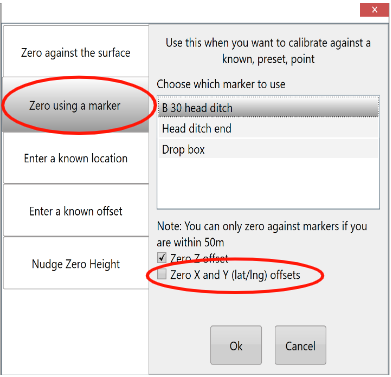
6. <span style="font-family: Helvetica,sans-serif;"><span style="font-size: 14pt; color: rgb(0, 0, 0); font-weight: 300;">Establish permanent “benchmark” locations to check against and re-align the job. You can use the regular ‘Zero’ button in the implementation screen for this. </span><span dir="ltr" style="font-size: 14pt; color: rgb(0, 0, 0); font-weight: 300;">![](https://docs.t3rra.com/uploads/images/gallery/2025-03/scaled-1680-/rpqaiu6smhskw-kcu025zwfqezhxbq3gja-png.png)</span></span>
7. <span dir="ltr" style="font-size: 14pt; font-family: Helvetica, sans-serif; color: rgb(0, 0, 0); font-weight: 300;">Use T3RRA software offsets to re-align the map.</span>