# Software Issues

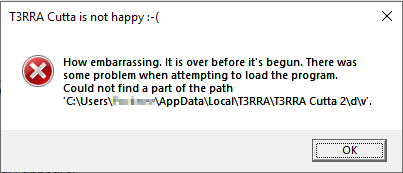
# T3RRA Xxxxx is not happy :-( error.

<span dir="ltr" style="font-size: 14pt; font-family: Helvetica, sans-serif; color: rgb(0, 0, 0); font-weight: 400;">**Symptoms**:</span>

<span style="font-family: Helvetica,sans-serif;"><span style="font-size: 14pt; color: rgb(0, 0, 0); font-weight: 300;">The following error (or similar) appears.</span></span>

<span style="font-family: Helvetica,sans-serif;"><span style="font-size: 14pt; color: rgb(0, 0, 0); font-weight: 700;"><span style="border:none;display:inline-block;overflow:hidden;width:403px;height:173px;">![](https://docs.t3rra.com/uploads/images/gallery/2025-03/scaled-1680-/dx3xavoo7lf6xuyrl-dwmazriauhpdyfuq-png.png)</span></span></span>

<span style="font-family: Helvetica,sans-serif;">  
</span>

<span style="font-family: Helvetica,sans-serif;"><span style="font-size: 14pt; color: rgb(0, 0, 0); font-weight: 400;">**Cause**:</span></span>

<span style="font-family: Helvetica,sans-serif;"><span style="font-size: 14pt; color: rgb(0, 0, 0); font-weight: 300;">There is a problem with T3RRAs program file structure. The program cannot find the correct path to the latest program files when it is started up. </span></span>

<span style="font-family: Helvetica,sans-serif;">  
</span>

<span style="font-family: Helvetica,sans-serif;"><span style="font-size: 14pt; color: rgb(0, 0, 0); font-weight: 400;">**Solution**:</span></span>

<span dir="ltr" style="font-size: 14pt; font-family: Helvetica, sans-serif; color: rgb(0, 0, 0); font-weight: 300;">Contact T3RRA or your dealer. Please provide context about when this error started happening and whether or not any changes were recently made to the tablet.</span>

# Out of memory errors

<span dir="ltr" style="font-size: 14pt; font-family: Helvetica, sans-serif; color: rgb(0, 0, 0); font-weight: 400;">**Symptoms**:</span>

<span style="font-family: Helvetica,sans-serif;"><span style="font-size: 14pt; color: rgb(0, 0, 0); font-weight: 300;">T3RRA software crashes with an “Out of Memory” error.</span></span>

<span style="font-family: Helvetica,sans-serif;">  
</span>

<span style="font-family: Helvetica,sans-serif;"><span style="font-size: 14pt; color: rgb(0, 0, 0); font-weight: 400;">**Cause**:</span></span>

<span style="font-family: Helvetica,sans-serif;"><span style="font-size: 14pt; color: rgb(0, 0, 0); font-weight: 300;">If the software is running on a 32bit version of Windows 10 and is working with large data sets it is possible to get this error.</span></span>

<span style="font-family: Helvetica,sans-serif;">  
</span>

<span style="font-family: Helvetica,sans-serif;"><span style="font-size: 14pt; color: rgb(0, 0, 0); font-weight: 400;">**Solution**:</span></span>

<span dir="ltr" style="font-size: 14pt; font-family: Helvetica, sans-serif; color: rgb(0, 0, 0); font-weight: 300;">Upgrade your Windows 10 operating system to the 64bit version.</span>

# T3RRA software crashes without an error message

<span dir="ltr" style="font-size: 14pt; font-family: Helvetica, sans-serif; color: rgb(0, 0, 0); font-weight: 400;">**Symptoms**:</span>

<span style="font-family: Helvetica,sans-serif;"><span dir="ltr" style="font-size: 14pt; color: rgb(0, 0, 0); font-weight: 300;">The T3RRA software will suddenly close with no warning or error message. It is not clear what has caused the program to do this. Alternatively, the program will freeze with the splash screen showing or not start at all.</span></span>

<span style="font-family: Helvetica,sans-serif;">  
</span>

<span style="font-family: Helvetica,sans-serif;"><span style="font-size: 14pt; color: rgb(0, 0, 0); font-weight: 400;">**Cause**:</span></span>

<span style="font-family: Helvetica,sans-serif;"><span style="font-size: 14pt; color: rgb(0, 0, 0); font-weight: 300;">Some unhandled error is causing the program to suddenly halt. </span></span>

<span style="font-family: Helvetica,sans-serif;">  
</span>

<span style="font-family: Helvetica,sans-serif;"><span dir="ltr" style="font-size: 14pt; color: rgb(0, 0, 0); font-weight: 400;">**Solution**:</span></span>

<span style="font-family: Helvetica,sans-serif;"><span dir="ltr" style="font-size: 14pt; color: rgb(0, 0, 0);">*If the issue occurs on startup, or you are on an old version*, updating can help. Sometimes an older version will run well enough to access the update function. To 'downgrade', right-click on the desktop shortcut and choose "Open file location". In that folder there should be two or more folders starting with "app-" (e.g. "app-2024.9.2"). In older products, there will be a "v" folder containing two or more folders with numbers for names (e.g. "0" and "2.233"). The larger the folder number, the more recent the release. Move the most recent release folder to a temporary location (e.g. Desktop) and restart the program. If it starts normally, open "Settings" and click "Download updates". Don't forget to delete the folder from the temporary location (or restore it if it doesn't help). If the issue persists, try rerunning the installer.</span></span>

<span style="font-family: Helvetica,sans-serif;"><span dir="ltr" style="font-size: 14pt; color: rgb(0, 0, 0); font-weight: 300;">*If a certain action by you causes the crash*, try to avoid that action. Normally this type of error requires our software developers to develop a fix and release an updated version of the software. However, this type of error is difficult to reproduce and hence difficult to fix. Follow the following steps to send the information the developers will need.</span></span>

<span style="font-family: Helvetica,sans-serif;">  
</span>

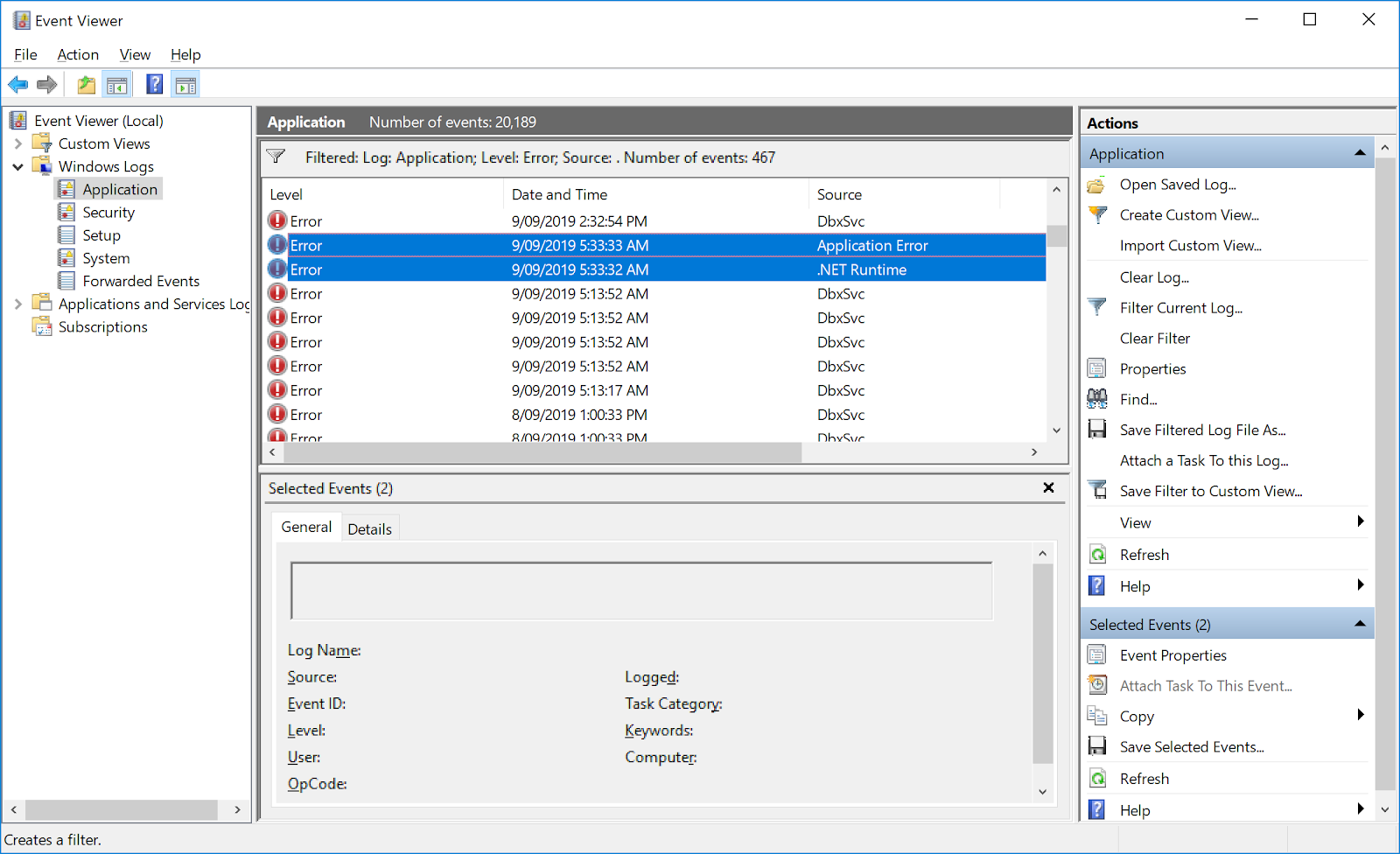
1. <span style="font-family: Helvetica,sans-serif;"><span style="font-size: 14pt; color: rgb(0, 0, 0); font-weight: 300;">Open the Windows ‘Event Viewer’ program </span></span>
2. <span style="font-family: Helvetica,sans-serif;"><span style="font-size: 14pt; color: rgb(0, 0, 0); font-weight: 300;">In the left pane navigate to “Windows Logs &gt; Application”</span></span>
3. <span style="font-family: Helvetica,sans-serif;"><span style="font-size: 14pt; color: rgb(0, 0, 0); font-weight: 300;">Find the most recent errors in the right pane that are related to the crash</span></span>
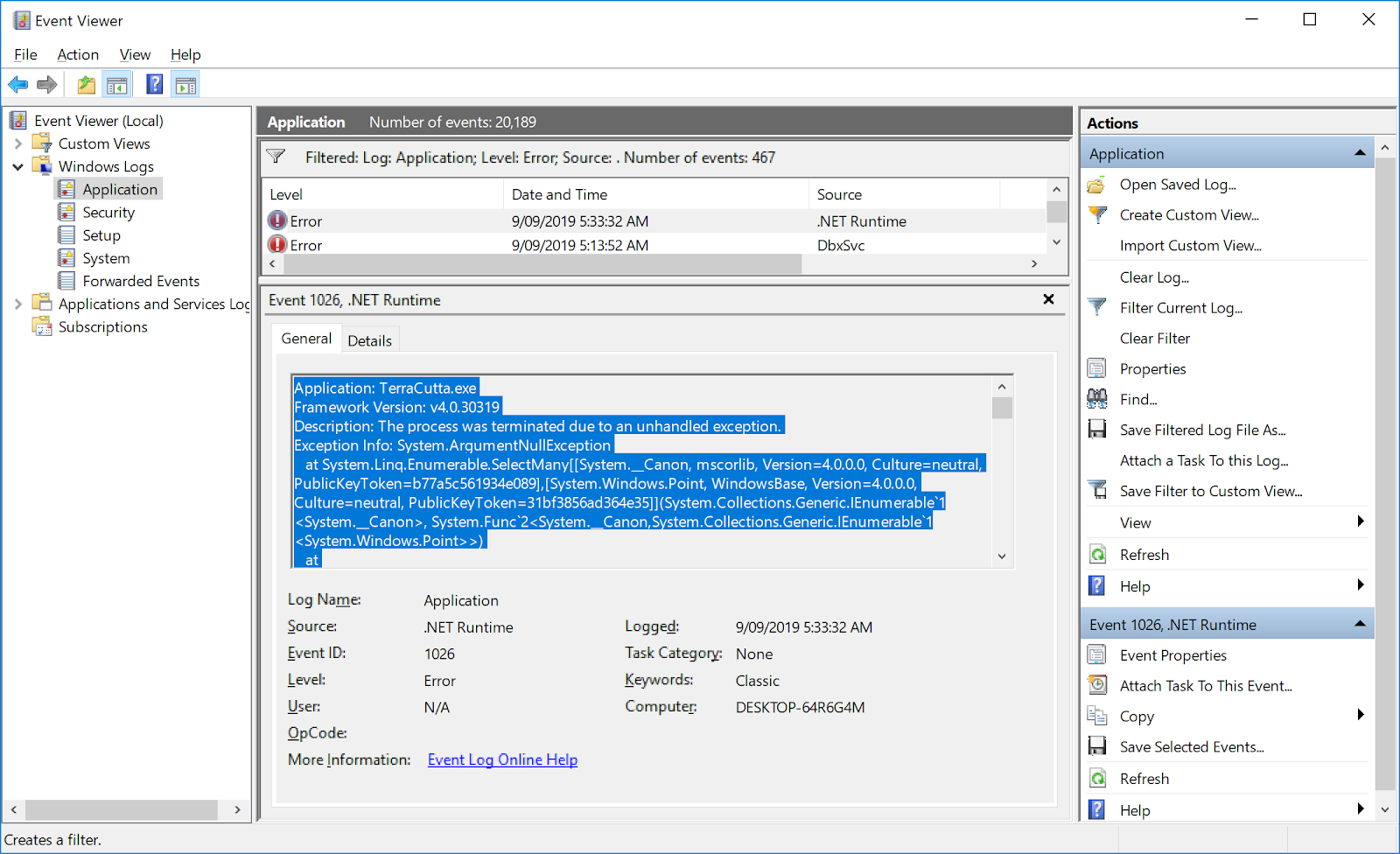
    1. <span style="font-family: Helvetica,sans-serif;"><span dir="ltr" style="font-size: 14pt; color: rgb(0, 0, 0); font-weight: 300;">Normally these errors will occur in pairs with the first one having the source “Application Error” and the second having the source “.NET Runtime”. It is the second one that is of interest normally.</span></span>
    2. <span style="font-family: Helvetica,sans-serif;"><span dir="ltr" style="font-size: 14pt; color: rgb(0, 0, 0); font-weight: 300;">Copy the contents to the “.NET Runtime” error into an email and send it to support@t3rra.com</span></span>

![](https://docs.t3rra.com/uploads/images/gallery/2025-03/scaled-1680-/w-yr4hdpp3mu6gtrtxblff1mnntdvgvhva-png.png)

<span style="font-family: Helvetica,sans-serif;"><span dir="ltr" style="font-size: 14pt; color: rgb(0, 0, 0); font-weight: 300;"> (image above: finding the errors in windows logs.)</span></span>

![](https://docs.t3rra.com/uploads/images/gallery/2025-03/scaled-1680-/jzikg-dqgx1bp9wgyb2whpnb8rssntmorw-png.png)

<span dir="ltr" style="font-size: 14pt; font-family: Helvetica, sans-serif; color: rgb(0, 0, 0); font-weight: 300;"> (Image above: highlighted contents that should be sent to T3RRA.)</span>

# Unauthorized Access Exception on program exit

<span dir="ltr" style="font-size: 14pt; font-family: Helvetica, sans-serif; color: rgb(0, 0, 0); font-weight: 400;">**Symptoms**:</span>

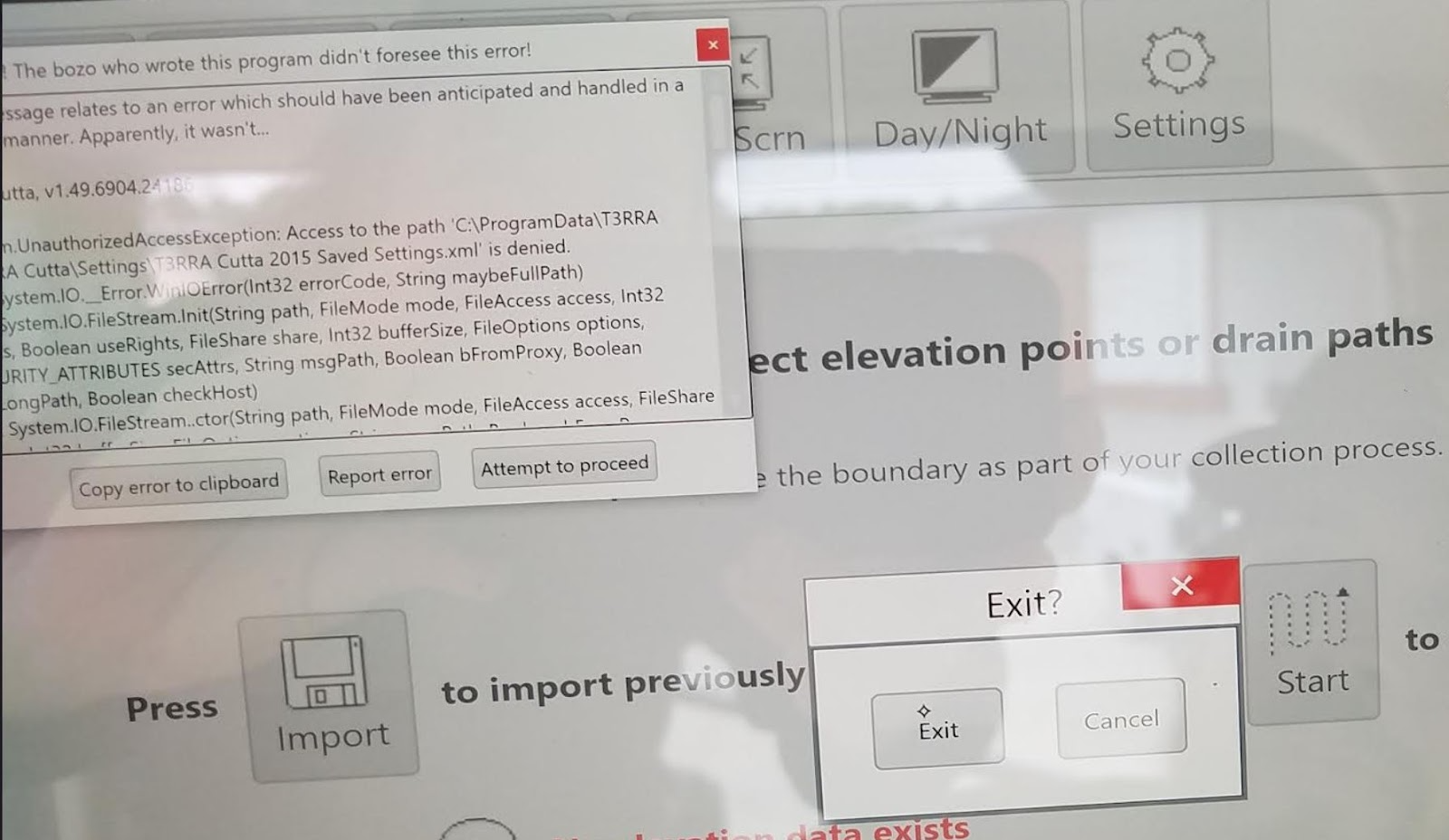
<span style="font-family: Helvetica,sans-serif;"><span style="font-size: 14pt; color: rgb(0, 0, 0); font-weight: 300;">Bozo Error message occurs upon Exit prohibiting close of T3RRA software.</span></span>

![](https://docs.t3rra.com/uploads/images/gallery/2025-03/scaled-1680-/viz-j4p-vvdi8gdqhsi-dyxycwmw1tesfw-png.png)

![](https://docs.t3rra.com/uploads/images/gallery/2025-03/scaled-1680-/kpqr-ad6igyumdogjtnjhznizzoyauydcw-png.png)

<span style="font-family: Helvetica,sans-serif;"><span style="font-size: 14pt; color: rgb(0, 0, 0); font-weight: 400;">**Cause**:</span></span>

<span style="font-family: Helvetica,sans-serif;"><span dir="ltr" style="font-size: 14pt; color: rgb(0, 0, 0); font-weight: 300;">Current “User” of the tablet does not have access to T3RRA Program Data in folder.</span></span>

<span style="font-family: Helvetica,sans-serif;"><span style="font-size: 14pt; color: rgb(0, 0, 0); font-weight: 400;">**Solution**:</span></span>

1. <span style="font-family: Helvetica,sans-serif;"><span style="font-size: 14pt; color: rgb(0, 0, 0); font-weight: 300;">Maneuver to the location - C:\\ProgramData\\T3RRA\\T3RRA Cutta\\Settings\\T3RRA Cutta Saved Settings.xml</span></span>
2. <span style="font-family: Helvetica,sans-serif;"><span style="font-size: 14pt; color: rgb(0, 0, 0); font-weight: 300;">Right click on T3RRA Cutta saved settings file.</span></span>
3. <span style="font-family: Helvetica,sans-serif;"><span style="font-size: 14pt; color: rgb(0, 0, 0); font-weight: 300;">Choose Properties</span></span>
4. <span style="font-family: Helvetica,sans-serif;"><span style="font-size: 14pt; color: rgb(0, 0, 0); font-weight: 300;">Choose Security tab</span></span>
5. <span style="font-family: Helvetica,sans-serif;"><span style="font-size: 14pt; color: rgb(0, 0, 0); font-weight: 300;">Choose Advanced</span></span>
6. <span style="font-family: Helvetica,sans-serif;"><span style="font-size: 14pt; color: rgb(0, 0, 0); font-weight: 300;">In Permissions tab Click Add</span></span>
7. <span style="font-family: Helvetica,sans-serif;"><span style="font-size: 14pt; color: rgb(0, 0, 0); font-weight: 300;">Choose select a principle</span></span>
8. <span style="font-family: Helvetica,sans-serif;"><span style="font-size: 14pt; color: rgb(0, 0, 0); font-weight: 300;">Type in name of User to add</span></span>
9. <span style="font-family: Helvetica,sans-serif;"><span style="font-size: 14pt; color: rgb(0, 0, 0); font-weight: 300;">Select Ok</span></span>
10. <span style="font-family: Helvetica,sans-serif;"><span style="font-size: 14pt; color: rgb(0, 0, 0); font-weight: 300;">Check Full control permissions</span></span>
11. <span style="font-family: Helvetica,sans-serif;"><span style="font-size: 14pt; color: rgb(0, 0, 0); font-weight: 300;">Select Ok</span></span>
12. <span dir="ltr" style="font-size: 14pt; font-family: Helvetica, sans-serif; color: rgb(0, 0, 0); font-weight: 300;">Select Apply</span>

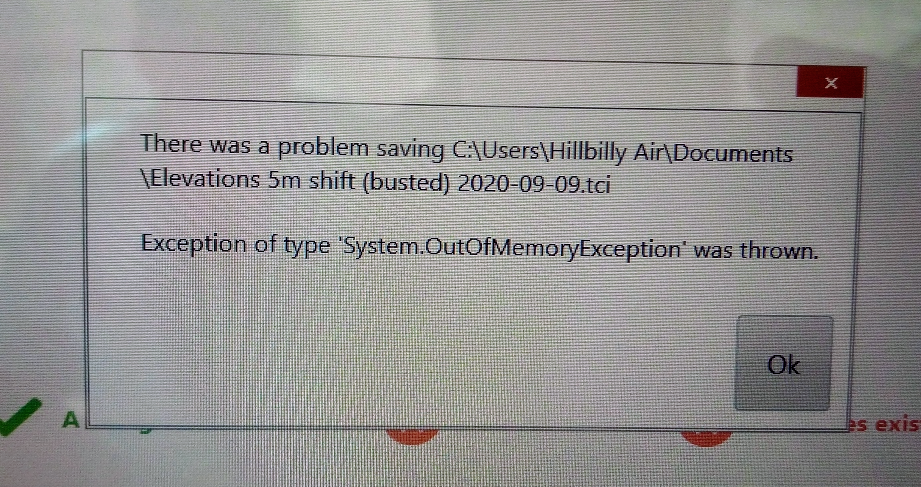
# ‘Out of memory’ error when saving

<span dir="ltr" style="font-size: 14pt; font-family: Helvetica, sans-serif; color: rgb(0, 0, 0); font-weight: 400;">**Symptoms**:</span>

<span style="font-family: Helvetica,sans-serif;"><span style="font-size: 14pt; color: rgb(0, 0, 0); font-weight: 300;">Attempting to save a project causes an ‘Out of Memory’ error and no file is saved. This error will also occur periodically when auto-saves occur. This error </span><span style="font-size: 14pt; color: rgb(0, 0, 0); font-weight: 400;">**will completely disrupt**</span><span style="font-size: 14pt; color: rgb(0, 0, 0); font-weight: 300;"> your ability to use the T3RRA software. Prior to the error occurring you may have noticed the project getting progressively slower and slower to load. If you run Task Manager you will see that the project is using excessive amounts of memory while loading.</span></span>

![](https://docs.t3rra.com/uploads/images/gallery/2025-03/scaled-1680-/pokyeaxqzsmrtn6mouvlkf5e2oumn3uxxq-png.png)

<span style="font-family: Helvetica,sans-serif;">  
</span>

<span style="font-family: Helvetica,sans-serif;"><span style="font-size: 14pt; color: rgb(0, 0, 0); font-weight: 400;">**Cause**:</span></span>

<span style="font-family: Helvetica,sans-serif;"><span style="font-size: 14pt; color: rgb(0, 0, 0); font-weight: 300;">There is a bug in earlier software versions that causes replication of unnecessary data within the project each time a save occurs. Eventually this will bloat the project file to the extent that internal variables can no longer process the data objects that exceed memory limits.</span></span>

<span style="font-family: Helvetica,sans-serif;">  
</span>

<span style="font-family: Helvetica,sans-serif;"><span style="font-size: 14pt; color: rgb(0, 0, 0); font-weight: 400;">**Solutions**:</span></span>

<span dir="ltr" style="font-size: 14pt; font-family: Helvetica, sans-serif; color: rgb(0, 0, 0); font-weight: 300;">Upgrade your software to at least v2.137. Load the offending project (it may take a long time to load) and then save it again. The project will have offending data sections removed and now should go back to normal load time on subsequent loads.</span>