# Setup & Installation issues

# Unable to install T3RRA software.

<span dir="ltr" style="font-size: 14pt; font-family: Helvetica, sans-serif; color: rgb(0, 0, 0); font-weight: 400;">**Symptoms**:</span>

<span style="font-family: Helvetica,sans-serif;"><span style="font-size: 14pt; color: rgb(0, 0, 0); font-weight: 300;">“Access denied” type errors occur when attempting to install T3RRA software. The installation fails, or the software disappears from the computer shortly after installation.</span></span>

![](https://docs.t3rra.com/uploads/images/gallery/2025-03/scaled-1680-/vpr56jwaofrp7j6eh-cunckdoumdpfdasw-png.png)

<span style="font-family: Helvetica,sans-serif;"><span style="font-size: 14pt; color: rgb(0, 0, 0); font-weight: 400;">**Causes**:</span></span>

1. <span style="font-family: Helvetica,sans-serif;"><span style="font-size: 14pt; color: rgb(0, 0, 0); font-weight: 300;">Antivirus software on the tablet prevents installation, or quarantines the installed files shortly after installation.</span></span>
2. <span style="font-family: Helvetica,sans-serif;"><span style="font-size: 14pt; color: rgb(0, 0, 0); font-weight: 300;">Company IT staff have locked down the tablet such that software cannot be installed.</span></span>

<span style="font-family: Helvetica,sans-serif;">  
</span>

<span style="font-family: Helvetica,sans-serif;"><span style="font-size: 14pt; color: rgb(0, 0, 0); font-weight: 400;">**Solutions**:</span></span>

1. <span style="font-family: Helvetica,sans-serif;"><span style="font-size: 14pt; color: rgb(0, 0, 0); font-weight: 300;">Disable your antivirus software or ‘whitelist’ T3RRA files with an exclusion. Consult your antivirus software documentation for information on how to do this. In some situations you may have to uninstall the antivirus software. It can normally be reinstalled afterwards.</span></span>
2. <span dir="ltr" style="font-size: 14pt; font-family: Helvetica, sans-serif; color: rgb(0, 0, 0); font-weight: 300;">Consult your company IT staff.</span>

# Unable to import RCD or ADAPT files directly from flash drive.

<span dir="ltr" style="font-size: 14pt; font-family: Helvetica, sans-serif; color: rgb(0, 0, 0); font-weight: 400;">**Symptoms**:</span>

<span style="font-family: Helvetica,sans-serif;"><span style="font-size: 14pt; color: rgb(0, 0, 0); font-weight: 300;">Choosing to Import Survey Data then picking RCD or ADAPT files on flash drive plugged in tablet and the files are not loading or ‘grayed out’ so you cannot choose them in the import list.</span></span>

<span style="font-family: Helvetica,sans-serif;">  
</span>

<span style="font-family: Helvetica,sans-serif;"><span style="font-size: 14pt; color: rgb(0, 0, 0); font-weight: 400;">**Causes**:</span></span>

<span style="font-family: Helvetica,sans-serif;"><span style="font-size: 14pt; color: rgb(0, 0, 0); font-weight: 300;">Flash drive is not transferring files correctly.</span></span>

<span style="font-family: Helvetica,sans-serif;">  
</span>

<span style="font-family: Helvetica,sans-serif;"><span style="font-size: 14pt; color: rgb(0, 0, 0); font-weight: 400;">**Solutions**:</span></span>

<span style="font-family: Helvetica,sans-serif;"><span style="font-size: 14pt; color: rgb(0, 0, 0); font-weight: 300;">Copy files from the flash drive to the tablet’s hard drive then import from that location.</span></span>

<span dir="ltr" style="font-size: 14pt; font-family: Helvetica, sans-serif; color: rgb(0, 0, 0); font-weight: 300;">Use a new flash drive or reformat the old one</span>

# Version manager not working correctly

Symptoms: The version manager is displaying no available version to roll back to.

Cause:

Solution:

1\. Access the T3RRA installation files.

2\. In the v folder rename the installation files.

3\. When restarting your T3RRA Software make sure you do not use the

# Software licence details disappearing after updating

Problem: After updating software to the latest version the licence becomes deactivated.

Cause:

Solution:

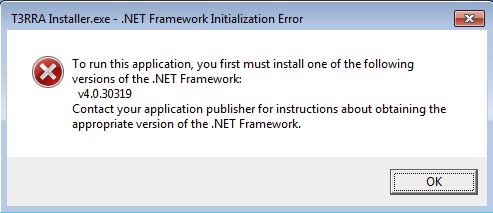
# InCab Installer will not open

<span style="font-size: 14pt; font-family: Helvetica, sans-serif; color: rgb(0, 0, 0); font-weight: 400;">**Symptoms:**</span><span style="font-family: Helvetica,sans-serif;"><span dir="ltr" style="font-size: 14pt; color: rgb(0, 0, 0); font-weight: 300;"></span></span>

<span style="font-family: Helvetica,sans-serif;"><span dir="ltr" style="font-size: 14pt; color: rgb(0, 0, 0); font-weight: 300;">When you open the T3RRA InCab Installer </span></span><span style="font-family: Helvetica,sans-serif;"><span dir="ltr" style="font-size: 14pt; color: rgb(0, 0, 0); font-weight: 300;">you see the following error window.</span></span>

<span style="font-family: Helvetica,sans-serif;"><span dir="ltr" style="font-size: 14pt; color: rgb(0, 0, 0); font-weight: 300;"><span style="font-size: 14pt; font-family: Oswald, sans-serif; color: rgb(0, 0, 0); font-weight: 300;"><span style="border:none;display:inline-block;overflow:hidden;width:493px;height:213px;">![](https://docs.t3rra.com/uploads/images/gallery/2025-03/scaled-1680-/ndfbg7r9ohyw-r0ciouhirqmu1lis0wqsw-png.png)</span></span></span></span>

<span dir="ltr" style="font-family: Helvetica,sans-serif;">![](https://docs.t3rra.com/uploads/images/gallery/2025-03/scaled-1680-/c4fmkbvxep4i8txhkkx2lgc2dmvljkfd5q-png.png)</span>

<span style="font-family: Helvetica,sans-serif;"><span style="font-size: 14pt; color: rgb(0, 0, 0); font-weight: 400;">**Cause:**</span></span>

<span style="font-family: Helvetica,sans-serif;"><span style="font-size: 14pt; color: rgb(0, 0, 0); font-weight: 300;">The Tablet may not have the latest version of .NET Framework(v4.8).</span></span>

<span style="font-family: Helvetica,sans-serif;">  
</span>

<span style="font-family: Helvetica,sans-serif;"><span style="font-size: 14pt; color: rgb(0, 0, 0); font-weight: 400;">**Solutions:**</span></span>

<span style="font-family: Helvetica,sans-serif;"><span dir="ltr" style="font-size: 14pt; color: rgb(0, 0, 0); font-weight: 300;">Download the latest version of .NET. Also make sure the window version is up to date.</span></span>

<span style="font-family: Helvetica,sans-serif;"><span style="font-size: 14pt; color: rgb(0, 0, 0); font-weight: 300;">Click this link to </span>[<span dir="ltr" style="font-size: 14pt; color: rgb(17, 85, 204); font-weight: 300; text-decoration-skip-ink: none;">Download the latest version</span>](https://dotnet.microsoft.com/en-us/download/dotnet-framework)</span><span style="font-size: 14pt; font-family: Helvetica, sans-serif; color: rgb(0, 0, 0); font-weight: 300;">.</span>