# John Deere related issues

# Notes for Dual or Triple Receiver systems.

<span dir="ltr" style="font-size: 14pt; font-family: Helvetica, sans-serif; color: rgb(0, 0, 0);">**Symptoms**:</span>

<span style="font-family: Helvetica,sans-serif;"><span style="font-size: 14pt; color: rgb(0, 0, 0); font-weight: 300;">There are many strange errors that can result from incorrectly configured dual or triple receiver systems when running iGrade, these can vary from no control outputs to machines behaving erratically, so we have compiled a few things to check if you are having trouble, </span></span>

<span style="font-family: Helvetica,sans-serif;">  
</span>

<span style="font-family: Helvetica,sans-serif;"><span style="font-size: 14pt; color: rgb(0, 0, 0);">**Solutions**:</span></span>

<span style="font-family: Helvetica,sans-serif;">  
</span>

<span style="font-family: Helvetica,sans-serif;"><span style="font-size: 14pt; color: rgb(0, 0, 0);">**Ensure both SCV1 and SCV3 are configured to “Remote Control”**</span></span>

<span style="font-family: Helvetica,sans-serif;"><span style="font-size: 14pt; color: rgb(0, 0, 0); font-weight: 300;">In the more common machine configurations where SCV1 is used for elevation control and SCV3 is used for “Slope” control these would be the correct settings, but for situations where a user has 2 receivers setup on one implement the SCV’s should both be configured to “Remote Control”</span></span>

<span style="font-family: Helvetica,sans-serif;">  
</span>

<span style="font-family: Helvetica,sans-serif;"><span style="font-size: 14pt; color: rgb(0, 0, 0);">**Power Cycle the Machine after making iGrade setting Change**</span></span>

<span style="font-family: Helvetica,sans-serif;"><span style="font-size: 14pt; color: rgb(0, 0, 0); font-weight: 300;">After making any settings changes on iGrade it is important to power cycle the machine, power down the machine, Wait for all displays to save configs and completely shut down, wait 10 seconds, then start the machine, before then going through the settings to confirm all settings have stored correctly,</span></span>

<span style="font-family: Helvetica,sans-serif;">  
</span>

<span style="font-family: Helvetica,sans-serif;"><span style="font-size: 14pt; color: rgb(0, 0, 0);">**Confirm SCV’s are connected correctly**</span></span>

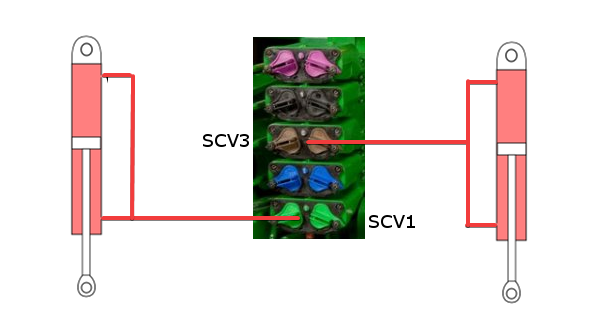
<span style="font-family: Helvetica,sans-serif;"><span style="font-size: 14pt; color: rgb(0, 0, 0); font-weight: 300;">SCV1=Left control cyl</span></span>

<span style="font-family: Helvetica,sans-serif;"><span style="font-size: 14pt; color: rgb(0, 0, 0); font-weight: 300;">SCV3=Right control cyl</span></span>

<span style="font-family: Helvetica,sans-serif;"><span style="font-size: 14pt; color: rgb(0, 0, 0); font-weight: 300;">Check hoses for Extend and Retract aren’t connected in reverse! It may seem silly but we have seen it stump the most experienced users before, Check and double-check those hoses!</span></span>

<span style="font-family: Helvetica,sans-serif;"><span style="font-size: 14pt; color: rgb(0, 0, 0); font-weight: 300;">It is also important to note that when using 2 receivers on one implement that both SCV’s operate independently based on their respective receiver, and both SCV’s must be on their own Hydraulic circuits,</span></span>

![](https://docs.t3rra.com/uploads/images/gallery/2025-03/scaled-1680-/rlqarrin47gil7s6iibxpneor3afraga8g-png.png)

<span style="font-family: Helvetica,sans-serif;"><span style="font-size: 14pt; color: rgb(0, 0, 0);">**Check Receiver Serial Numbers**</span></span>

<span style="font-family: Helvetica,sans-serif;"><span style="font-size: 14pt; color: rgb(0, 0, 0); font-weight: 300;">Check the serial numbers of the receivers, the receivers should be placed in order of their serial number, from lowest to highest.</span></span>

<span style="font-family: Helvetica,sans-serif;"><span style="font-size: 14pt; color: rgb(0, 0, 0); font-weight: 300;">Ensure the lowest serial number is on the Tractor, the next serial number is on the left side of the implement and first on the loom coming from the tractor, then the receiver with the highest serial number is on the right side and last on the Loom.</span></span>

<span style="font-family: Helvetica,sans-serif;">  
</span>

<span style="font-family: Helvetica,sans-serif;"><span style="font-size: 14pt; color: rgb(0, 0, 0); font-weight: 300;">The same applies for dual and triple scraper systems where the lowest serial number should be on the tractor. The next goes on on scraper 1 and so on for scraper 2 and 3. With each additional receiver being placed along the harness in order of serial number.</span></span>

<span style="font-family: Helvetica,sans-serif;">  
</span>

<span style="font-family: Helvetica,sans-serif;"><span style="font-size: 14pt; color: rgb(0, 0, 0);">**Receiver heights for UCC1 or UCC2 on implements**</span></span>

<span style="font-family: Helvetica,sans-serif;">  
</span>

- <span style="font-family: Helvetica,sans-serif;"><span style="font-size: 14pt; color: rgb(0, 0, 0); font-weight: 300;">When utilising dual scrapers on </span><span style="font-size: 14pt; color: rgb(0, 0, 0);">**UCC2**</span><span style="font-size: 14pt; color: rgb(0, 0, 0); font-weight: 300;"> you may need to adjust the receiver height setting in the individual receivers settings through the ISO menus to ensure implements level at the same elevation. NOTE: To lower the blade enter a higher receiver height. To raise the blade position, lower the height set in the receiver setup.</span></span>
- <span style="font-family: Helvetica,sans-serif;"><span style="font-size: 14pt; color: rgb(0, 0, 0); font-weight: 300;">When utilising dual scrapers with </span><span style="font-size: 14pt; color: rgb(0, 0, 0);">**UCC1**</span><span style="font-size: 14pt; color: rgb(0, 0, 0); font-weight: 300;">, both receivers must be mounted the same height above the blade. Implement GPS offsets cannot be entered in the display to account for mounting error. If a constant offset is noticed during operation between scrapers, corrections must be made to the implement mast using shims.</span></span>

# Diagnosing guidance line location issues

<span dir="ltr" style="font-size: 13pt; font-family: Helvetica, sans-serif; color: rgb(0, 0, 0); font-weight: 400;">**Symptoms**:</span>

<span style="font-family: Helvetica,sans-serif;"><span style="font-size: 13pt; color: rgb(0, 0, 0); font-weight: 300;">Imported guidance lines into display are not in the correct location:</span></span>

<span style="font-family: Helvetica,sans-serif;"><span style="font-size: 13pt; color: rgb(0, 0, 0); font-weight: 300;">- Tractor is manually steered down lines displayed on T3RRA.</span></span>

<span style="font-family: Helvetica,sans-serif;"><span style="font-size: 13pt; color: rgb(0, 0, 0); font-weight: 300;">- Tractor is auto steered down lines.</span></span>

<span style="font-family: Helvetica,sans-serif;"><span style="font-size: 13pt; color: rgb(0, 0, 0); font-weight: 300;">- Auto and manual steering result in significantly different paths.</span></span>

<span style="font-family: Helvetica,sans-serif;"><span style="font-size: 13pt; color: rgb(0, 0, 0); font-weight: 400;">**Possible causes with solutions**:</span></span>

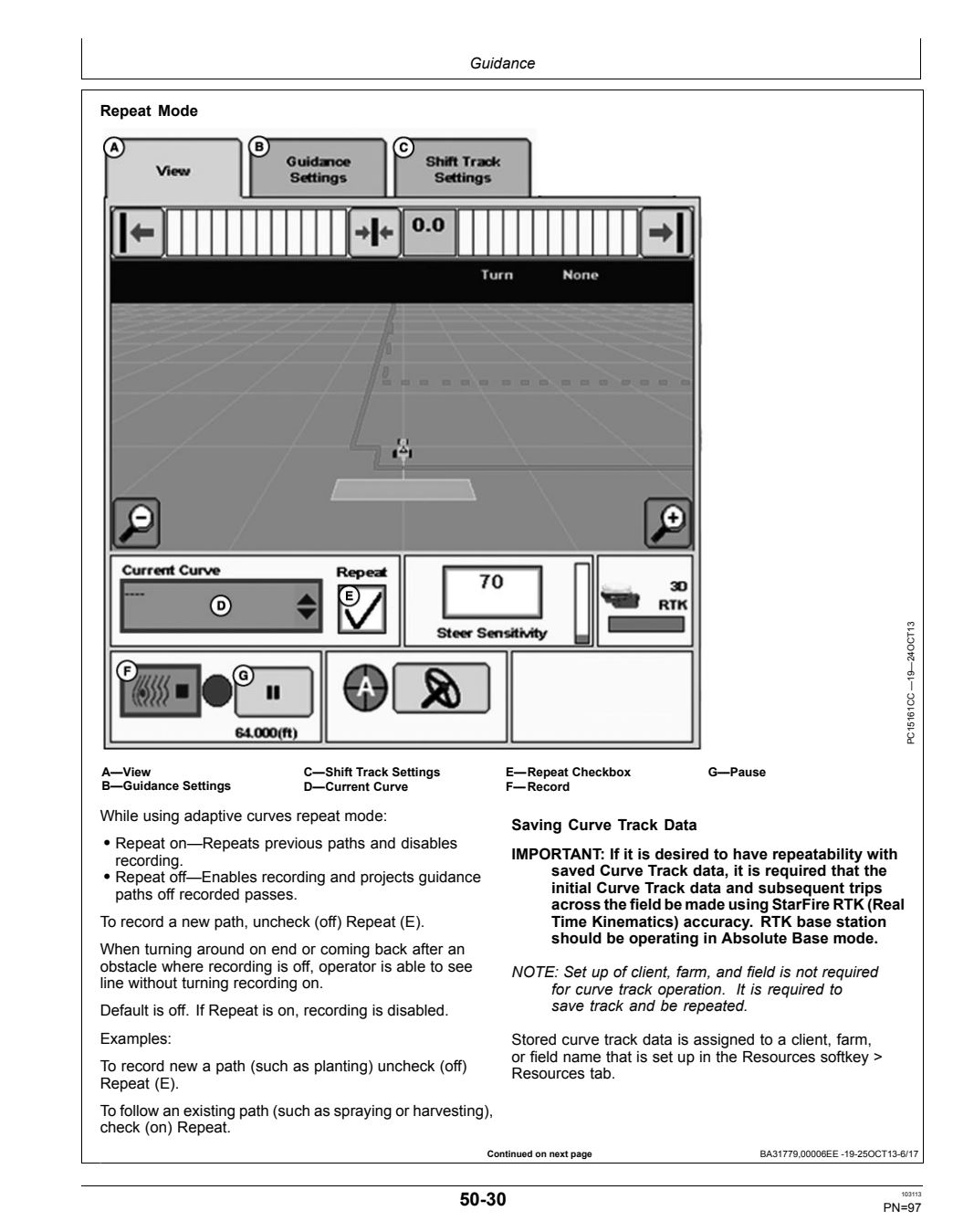
<span style="font-family: Helvetica,sans-serif;"><span style="font-size: 13pt; color: rgb(0, 0, 0); font-weight: 300; text-decoration-skip-ink: none;"><u>Cause</u></span><span style="font-size: 13pt; color: rgb(0, 0, 0); font-weight: 300;">: For 2630 only - Repeat box was not checked.</span></span>

<span style="font-family: Helvetica,sans-serif;"><span style="font-size: 13pt; color: rgb(0, 0, 0); font-weight: 300; text-decoration-skip-ink: none;"><u>Solution</u></span><span style="font-size: 13pt; color: rgb(0, 0, 0); font-weight: 300;">: For 2630 only - check Repeat box then cycle.</span></span>

<span style="font-family: Helvetica,sans-serif;"><span style="font-size: 13pt; color: rgb(0, 0, 0); font-weight: 300; text-decoration-skip-ink: none;"><u>Cause</u>:</span><span style="font-size: 13pt; color: rgb(0, 0, 0); font-weight: 300;"> Survey data used to Generate paths captured on a different correction source (SF3, Dealer base, SF1 and others).</span></span>

<span style="font-family: Helvetica,sans-serif;"><span style="font-size: 13pt; color: rgb(0, 0, 0); font-weight: 300; text-decoration-skip-ink: none;"><u>Solution</u>:</span><span style="font-size: 13pt; color: rgb(0, 0, 0); font-weight: 300;"> Due to the in-ability to complete North-South, East-West shift for Guidance lines in a JD display, we cannot correct or guarantee the accuracy of lines created from another correction then the correction used to survey them. It is best practice and highly recommended that users survey, design, and implement from a single GPS source.</span></span>

<span style="font-family: Helvetica,sans-serif;"><span style="font-size: 13pt; color: rgb(0, 0, 0); font-weight: 300; text-decoration-skip-ink: none;"><u>Cause</u>: </span><span style="font-size: 13pt; color: rgb(0, 0, 0); font-weight: 300;">Survey completed from Dealer base and implementing from a Quick survey base</span></span>

<span style="font-family: Helvetica,sans-serif;"><span style="font-size: 13pt; color: rgb(0, 0, 0); font-weight: 300; text-decoration-skip-ink: none;"><u>Solution</u></span><span style="font-size: 13pt; color: rgb(0, 0, 0); font-weight: 300;">: It is always good practice to implement with an absolute base. If there is a dealer network base coverage available at the location of the base used for implementation, we highly recommend connecting that base to the dealer network as a vehicle. Take note of the lat/long and elevation values then enter those details into the base location after configuring the base to absolute base. (refer to JD technical documentation for more information on editing base parameters).</span></span>

<span style="font-size: 14pt; font-family: Helvetica, sans-serif; color: rgb(0, 0, 0); font-weight: 400;"><span style="border: none; display: inline-block; overflow: hidden; width: 202px; height: 245px;">![](https://docs.t3rra.com/uploads/images/gallery/2025-03/scaled-1680-/y2sk-l3qdxjymxdisjvjqw1gk1ayceiltw-png.png)</span></span>

# Error “Incorrect MD5 Hash” occurs when loading project

<span dir="ltr" style="font-size: 14pt; font-family: Helvetica, sans-serif; color: rgb(0, 0, 0); font-weight: 400;">**Symptoms**:</span>

<span style="font-family: Helvetica,sans-serif;"><span style="font-size: 14pt; color: rgb(0, 0, 0); font-weight: 300;">When loading a project an error similar to “Incorrect MD5 Hash” occurs. The project fails to load.</span></span>

<span style="font-family: Helvetica,sans-serif;">  
</span>

<span style="font-family: Helvetica,sans-serif;"><span style="font-size: 14pt; color: rgb(0, 0, 0); font-weight: 400;">**Cause**:</span></span>

<span style="font-family: Helvetica,sans-serif;"><span style="font-size: 14pt; color: rgb(0, 0, 0); font-weight: 300;">The file has become corrupted somehow. This file will no longer work. It may have happened if Windows shut down unexpectedly while a project was saving, or if a USB drive was removed prematurely while copying a file.</span></span>

<span style="font-family: Helvetica,sans-serif;">  
</span>

<span style="font-family: Helvetica,sans-serif;"><span style="font-size: 14pt; color: rgb(0, 0, 0); font-weight: 400;">**Solution**:</span></span>

<span dir="ltr" style="font-size: 14pt; font-family: Helvetica, sans-serif; color: rgb(0, 0, 0); font-weight: 300;">There is no solution to this problem. The file is likely unrecoverable. Make sure you have sufficient backups available in case this error occurs. Switch to a backed up version of the project file and delete this one. If this problem continues to occur be aware that it may be a sign that your hard drive is failing. It may be time to replace it.</span>

# Dual GPS scraper is not level.

<span dir="ltr" style="font-size: 14pt; font-family: Helvetica, sans-serif; color: rgb(0, 0, 0); font-weight: 400;">**Symptoms**:</span>

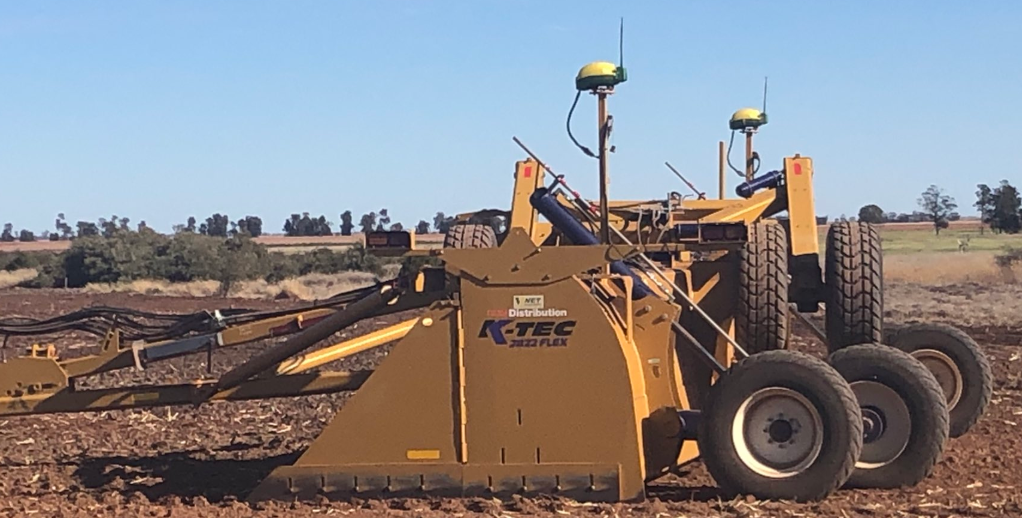
<span style="font-family: Helvetica,sans-serif;"><span style="font-size: 14pt; color: rgb(0, 0, 0); font-weight: 300;">When using two GPS receivers in a side-by-side configuration on a single scraper, one side of the scraper is consistently lower than the other side.</span></span>

<span style="font-family: Helvetica,sans-serif;">  
</span>

<span style="font-family: Helvetica,sans-serif;"><span style="font-size: 14pt; color: rgb(0, 0, 0); font-weight: 400;">**Cause**:</span></span>

<span style="font-family: Helvetica,sans-serif;"><span style="font-size: 14pt; color: rgb(0, 0, 0); font-weight: 300;">One GPS is mounted lower than the other, or Implement GPS Receiver Offsets are incorrectly entered.</span></span>

<span style="font-family: Helvetica,sans-serif;">  
</span>

<span style="font-family: Helvetica,sans-serif;"><span style="font-size: 14pt; color: rgb(0, 0, 0); font-weight: 400;">**Solution**:</span></span>

<span style="font-family: Helvetica,sans-serif;"><span style="font-size: 14pt; color: rgb(0, 0, 0); font-weight: 300;">Select Controller Setup softkey &gt; Profile tab &gt; GPS Offsets Edit button. Enter the correct GPS height offsets.</span></span>

![](https://docs.t3rra.com/uploads/images/gallery/2025-03/scaled-1680-/qw4csmbbifljv4ox-8x6ik-7pnfyn-vng-png.png)

# Height control jumping in and out of Auto

Symptom:

The height control is jumping in and out of Auto control

Possible causes:

During iGrade setup the system has not been reset and setting in both SCV 1 and 2 causing mixed messages.

Fix:

Turn off the tractor and turn it back on again to reset the system and only the last set setting should remain.