# Designing issues

# Levees are jumbled and crossing over.

<span dir="ltr" style="font-size: 14pt; font-family: Helvetica, sans-serif; color: rgb(0, 0, 0); font-weight: 400;">**Symptoms**:</span>

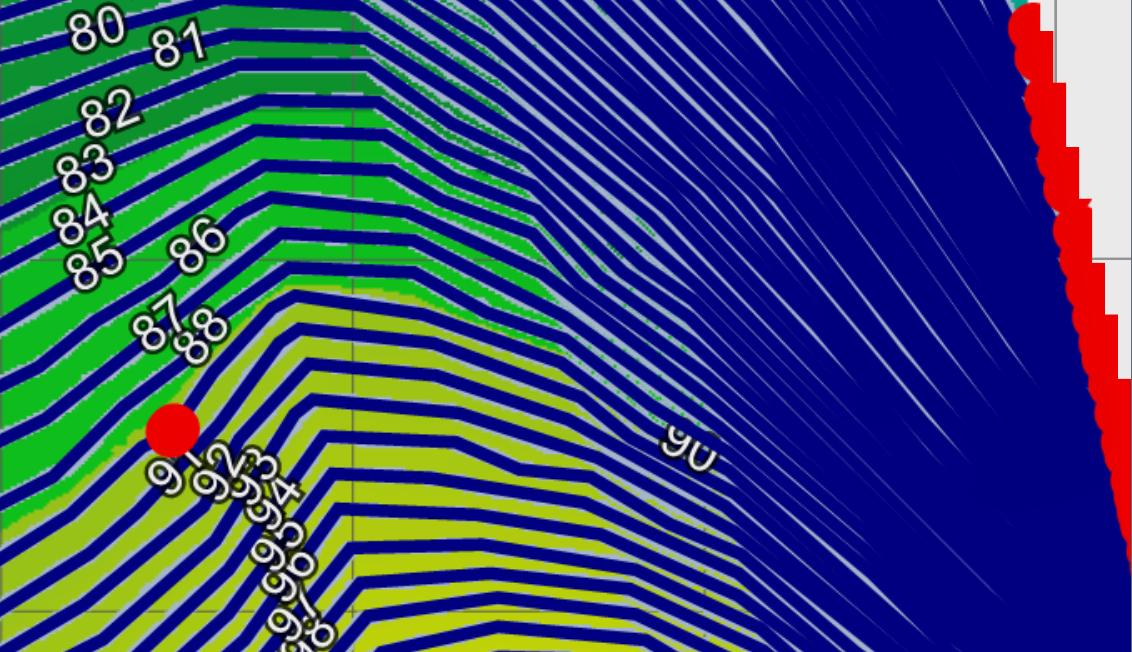
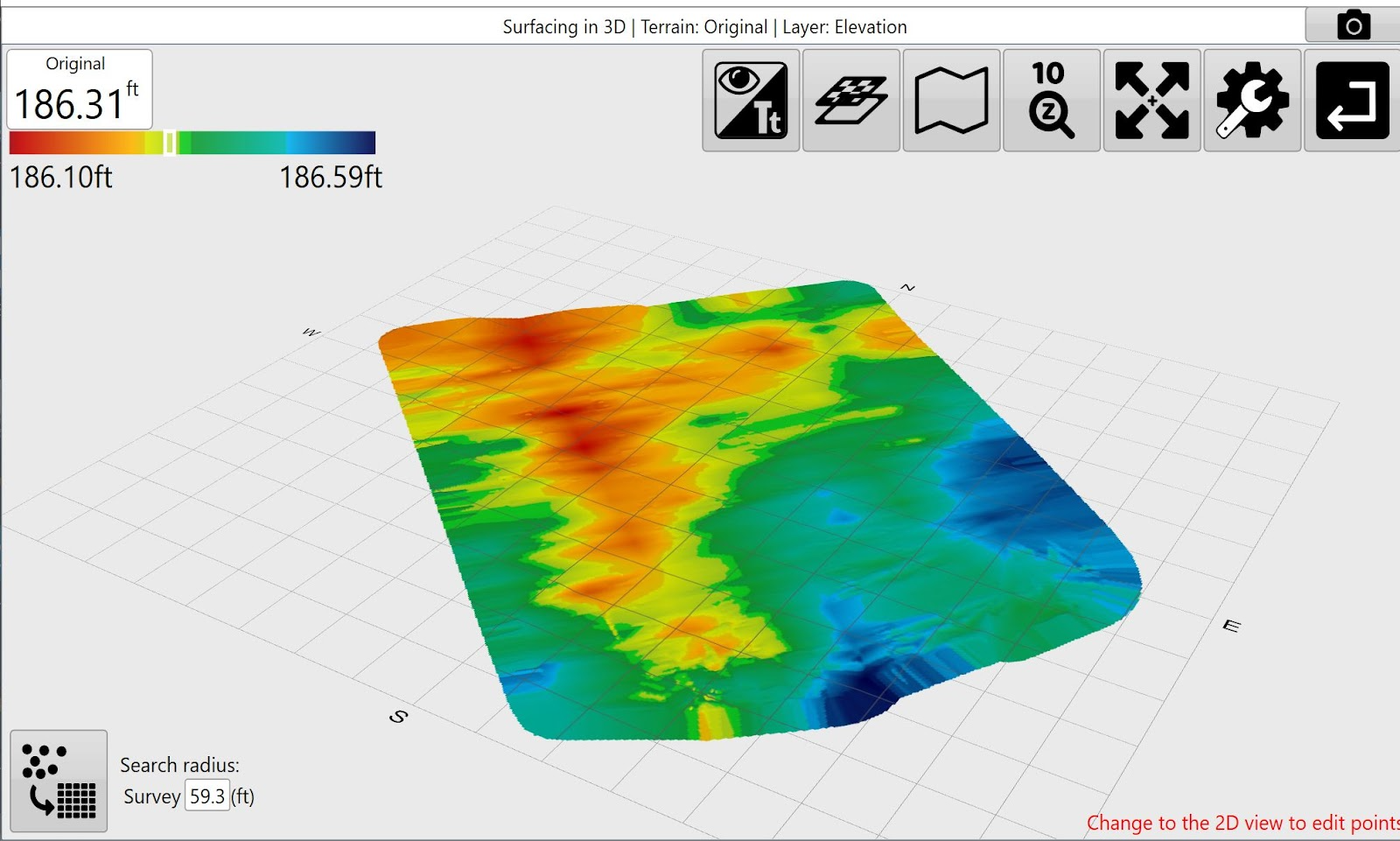
<span style="font-family: Helvetica,sans-serif;"><span dir="ltr" style="font-size: 14pt; color: rgb(0, 0, 0); font-weight: 300;">When you create levees in T3RRA Cutta, Ditch or Levee, the levee lines seem very ‘messy’. There are frequent line endings and levee paths sometimes appear to cross over each other </span></span>

![](https://docs.t3rra.com/uploads/images/gallery/2025-03/scaled-1680-/q78yttnanv6vs1bhvckq7vboriibxdjonq-png.png)

<span style="font-family: Helvetica,sans-serif;"><span style="font-size: 14pt; color: rgb(0, 0, 0); font-weight: 400;">**Cause**:</span></span>

<span style="font-family: Helvetica,sans-serif;"><span style="font-size: 14pt; color: rgb(0, 0, 0); font-weight: 300;">The levees are spaced very closely. T3RRA software uses an algorithm that looks at the edges of individual raster pixels and problems can occur if the levee lines are spaced at a width of equal to, or less than, the pixel size. </span></span>

<span style="font-family: Helvetica,sans-serif;">  
</span>

<span style="font-family: Helvetica,sans-serif;"><span style="font-size: 14pt; color: rgb(0, 0, 0); font-weight: 400;">**Solution**:</span></span>

<span style="font-family: Helvetica,sans-serif;"><span dir="ltr" style="font-size: 14pt; color: rgb(0, 0, 0); font-weight: 300;">Resurface the survey data at a smaller pixel size. Then re-do the levees. The correct pixel size will depend on the slope of the land, and the required vertical distance between levees.</span></span>

<span style="font-family: Helvetica,sans-serif;"><span dir="ltr" style="font-size: 14pt; color: rgb(0, 0, 0); font-weight: 300;">![](https://docs.t3rra.com/uploads/images/gallery/2025-03/scaled-1680-/3-d3skcdmu06eoqw89ucuqppym5bzdtw-q-png.png)</span></span>

# Imported SWP+ ditch track names are too long.

<span dir="ltr" style="font-size: 14pt; font-family: Helvetica, sans-serif; color: rgb(0, 0, 0); font-weight: 400;">**Symptoms**:</span>

<span style="font-family: Helvetica,sans-serif;"><span style="font-size: 14pt; color: rgb(0, 0, 0); font-weight: 300;">After importing SWP+ ditch tracks, you see that their assigned names are too long and cover most of the surface.</span></span>

<span style="font-family: Helvetica,sans-serif;">  
</span>

<span style="font-family: Helvetica,sans-serif;"><span style="font-size: 14pt; color: rgb(0, 0, 0); font-weight: 400;">**Cause**:</span></span>

<span style="font-family: Helvetica,sans-serif;"><span style="font-size: 14pt; color: rgb(0, 0, 0); font-weight: 300;">Previously assigned names are imported along with ditch tracks.</span></span>

<span style="font-family: Helvetica,sans-serif;">  
</span>

<span style="font-family: Helvetica,sans-serif;"><span style="font-size: 14pt; color: rgb(0, 0, 0); font-weight: 400;">**Solutions**:</span></span>

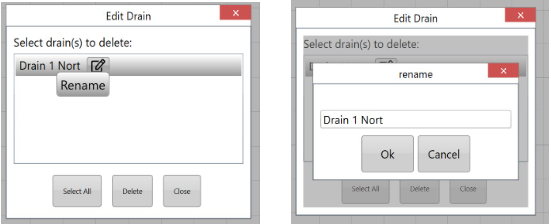
<span style="font-family: Helvetica,sans-serif;"><span dir="ltr" style="font-size: 14pt; color: rgb(0, 0, 0); font-weight: 300;">Return to the Surface step and use the Edit Drains button to rename.</span></span>

![](https://docs.t3rra.com/uploads/images/gallery/2025-03/scaled-1680-/5czekq8plkaztm2tkyimlhqur-td-sjnag-png.png)

<span style="font-family: Helvetica,sans-serif;"><span dir="ltr" style="font-size: 14pt; color: rgb(0, 0, 0); font-weight: 300;">Click on the pencil and paper icon, rename drain, choose Ok, then Close.</span></span><span style="font-family: Helvetica,sans-serif;"><span dir="ltr" style="font-size: 14pt; color: rgb(0, 0, 0); font-weight: 300;">![](https://docs.t3rra.com/uploads/images/gallery/2025-03/scaled-1680-/c4xetsjjz18vqb3qiewmzdtvpyc84zyb5w-png.png)</span></span>
# Drain Design freezing and/or producing jagged profile view OR Small Field design has jagged edge and difficult to see changes in elevation.

<span dir="ltr" style="font-size: 14pt; font-family: Helvetica, sans-serif; color: rgb(0, 0, 0); font-weight: 400;">**Symptoms**:</span>

<span style="font-family: Helvetica,sans-serif;"><span style="font-size: 14pt; color: rgb(0, 0, 0); font-weight: 300;">After Applying drain design, the tablet freezes.</span></span>

<span style="font-family: Helvetica,sans-serif;"><span style="font-size: 14pt; color: rgb(0, 0, 0); font-weight: 300;">Profile view of drain is jagged.</span></span>

<span style="font-family: Helvetica,sans-serif;"><span style="font-size: 14pt; color: rgb(0, 0, 0); font-weight: 300;">Small field design has jagged edges.</span></span>

<span style="font-family: Helvetica,sans-serif;"><span style="font-size: 14pt; color: rgb(0, 0, 0); font-weight: 300;">Small field not defined enough.</span></span>

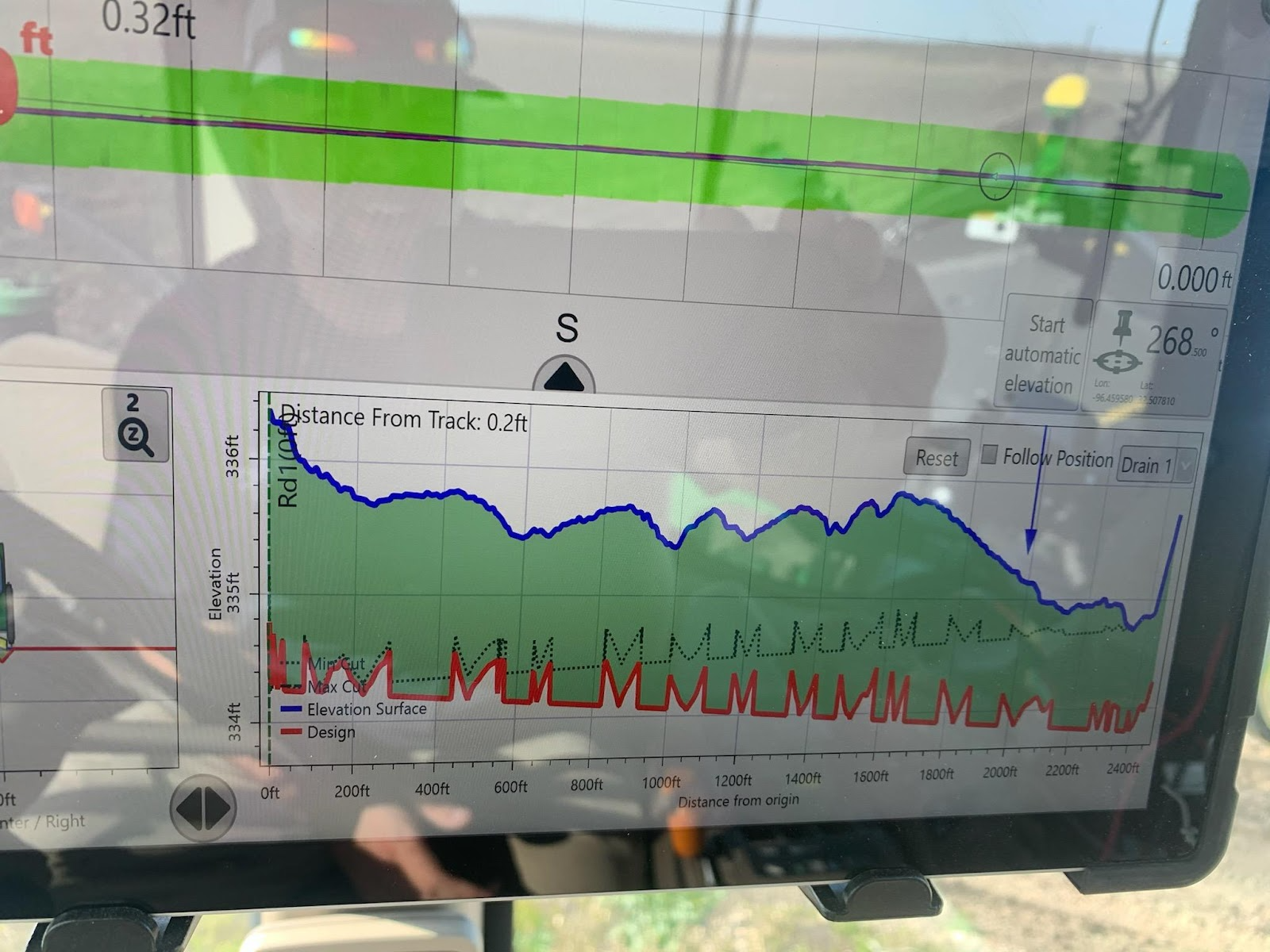
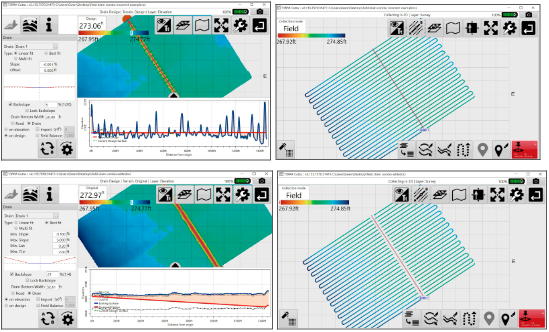
<span style="font-family: Helvetica,sans-serif;"><span style="font-size: 14pt; color: rgb(0, 0, 0); font-weight: 300;">When I am in the Drains Design step, the profile view of my surveyed drain appears ‘jagged’ and ‘corrupt’. I know what I am viewing in the drain profile window is not an accurate representation of the original surface.</span></span>

<span style="font-family: Helvetica,sans-serif;"><span style="font-size: 14pt; color: rgb(0, 0, 0); font-weight: 400;">**Possible causes**:</span></span>

<span style="font-family: Helvetica,sans-serif;"><span style="font-size: 14pt; color: rgb(0, 0, 0); font-weight: 300;">Pixel size is too large for thin drain.</span></span>

<span style="font-family: Helvetica,sans-serif;"><span style="font-size: 14pt; color: rgb(0, 0, 0); font-weight: 300;">Drain is long and the drain width is thin.</span></span>

<span style="font-family: Helvetica,sans-serif;"><span style="font-size: 14pt; color: rgb(0, 0, 0); font-weight: 300;">A drain survey was collected OVER a field survey (or visa versa).</span></span>

<span style="font-family: Helvetica,sans-serif;"><span dir="ltr" style="font-size: 14pt; color: rgb(0, 0, 0); font-weight: 400;">**Solutions**:</span></span>

<span style="font-family: Helvetica,sans-serif;"><span style="font-size: 14pt; color: rgb(0, 0, 0); font-weight: 300;">Change Pixel size.</span></span>

<span style="font-family: Helvetica,sans-serif;"><span style="font-size: 14pt; color: rgb(0, 0, 0); font-weight: 300;">Change width of drain (only if the change will not affect implementation).</span></span>

<span style="font-family: Helvetica,sans-serif;">  
</span>

<span style="font-family: Helvetica,sans-serif;"><span style="font-size: 14pt; color: rgb(0, 0, 0); font-weight: 400;">Image of profile view of drain with jagged drain line:</span></span>

![](https://docs.t3rra.com/uploads/images/gallery/2025-03/scaled-1680-/1ruptco72elbikclupvk3tnt97h6gw2wkq-png.png)

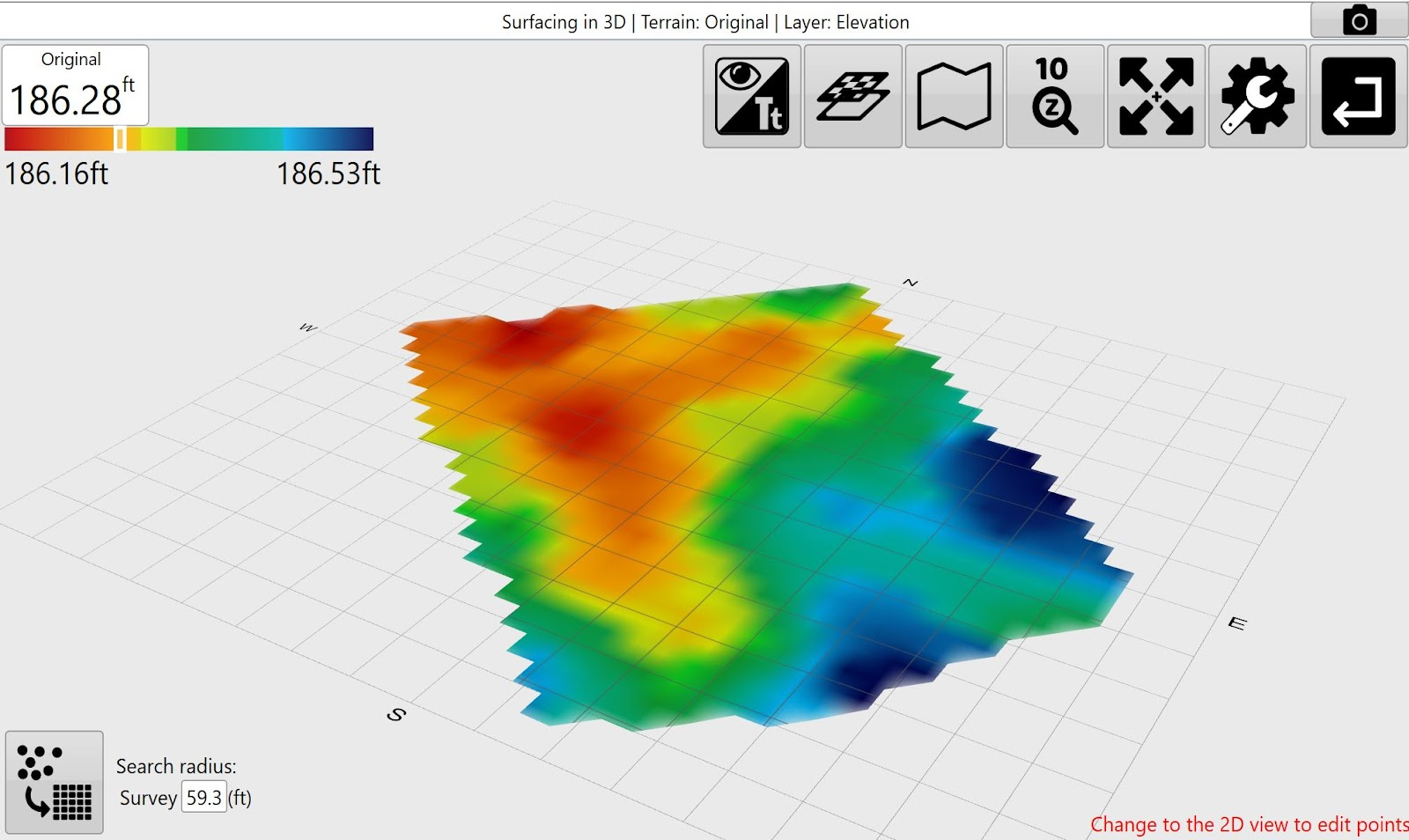
<span style="font-family: Helvetica,sans-serif;"><span style="font-size: 14pt; color: rgb(0, 0, 0); font-weight: 300;">Image of small field with large pixel size:</span></span>

![](https://docs.t3rra.com/uploads/images/gallery/2025-03/scaled-1680-/aeerezcogqikdfiqjfguq8b0dkzcoeompg-png.png)

<span style="font-family: Helvetica,sans-serif;">  
</span>

<span style="font-family: Helvetica,sans-serif;"><span style="font-size: 14pt; color: rgb(0, 0, 0); font-weight: 300;">Image of small field with small pixel size:</span></span>

![](https://docs.t3rra.com/uploads/images/gallery/2025-03/scaled-1680-/i0hcckkpghbvtefv9nikoavylawjhh-cuq-png.png)

<span style="font-family: Helvetica,sans-serif;"><span style="font-size: 14pt; color: rgb(0, 0, 0); font-weight: 300;">Solutions if drain and field surveys overlap: </span></span>

<span style="font-family: Helvetica,sans-serif;"><span style="font-size: 14pt; color: rgb(0, 0, 0); font-weight: 300;">Delete the field elevation points directly under the drain path of drain surveyed points.</span></span>

<span style="font-family: Helvetica,sans-serif;"><span dir="ltr" style="font-size: 14pt; color: rgb(0, 0, 0); font-weight: 300;">Resurvey in Field survey mode pausing field collection of points when traveling over the drain path then change to Drain survey mode to collect the drain path that is clear of field elevation points.</span></span><span style="font-family: Helvetica,sans-serif;"><span dir="ltr" style="font-size: 14pt; color: rgb(0, 0, 0); font-weight: 300;">![](https://docs.t3rra.com/uploads/images/gallery/2025-03/scaled-1680-/eolvovllvirqvp0czsoxakmvvjm9cqxsxa-png.png)</span></span>
# Attempting to save a PDF report throws an error.

<span dir="ltr" style="font-size: 14pt; font-family: Helvetica, sans-serif; color: rgb(0, 0, 0); font-weight: 400;">**Symptoms**:</span>

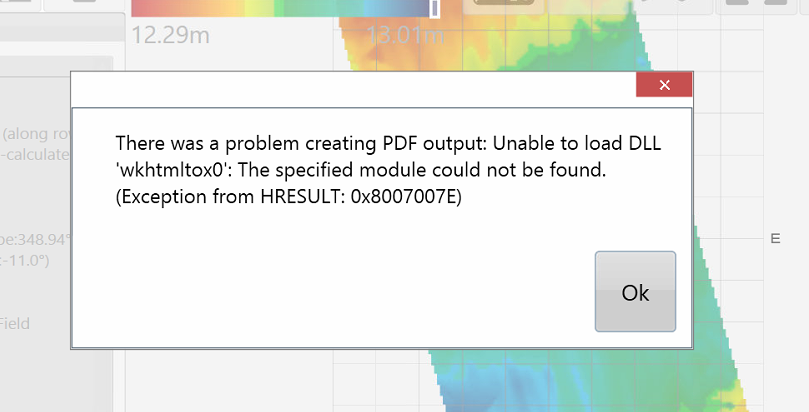
<span style="font-family: Helvetica,sans-serif;"><span style="font-size: 14pt; color: rgb(0, 0, 0); font-weight: 300;">When attempting to create a PDF report on a tablet running Windows 8.1 an error message appears and no report is created.</span></span>

![](https://docs.t3rra.com/uploads/images/gallery/2025-03/scaled-1680-/814htogk08iuc6s8xuugi4n5lwgdixvrlq-png.png)

<span style="font-family: Helvetica,sans-serif;">  
</span>

<span style="font-family: Helvetica,sans-serif;"><span style="font-size: 14pt; color: rgb(0, 0, 0); font-weight: 400;">**Cause**:</span></span>

<span style="font-family: Helvetica,sans-serif;"><span style="font-size: 14pt; color: rgb(0, 0, 0); font-weight: 300;">Windows 8.1 is missing some critical files the PDF creator relies on. </span></span>

<span style="font-family: Helvetica,sans-serif;">  
</span>

<span style="font-family: Helvetica,sans-serif;"><span style="font-size: 14pt; color: rgb(0, 0, 0); font-weight: 400;">**Solution**:</span></span>

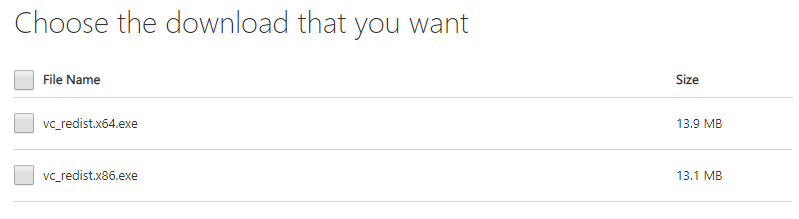
<span style="font-family: Helvetica,sans-serif;"><span style="font-size: 14pt; color: rgb(0, 0, 0); font-weight: 300;">Install the VC++ 2015 Redistributable files. These are available at </span>[<span style="font-size: 14pt; color: rgb(17, 85, 204); font-weight: 300; text-decoration-skip-ink: none;">www.microsoft.com</span>](http://www.microsoft.com)<span style="font-size: 14pt; color: rgb(0, 0, 0); font-weight: 300;">. Use a search engine to find them. Choose the version that matches your tablet (32 or 64bit). Install on the tablet. The PDF creation process should then work.</span></span>

![](https://docs.t3rra.com/uploads/images/gallery/2025-03/scaled-1680-/rrpew5hvl6roloc7nhdkvlrb-dzcx1l6zw-png.png)

# Markers not visible.

<span dir="ltr" style="font-size: 14pt; font-family: Helvetica, sans-serif; color: rgb(0, 0, 0); font-weight: 400;">**Symptoms**:</span>

<span style="font-family: Helvetica,sans-serif;"><span style="font-size: 14pt; color: rgb(0, 0, 0); font-weight: 300;">Markers are not visible on the map surface, and you believe they should be present.</span></span>

<span style="font-family: Helvetica,sans-serif;"><span style="font-size: 14pt; color: rgb(0, 0, 0); font-weight: 300;">When you have created markers (Bench Marks ) in T3RRA Design and have exported your control file for T3RRA Cutta or T3RRA Ditch.</span></span>

<span style="font-family: Helvetica,sans-serif;">  
</span>

<span style="font-family: Helvetica,sans-serif;"><span style="font-size: 14pt; color: rgb(0, 0, 0); font-weight: 400;">**Cause**:</span></span>

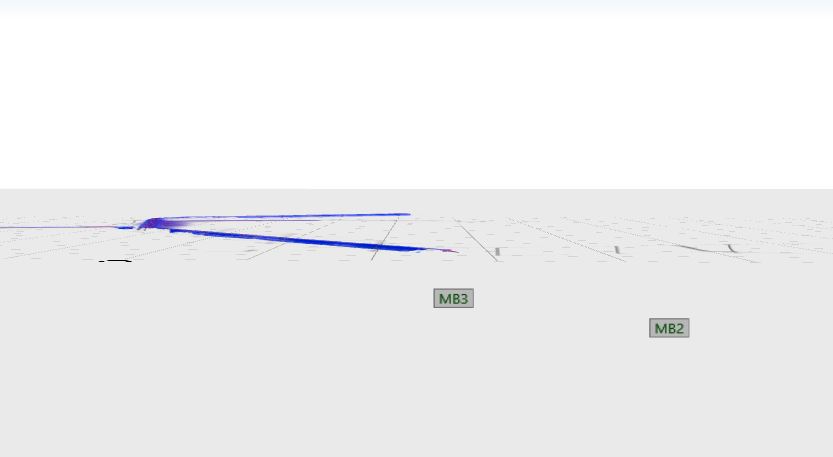
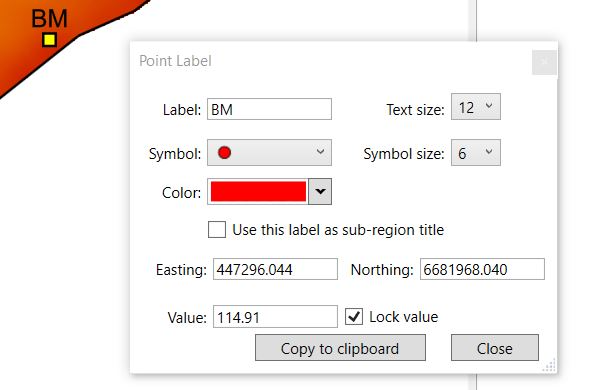
<span style="font-family: Helvetica,sans-serif;"><span style="font-size: 14pt; color: rgb(0, 0, 0); font-weight: 300;">A marker may have been given an incorrect elevation value, causing it to be well above or below the surface. This can happen for instance if the design was made in T3RRA Design and the marker was given an elevation of zero.</span></span>

<span style="font-family: Helvetica,sans-serif;"><span dir="ltr" style="font-size: 14pt; color: rgb(0, 0, 0); font-weight: 300;">The markers have been exported without a height set, therefore will only show up in 3D underneath the surface.</span></span>

<span style="font-family: Helvetica,sans-serif;"><span dir="ltr" style="font-size: 14pt; color: rgb(0, 0, 0); font-weight: 300;">![](https://docs.t3rra.com/uploads/images/gallery/2025-03/scaled-1680-/wqmfae3nw86irj4vzop2ssz9kn-831vduw-png.png)</span></span>

<span style="font-family: Helvetica,sans-serif;"><span style="font-size: 14pt; color: rgb(0, 0, 0); font-weight: 400;">**Solutions**:</span></span>

1. <span style="font-family: Helvetica,sans-serif;"><span style="font-size: 14pt; color: rgb(0, 0, 0); font-weight: 300;">Check to see that the marker is actually present. This can be done by tapping the ‘Delete marker’ button in the bottom right of any map-screen and seeing if the marker of interest is in the list to be deleted. If it is then close that dialog and then zoom as far out as you can. You will likely see the marker a long way above or below the surface. If the ‘Delete marker’ button is not present it means there are no markers available on the map.</span></span>
2. <span style="font-family: Helvetica,sans-serif;"><span style="font-size: 14pt; color: rgb(0, 0, 0); font-weight: 300;">There is currently no way of changing the elevation associated with a marker. Go back to the original source software and fix the issue there. If this is not a satisfactory solution please contact T3RRA to explain the use case and we will examine ways to achieve your goals.</span></span>
3. <span style="font-family: Helvetica,sans-serif;"><span style="font-size: 14pt; color: rgb(0, 0, 0); font-weight: 300;">When creating markers in T3RRA Design always make sure that you enter the value and tick the “Lock value” before exporting your control file.</span></span><span style="font-family: Helvetica,sans-serif;"><span dir="ltr" style="font-size: 14pt; color: rgb(0, 0, 0); font-weight: 300;"> ![](https://docs.t3rra.com/uploads/images/gallery/2025-03/scaled-1680-/zfo00sxoksnzxunmqqdofmteoqindrwmtw-png.png)</span></span>

# My cut/fill map is totally a single color representing no cut and no fill.
<span style="font-family: Helvetica,sans-serif;">![](https://docs.t3rra.com/uploads/images/gallery/2025-03/scaled-1680-/wqkqrusy8ufihksz-lvmt9v7hebxkwxsw-png.png)</span>

<span style="font-family: Helvetica,sans-serif;"><span dir="ltr" style="font-size: 14pt; color: rgb(0, 0, 0); font-weight: 400;">**Symptoms**:</span></span>

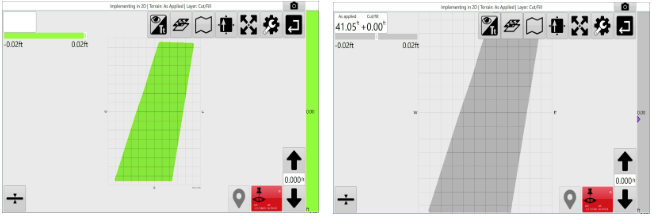
<span style="font-family: Helvetica,sans-serif;"><span style="font-size: 14pt; color: rgb(0, 0, 0); font-weight: 300;">In the implementation or design phase of T3RRA software, you view a cut/fill map and it is a uniform green or gray color representing no cut and no fill (depending on your cut/fill color schematic selected in Settings). When you touch part of the map it shows the Cut/Fill value as being 0.</span></span>

<span style="font-family: Helvetica,sans-serif;">  
</span>

<span style="font-family: Helvetica,sans-serif;"><span style="font-size: 14pt; color: rgb(0, 0, 0); font-weight: 400;">**Cause**:</span></span>

1. <span style="font-family: Helvetica,sans-serif;"><span style="font-size: 14pt; color: rgb(0, 0, 0); font-weight: 300;">Your original surface and your design surface are exactly the same. This happens if no design has been created. When surfacing first completes a “blank” design is created that matches the original surface exactly. As a cut/fill map is the difference between the original surface and the design surface it will necessarily be a map of zero values.</span></span>
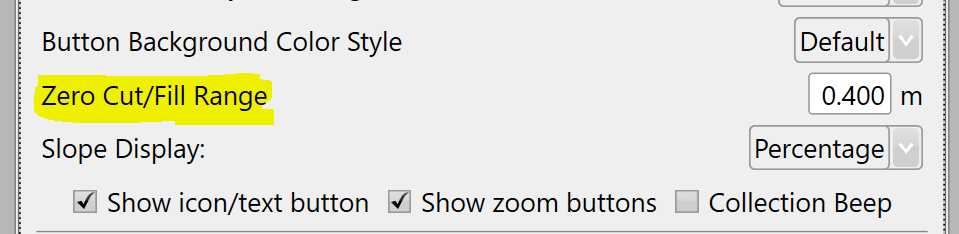
2. <span style="font-family: Helvetica,sans-serif;"><span style="font-size: 14pt; color: rgb(0, 0, 0); font-weight: 300;">Your ‘Zero Cut/Fill Range’ is too large.</span></span>

<span style="font-family: Helvetica,sans-serif;"><span style="font-size: 14pt; color: rgb(0, 0, 0); font-weight: 400;">**Solution**:</span></span>

<span style="font-family: Helvetica,sans-serif;"><span dir="ltr" style="font-size: 14pt; color: rgb(0, 0, 0); font-weight: 400;">![](https://docs.t3rra.com/uploads/images/gallery/2025-03/scaled-1680-/l9-ldxgv-irtths8ohkdr5gdq-gr-scxua-png.png) </span></span>

1. <span style="font-family: Helvetica,sans-serif;"><span dir="ltr" style="font-size: 14pt; color: rgb(0, 0, 0); font-weight: 300;"> Go to the design step of the wizard and create a new design. </span></span>
2. <span style="font-family: Helvetica,sans-serif;"><span style="font-size: 14pt; color: rgb(0, 0, 0); font-weight: 300;">Open </span><span style="font-size: 14pt; color: rgb(0, 0, 0); font-weight: 400;">**Settings &gt; Application**</span></span><span dir="ltr" style="font-size: 14pt; font-family: Helvetica, sans-serif; color: rgb(0, 0, 0); font-weight: 300;"> and lower your ‘Zero Cut/Fill Range’ </span>

# There is an ‘offset’ cut area beside my drain.

<span dir="ltr" style="font-size: 14pt; font-family: Helvetica, sans-serif; color: rgb(0, 0, 0); font-weight: 400;">**Symptoms**:</span>

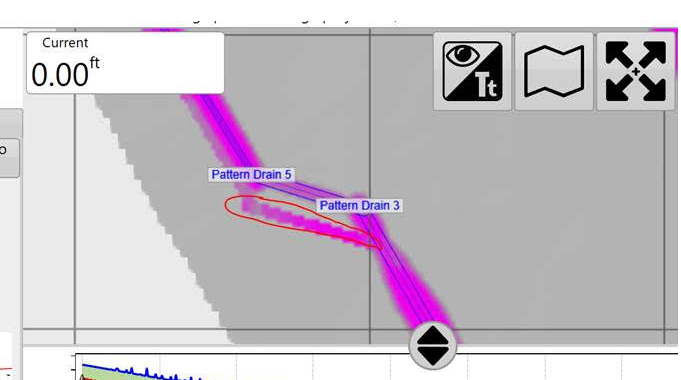
<span style="font-family: Helvetica,sans-serif;"><span style="font-size: 14pt; color: rgb(0, 0, 0); font-weight: 300;">When burning a drain profile into a surface, one or more side cut areas appear that seem disconnected with the actual drain path. </span></span>
<span style="font-family: Helvetica,sans-serif;">![](https://docs.t3rra.com/uploads/images/gallery/2025-03/scaled-1680-/ykyqnzzs4pgapsnlnnz7vtswrqutk7a1ia-png.png) </span>

<span style="font-family: Helvetica,sans-serif;"><span style="font-size: 14pt; color: rgb(0, 0, 0); font-weight: 400;">**Cause**:</span></span>

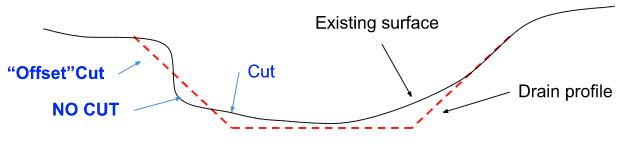
<span style="font-family: Helvetica,sans-serif;"><span dir="ltr" style="font-size: 14pt; color: rgb(0, 0, 0); font-weight: 300;">The side batter from the drain rises up through an existing surface that undulates in such a way that both cut and no-cut areas result.</span></span><span style="font-family: Helvetica,sans-serif;"><span dir="ltr" style="font-size: 14pt; color: rgb(0, 0, 0); font-weight: 300;">![](https://docs.t3rra.com/uploads/images/gallery/2025-03/scaled-1680-/3jmgustqqeckuuryoaqvg3sbrlns133fxw-png.png)</span>  
</span>

<span style="font-family: Helvetica,sans-serif;"><span style="font-size: 14pt; color: rgb(0, 0, 0); font-weight: 400;">**Solution**:</span></span>

<span dir="ltr" style="font-size: 14pt; font-family: Helvetica, sans-serif; color: rgb(0, 0, 0); font-weight: 300;">Increase the batter angle, or smooth the field surface before creating the drains (and create the drains based on the DESIGN, not the ORIGINAL surface). Alternatively, simply ignore the offset cut area.</span>

# Drain Design error message ‘not downhill all the way’

<span dir="ltr" style="font-size: 14pt; font-family: Helvetica, sans-serif; color: rgb(0, 0, 0); font-weight: 400;">**Symptoms**:</span>

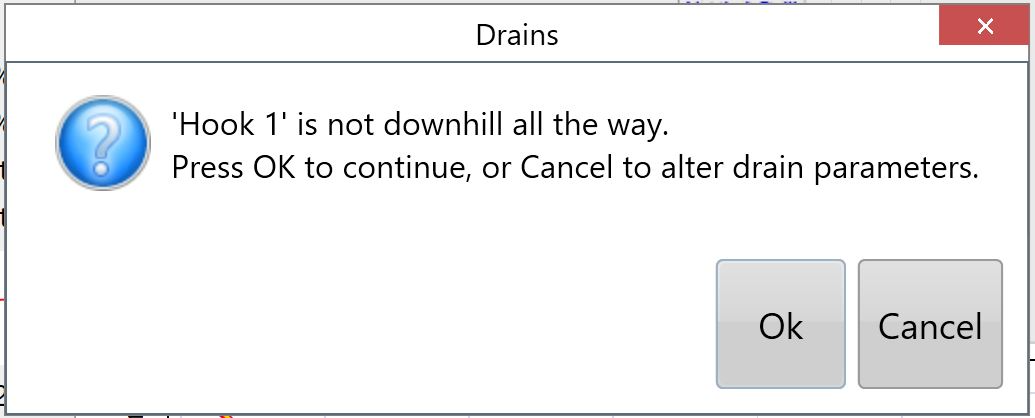
<span style="font-family: Helvetica,sans-serif;"><span style="font-size: 14pt; color: rgb(0, 0, 0); font-weight: 300;">When designing a drain, you receive an error message:</span></span>

![](https://docs.t3rra.com/uploads/images/gallery/2025-03/scaled-1680-/vevieiz2l3uesqrf6lpuza3hpuhqyrg49a-png.png)

<span style="font-family: Helvetica,sans-serif;"><span style="font-size: 14pt; color: rgb(0, 0, 0); font-weight: 400;">**Cause**:</span></span>

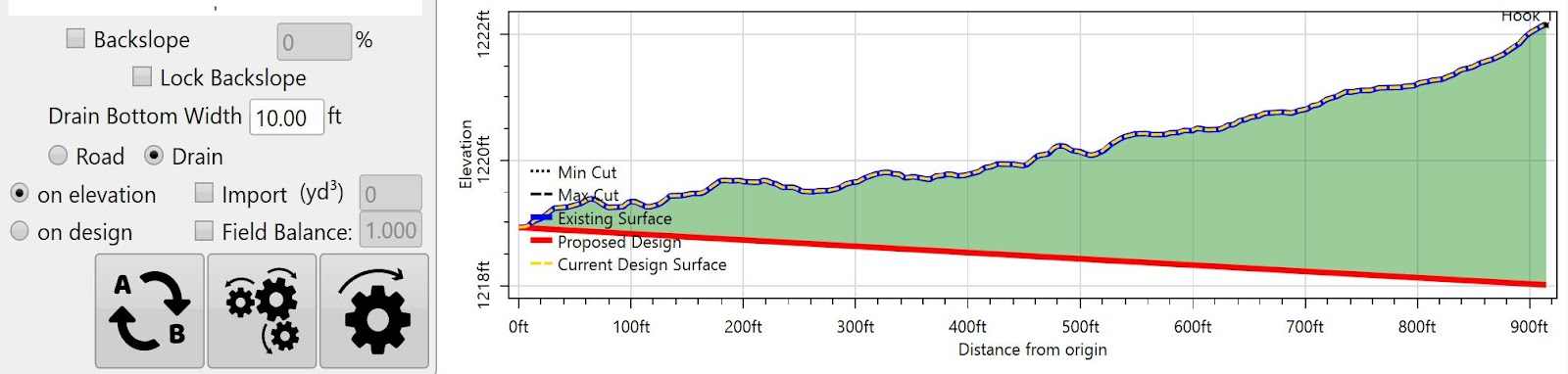
<span style="font-family: Helvetica,sans-serif;"><span style="font-size: 14pt; color: rgb(0, 0, 0); font-weight: 300;">Parameters entered do not allow drain to flow downhill all the way.</span></span>

<span style="font-family: Helvetica,sans-serif;">  
</span>

<span style="font-family: Helvetica,sans-serif;"><span style="font-size: 14pt; color: rgb(0, 0, 0); font-weight: 400;">**Solutions**:</span></span>

<span style="font-family: Helvetica,sans-serif;"><span style="font-size: 14pt; color: rgb(0, 0, 0); font-weight: 300;">Change parameters until they produce a drain that will flow downhill all the way. i.e. increase Max Cut.</span></span>

# Drain Design error message ‘drains were affected by this operation’

<span dir="ltr" style="font-size: 14pt; font-family: Helvetica, sans-serif; color: rgb(0, 0, 0); font-weight: 400;">**Symptoms**:</span>

<span style="font-family: Helvetica,sans-serif;"><span style="font-size: 14pt; color: rgb(0, 0, 0); font-weight: 300;">When designing a drain, you receive an error message:</span></span>

![](https://docs.t3rra.com/uploads/images/gallery/2025-03/scaled-1680-/ggmoddk-etqogxy3bsejmre6en5njlhlwg-png.png)

<span style="font-family: Helvetica,sans-serif;"><span style="font-size: 14pt; color: rgb(0, 0, 0); font-weight: 400;">**Cause**:</span></span>

1. <span style="font-family: Helvetica,sans-serif;"><span style="font-size: 14pt; color: rgb(0, 0, 0); font-weight: 300;">Elevation data was collected from low to high elevation where another drain connects.</span></span>
2. <span style="font-family: Helvetica,sans-serif;"><span style="font-size: 14pt; color: rgb(0, 0, 0); font-weight: 300;">Drain was split with the Split Drain tool.</span></span>

![](https://docs.t3rra.com/uploads/images/gallery/2025-03/scaled-1680-/elsccikbklziq8sutie8cmhecdxc2nkt7a-png.png)

<span style="font-family: Helvetica,sans-serif;"><span style="font-size: 14pt; color: rgb(0, 0, 0); font-weight: 400;">**Solutions**:</span></span>

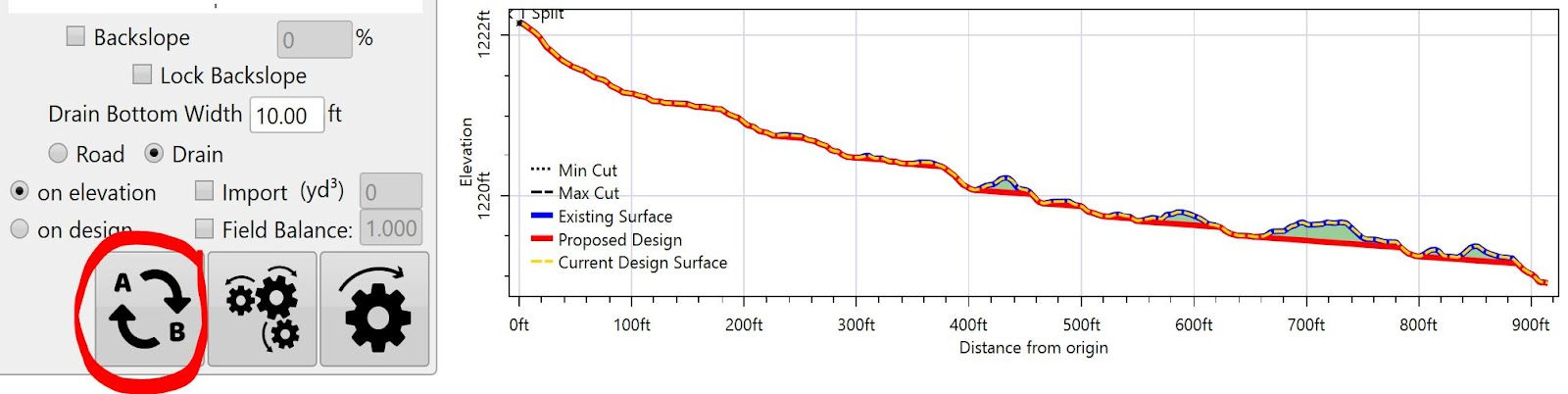
<span style="font-family: Helvetica,sans-serif;"><span style="font-size: 14pt; color: rgb(0, 0, 0); font-weight: 300;">Swap AB before designing so the drain is designed from high to low elevation.</span></span>

![](https://docs.t3rra.com/uploads/images/gallery/2025-03/scaled-1680-/d5yrcunw4ibjdvitc0c2uwqfykmzpob17q-png.png)