# Regions

<span style="font-family: Helvetica,sans-serif;"><span dir="ltr" style="font-size: 14pt; color: rgb(35, 31, 32); font-weight: 300;">![](https://docs.t3rra.com/uploads/images/gallery/2025-03/scaled-1680-/9xx8kms2p0bkynvj5d4gdropbc009sydzh8qq-png.png)To create regions, press the ‘</span><span style="font-size: 14pt; color: rgb(35, 31, 32); font-weight: 400;">**Regions**</span><span style="font-size: 14pt; color: rgb(35, 31, 32); font-weight: 300;">’ button </span><span style="font-size: 14pt; color: rgb(32, 32, 32); font-weight: 300;">(regions are not available in drain related functions).</span></span>
<span style="font-family: Helvetica,sans-serif;"><span dir="ltr" style="font-size: 14pt; color: rgb(32, 32, 32); font-weight: 300;">![](https://docs.t3rra.com/uploads/images/gallery/2025-03/scaled-1680-/aaC1loavxh00h2cn4rsvflukuic5w5u0-jc8q-png.png)</span></span>

<span style="font-family: Helvetica,sans-serif;"><span style="font-size: 14pt; color: rgb(0, 0, 0); font-weight: 300;">The </span><span style="font-size: 14pt; color: rgb(35, 31, 32); font-weight: 300;">‘</span><span style="font-size: 14pt; color: rgb(35, 31, 32); font-weight: 400;">**Regions**</span><span style="font-size: 14pt; color: rgb(35, 31, 32); font-weight: 300;">’ </span><span dir="ltr" style="font-size: 14pt; color: rgb(0, 0, 0); font-weight: 300;">tool is used to split a field into multiple workable areas. Different design options can be applied to multiple different regions. For example,</span></span><span style="font-family: Helvetica,sans-serif;"><span dir="ltr" style="font-size: 14pt; color: rgb(0, 0, 0); font-weight: 300;"> you can apply different primary and secondary slopes, or different levee designs in each region.</span></span>

<span style="font-family: Helvetica,sans-serif;">  
</span>

<span style="font-family: Helvetica,sans-serif;"><span dir="ltr" style="font-size: 14pt; color: rgb(255, 0, 0); font-weight: 300;">NOTE: It ispossible to create different design types in different regions. You can have a best-fit plane in one region, and a multi-fit surface in another, for instance.</span></span>

<span dir="ltr" style="font-family: Helvetica,sans-serif;"><span class="fr-video fr-deletable fr-fvc fr-dvb fr-draggable"><iframe allowfullscreen="allowfullscreen" class="fr-draggable align-center" frameborder="0" height="360" sandbox="allow-scripts allow-forms allow-same-origin allow-presentation" src="https://www.youtube.com/embed/NQn9PJkU6Y4?&wmode=opaque" width="640"></iframe>

</span></span>

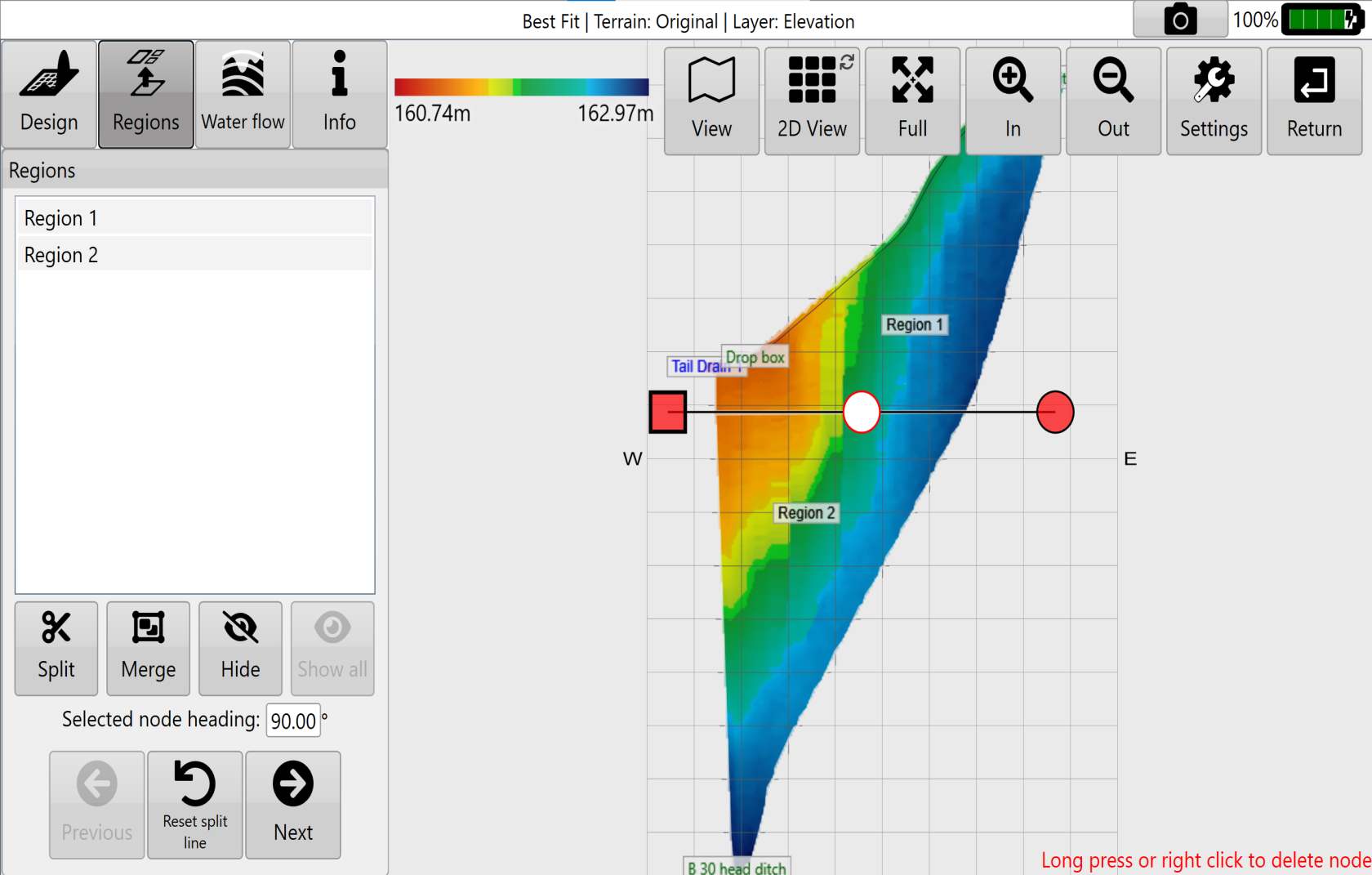
<span style="font-family: Helvetica,sans-serif;"><span dir="ltr" style="font-size: 14pt; color: rgb(0, 0, 0); font-weight: 300;">Regions are created by moving a splitting line across two edges of an existing region, or whole field if no regions exist. The split line is set by moving </span><span style="font-size: 14pt; color: rgb(0, 0, 0); font-weight: 400;">**Point A**</span><span style="font-size: 14pt; color: rgb(0, 0, 0); font-weight: 300;"> and </span><span style="font-size: 14pt; color: rgb(0, 0, 0); font-weight: 400;">**Point B**</span><span dir="ltr" style="font-size: 14pt; color: rgb(0, 0, 0); font-weight: 300;"> into position. The line can be positioned by pressing the </span><span style="font-size: 14pt; color: rgb(0, 0, 0); font-weight: 400;">**up**, **down**, **left**,</span><span style="font-size: 14pt; color: rgb(0, 0, 0); font-weight: 300;"> or </span><span style="font-size: 14pt; color: rgb(0, 0, 0); font-weight: 400;">**right**</span><span style="font-size: 14pt; color: rgb(0, 0, 0); font-weight: bold;"> </span><span dir="ltr" style="font-size: 14pt; color: rgb(0, 0, 0); font-weight: 300;">arrow buttons or moving the points directly using the touchscreen.</span><span dir="ltr" style="font-size: 14pt; color: rgb(0, 0, 0); font-weight: 300;"> The split lines straight, but by using the white nodes on the line or merging regions it is possible to achieve region boundaries that are not straight.</span></span>

 ![](https://docs.t3rra.com/uploads/images/gallery/2025-03/scaled-1680-/POjyddkcphcvqj3sway0h2mjcoa3xwqbsdfya-png.png)

<span style="font-family: Helvetica,sans-serif;"><span dir="ltr" style="font-size: 14pt; color: rgb(0, 0, 0); font-weight: 300;">The '</span><span style="font-size: 14pt; color: rgb(0, 0, 0); font-weight: 400;">**Split**</span><span dir="ltr" style="font-size: 14pt; color: rgb(0, 0, 0); font-weight: 300;">' button confirms the “split” on the selected area.</span></span>

<span style="font-family: Helvetica,sans-serif;">  
</span>

<span style="font-family: Helvetica,sans-serif;"><span style="font-size: 14pt; color: rgb(0, 0, 0); font-weight: 300;">The '</span><span style="font-size: 14pt; color: rgb(0, 0, 0); font-weight: 400;">**Merge**</span><span dir="ltr" style="font-size: 14pt; color: rgb(0, 0, 0); font-weight: 300;">' button will merge regions selected in the list into one region.</span></span>

<span style="font-family: Helvetica,sans-serif;">  
</span>

<span style="font-family: Helvetica,sans-serif;"><span style="font-size: 14pt; color: rgb(0, 0, 0); font-weight: 300;">The ‘</span><span style="font-size: 14pt; color: rgb(0, 0, 0); font-weight: 400;">**Hide**</span><span style="font-size: 14pt; color: rgb(0, 0, 0); font-weight: 300;">’ button will delete whatever design exists with the selected region(s). At this point the region will not exist as a separate area that can accept designs. It can still have full-field designs applied to it.</span></span>

<span style="font-family: Helvetica,sans-serif;">  
</span>

<span style="font-family: Helvetica,sans-serif;"><span style="font-size: 14pt; color: rgb(0, 0, 0); font-weight: 300;">The ‘</span><span style="font-size: 14pt; color: rgb(0, 0, 0); font-weight: 400;">**Restore**</span><span style="font-size: 14pt; color: rgb(0, 0, 0); font-weight: 300;">’ button will restore all deleted regions.</span></span>

<span style="font-family: Helvetica,sans-serif;">  
</span>

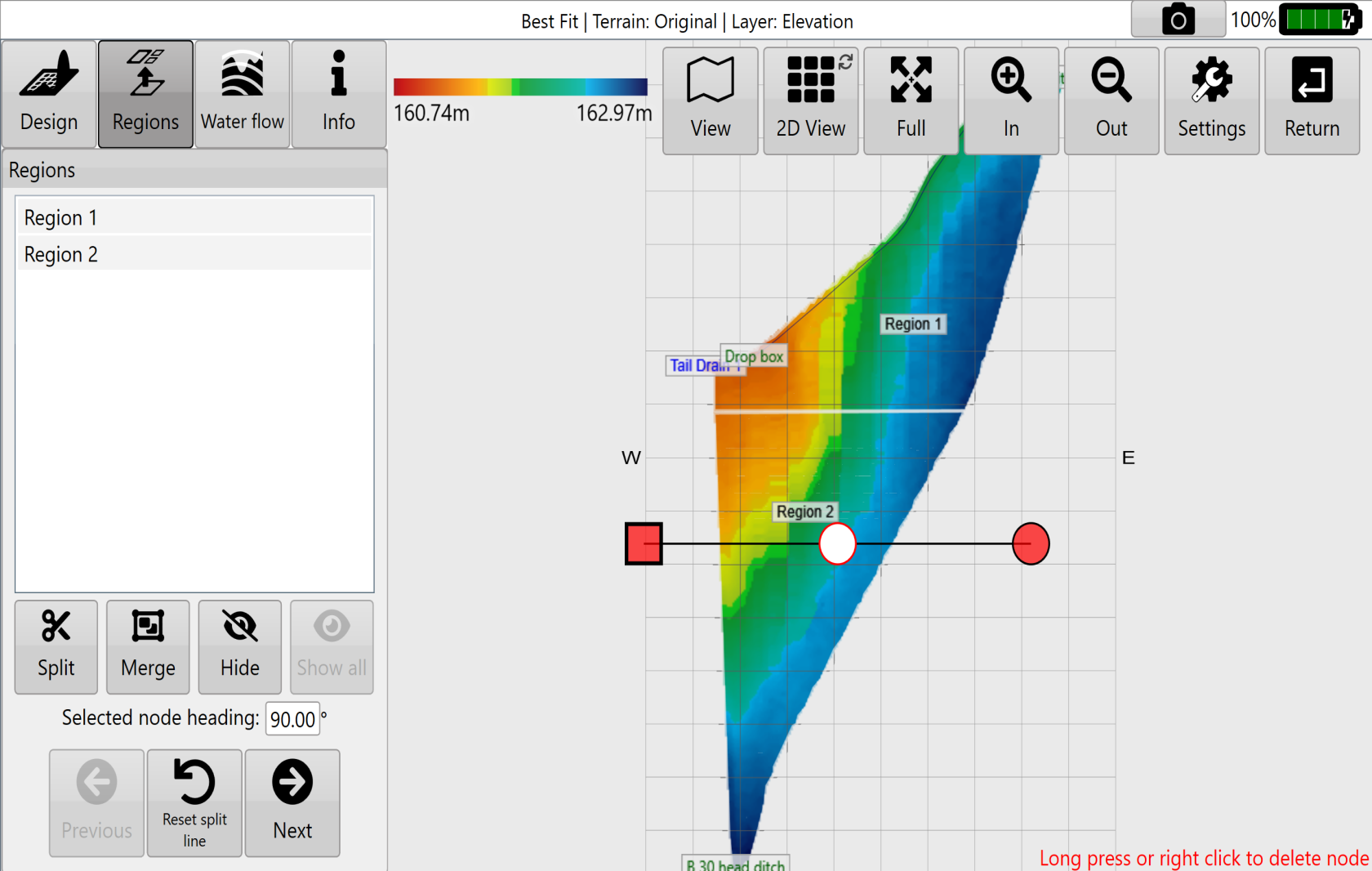
<span style="font-family: Helvetica,sans-serif;"><span style="font-size: 14pt; color: rgb(0, 0, 0); font-weight: 300;">To create non-linear split lines first create multiple splits that intersect, and then merge the regions that are not wanted. See below for an example.</span></span>
<span style="font-family: Helvetica,sans-serif;">  
</span>

<span style="font-family: Helvetica,sans-serif;">![](https://docs.t3rra.com/uploads/images/gallery/2025-03/scaled-1680-/m1uuzvyssbx3jjkqcebk0qrzdgbueznh5petq-png.png)</span>

<span dir="ltr" style="font-size: 14pt; font-family: Helvetica, sans-serif; color: rgb(0, 0, 0); font-weight: 300;">![](https://docs.t3rra.com/uploads/images/gallery/2025-03/scaled-1680-/5Vgx3kynlmltuqkmxq8teofcsyx4qfw6i63fa-png.png)Press the '</span><span style="font-size: 14pt; font-family: Helvetica, sans-serif; color: rgb(0, 0, 0); font-weight: 400;">**Back to Design**</span><span dir="ltr" style="font-size: 14pt; font-family: Helvetica, sans-serif; color: rgb(0, 0, 0); font-weight: 300;">' button when you have finished adding your regions. </span>

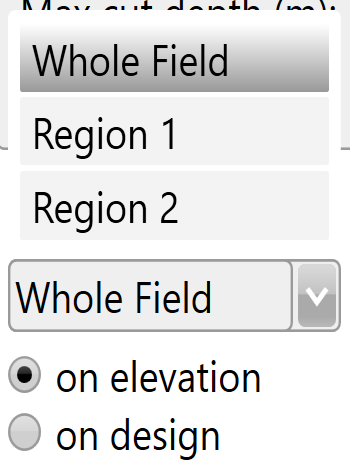
<span style="font-size: 14pt; font-family: Helvetica, sans-serif; color: rgb(0, 0, 0); font-weight: 300;">In certain design functions (multi-fit, best-fit, smoothing, and levees) different regions can be selected from a drop down menu allowing you to make design changes to only the selected region.</span>

![](https://docs.t3rra.com/uploads/images/gallery/2025-03/scaled-1680-/lhNgz7my2k-gn8jkofgfaza3hyqassnb-8loq-png.png)

<span dir="ltr" style="font-size: 14pt; font-family: Helvetica, sans-serif; color: rgb(0, 0, 0); font-weight: 300;">Choose to apply your design to the original elevation surface or to the design surface.</span>