# Map: Recent GPS Errors

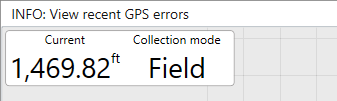
<span dir="ltr" style="font-size: 18px; font-family: Helvetica, sans-serif;">In the top left of the screen, after a GPS error is encountered, an INFO hint will be shown.</span>

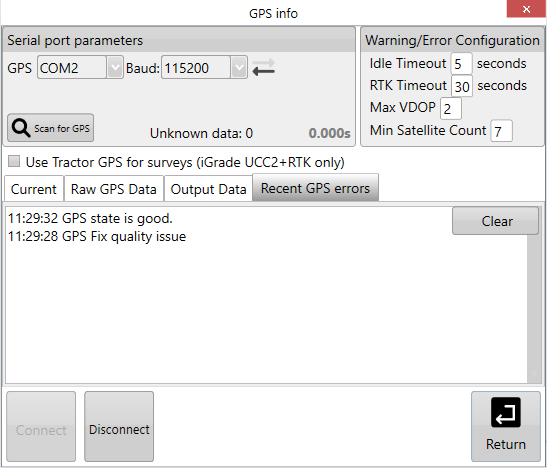
![](https://docs.t3rra.com/uploads/images/gallery/2025-03/scaled-1680-/JHfqvdou1upwbvcihdrqkxolbfdg3fvcubd7g-png.png)<span dir="ltr" style="font-size: 18px; font-family: Helvetica, sans-serif;"><span dir="ltr" style="color: rgb(0, 0, 0); font-family: Helvetica, sans-serif; font-size: 18px; font-style: normal; font-variant-ligatures: normal; font-variant-caps: normal; font-weight: 400; letter-spacing: normal; orphans: 2; text-align: left; text-indent: 0px; text-transform: none; widows: 2; word-spacing: 0px; -webkit-text-stroke-width: 0px; white-space: normal;  text-decoration-thickness: initial; text-decoration-style: initial; text-decoration-color: initial; display: inline !important; float: none;">Tapping on this text will open the GPS info window to show the recent errors. This is helpful if you have frequent but intermittent errors that happen too quickly to read the error messages.</span></span>

<span dir="ltr" style="font-size: 18px; font-family: Helvetica, sans-serif;">![](https://docs.t3rra.com/uploads/images/gallery/2025-03/scaled-1680-/wk91d9t3-uwysocne9vhj-lszarxsqi2on7w-png.png)</span>