# Magic Plane
The Magic plane is a shortcut method for creating a plane of survey points without actually having to collect them. This can be used when the grade and direction of the desired plane is known and getting accurate cut/fill volumes is not required. An example would be a building pad.
NOTE: If you use ‘**Magic plane**’ as your original surface you are unlikely to be able to create an accurate cut/fill map. This is because the newly created plane is unlikely to match the actual real world surface. Any cut/fill map created from a design you place on a ‘Magic plane’ will be relative to it, and not the real world surface.
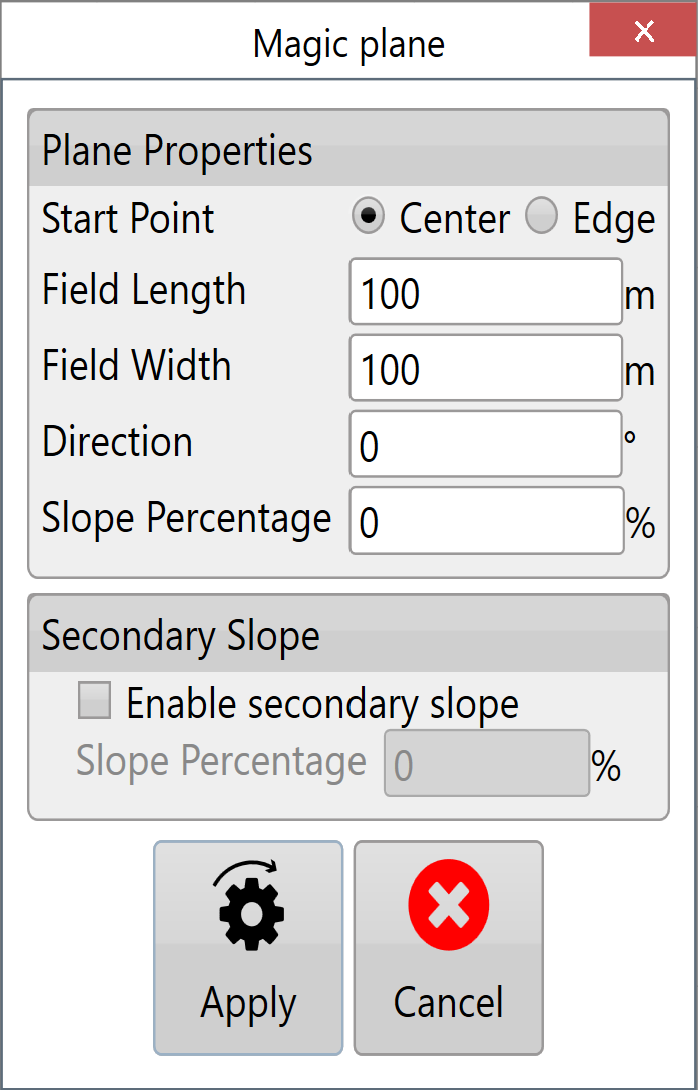**Start Point** - The 2 options available are center or edge, this will generate the magic plane with your current location (or the location of some pre-existing surveyed points) at the center, or at the center of an edge.
**Field Length** - This is the length of the magic plane and can be adjusted as needed.
**Field Width** - This is the width of the magic plane and can also be adjusted as needed.
**Direction** - This sets which direction the magic plane is oriented.
**Slope** **Percentage** - This sets the degree of the slope.
**Secondary slope** - This is enabled by selecting the “**Enable secondary slope**” check box. (the secondary slope runs at 90o to the primary)