# Limits Tab

### <span dir="ltr" style="font-size: 14pt; font-family: Oswald, sans-serif; color: rgb(0, 0, 0); font-weight: 400;">![](https://docs.t3rra.com/uploads/images/gallery/2025-03/scaled-1680-/hdB8sz2m1sfqiewvd4cua8d6glqfghbi4ut2w-png.png)</span><span dir="ltr" style="font-size: 14pt; font-family: Helvetica, sans-serif; color: rgb(0, 0, 0); font-weight: 400;">**Blade Shift Increment** </span><span style="font-family: Helvetica,sans-serif;"><span style="font-size: 14pt; color: rgb(0, 0, 0); font-weight: 300;">-Used to set the height adjustment value of the up/down elevation adjustments buttons in the implementation wizard step. </span></span>

<span style="font-family: Helvetica,sans-serif;"><span style="font-size: 14pt; color: rgb(0, 0, 0); font-weight: 400;">**NOTE**</span><span style="font-size: 14pt; color: rgb(0, 0, 0); font-weight: 300;"> - recommended distance for the blade shift increment would be 0.03 - 0.06 feet (0.4 - 0.8 inches, or 0.01m - 0.02m).</span></span>

<span style="font-family: Helvetica,sans-serif;">  
</span>

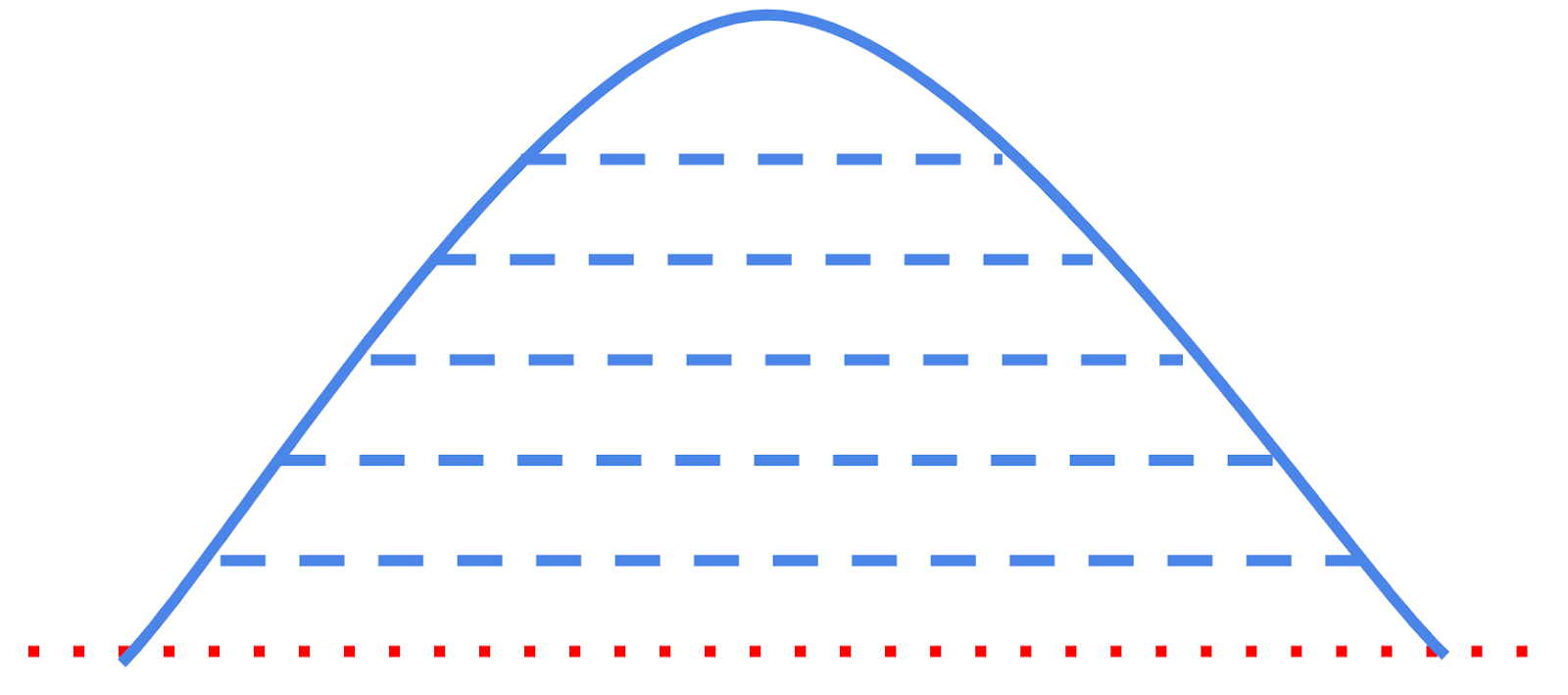
<span style="font-family: Helvetica,sans-serif;"><span style="font-size: 14pt; color: rgb(0, 0, 0); font-weight: 400;">**Static Blade Limit** </span><span style="font-size: 14pt; color: rgb(0, 0, 0); font-weight: 300;">- This feature allows you to temporarily alter your target design heights by a certain amount. For instance, by setting the Static Blade Limit to 50% you will effectively be setting your target cut and fill heights to be 50% of what the actual design calls for. This setting can also be used to overfill a design by a percentage to allow for soil to “sink “ by a percentage over time. Having a setting of 110% will fill a 100mm fill to 110mm to allow for future compaction. </span></span>

<span style="font-family: Helvetica,sans-serif;"><span style="font-size: 14pt; color: rgb(0, 0, 0); font-weight: 300;">This is useful for building up banks, roads, or mounds in gradual steps and allows for even compaction of dirt.</span></span>

<span style="font-family: Helvetica,sans-serif;">  
</span>

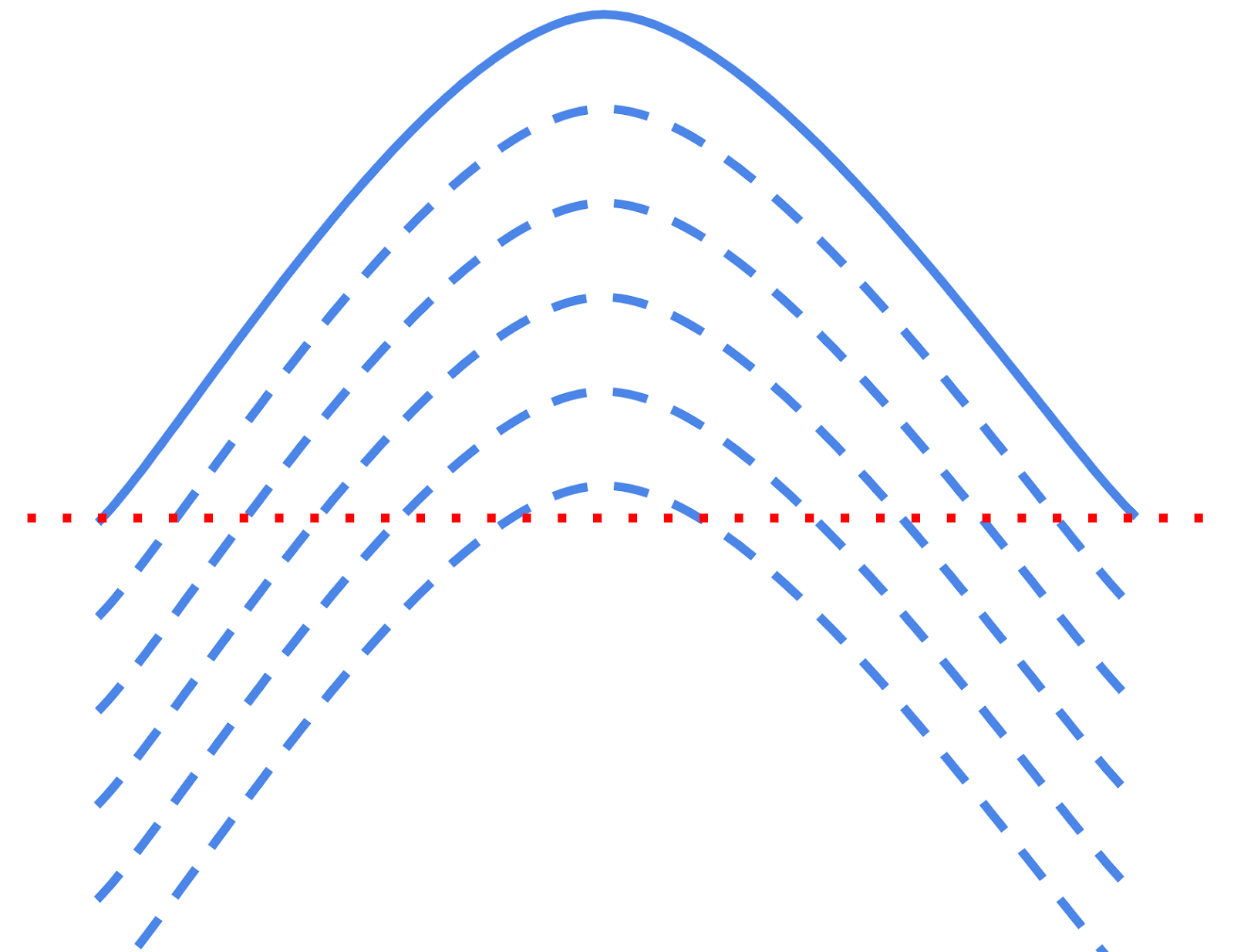
<span style="font-family: Helvetica,sans-serif;"><span style="font-size: 14pt; color: rgb(0, 0, 0); font-weight: 300;">The checkbox '</span><span style="font-size: 14pt; color: rgb(0, 0, 0); font-weight: 400;">**Ignore cuts**</span><span style="font-size: 14pt; color: rgb(0, 0, 0); font-weight: 300;">' is useful if you want to gradually build up a mound of dirt by using the vertical nudge to lower a design surface below the current surface and then slowly nudge it upwards so that the fill pattern starts with the apex of the mound and proceeds outwards. In this case you do not want to cut in the regions where the mound design surface is currently nudged below the original surface. </span><span style="font-size: 14pt; color: rgb(255, 0, 0); font-weight: 400;">**NOTE**</span><span style="font-size: 14pt; color: rgb(255, 0, 0); font-weight: 300;">: 'Ignore cuts' can be activated even if the Static Blade Limit is set to “None”.</span></span>

<span style="font-family: Helvetica,sans-serif;">  
</span>

<span style="font-family: Helvetica,sans-serif;"><span style="font-size: 14pt; color: rgb(0, 0, 0); font-weight: 300;">The static blade limit amount is set on the implementation screen. </span></span>

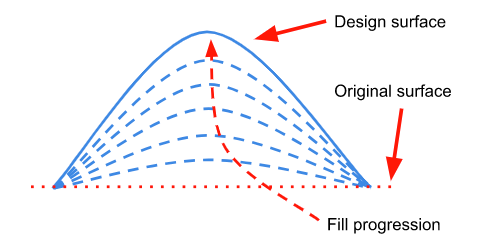
<span style="font-family: Helvetica,sans-serif;"><span style="font-size: 14pt; color: rgb(0, 0, 0); font-weight: 400;">Methods to progressively add layers of dirt to a fill area.</span></span>

<span style="font-family: Helvetica,sans-serif;">  
</span>

<span style="font-family: Helvetica,sans-serif;">  
</span>

<table class="fr-no-borders" id="bkmrk-static-blade-limitby" style="width: 100%;"><tbody><tr><td style="width: 50.0000%;"><span style="font-family: Helvetica,sans-serif;"><span style="font-size: 14pt; color: rgb(0, 0, 0); font-weight: 400;">**Static Blade Limit**</span></span>

<span style="font-family: Helvetica,sans-serif;"><span style="font-size: 14pt; color: rgb(0, 0, 0); font-weight: 400;">**by Percent**</span></span>

</td><td dir="ltr" style="width: 50.0000%;">![](https://docs.t3rra.com/uploads/images/gallery/2025-03/scaled-1680-/fXsyhu0-xepx-hulm3tuy8s4pcwwjwglzg5hq-png.png)</td></tr><tr><td style="width: 50.0000%;"><span style="font-family: Helvetica,sans-serif;"><span dir="ltr" style="font-size: 14pt; color: rgb(0, 0, 0); font-weight: 400;">**Static Blade Limit**</span></span>

<span style="font-family: Helvetica,sans-serif;"><span style="font-size: 14pt; color: rgb(0, 0, 0); font-weight: 400;">**By Absolute Value**</span></span>

</td><td dir="ltr" style="width: 50.0000%;">![](https://docs.t3rra.com/uploads/images/gallery/2025-03/scaled-1680-/AnPbiywpjnhoodr5rx1fqp8slpkkkgo4sytsq-png.png)</td></tr><tr><td style="width: 50.0000%;"><span style="font-family: Helvetica,sans-serif;"><span dir="ltr" style="font-size: 14pt; color: rgb(0, 0, 0); font-weight: 400;">**Combination of vertical blade offset** </span></span>

<span style="font-family: Helvetica,sans-serif;"><span dir="ltr" style="font-size: 14pt; color: rgb(0, 0, 0); font-weight: 400;">**+ Ignore cuts** </span></span>

</td><td dir="ltr" style="width: 50.0000%;">![](https://docs.t3rra.com/uploads/images/gallery/2025-03/scaled-1680-/jNLtqktbk7z82sr45bo1p41hqxxpyguwzzfgg-png.png) </td></tr></tbody></table>

<span style="font-family: Helvetica,sans-serif;"><span dir="ltr" style="font-size: 14pt; color: rgb(0, 0, 0); font-weight: 400;">  
</span></span>

<span style="font-family: Helvetica,sans-serif;"><span dir="ltr" style="font-size: 14pt; color: rgb(0, 0, 0); font-weight: 400;">**![](https://docs.t3rra.com/uploads/images/gallery/2025-03/scaled-1680-/6Ynfxwfhmcovvnybul4rrcbl43twp1ylo6baa-png.png)Dynamic Blade Limit**</span><span dir="ltr" style="font-size: 14pt; color: rgb(0, 0, 0); font-weight: 300;"> - The increment which the blade will move per pass of cut or fill. It allows progressively cutting to a total depth without over cutting on an individual pass.</span></span>

<span style="font-family: Helvetica,sans-serif;">  
</span>

<span style="font-family: Helvetica,sans-serif;"><span style="font-size: 14pt; color: rgb(0, 0, 0); font-weight: 300;">This feature is designed to allow cuts to be taken in “bite size“ chunks without causing the machine to be overloaded.</span></span>

<span style="font-family: Helvetica,sans-serif;">  
</span>

<span style="font-family: Helvetica,sans-serif;"><span style="font-size: 14pt; color: rgb(0, 0, 0); font-weight: 300;">It can optionally be applied only to cuts, only to fills, or both.</span></span>

<span style="font-family: Helvetica,sans-serif;">  
</span>

<span style="font-family: Helvetica,sans-serif;"><span style="font-size: 14pt; color: rgb(0, 0, 0); font-weight: 300;">It uses the as-applied functionality to track blade heights on previous passes in order to set the current blade height. Dynamic Blade Limit does not operate unless as-applied functionality is activated. For more see </span></span>[<span style="font-size: 14pt; font-family: Helvetica, sans-serif; color: rgb(17, 85, 204); font-weight: 300; text-decoration-skip-ink: none;">Understanding the relationship between the “As-applied” surface and the Dynamic Blade Limit.</span>](https://t3rra-help.freshdesk.com/en/support/solutions/articles/51000330200-understanding-the-relationship-between-the-as-applied-surface-and-the-dynamic-blade-limit-)

![](https://docs.t3rra.com/uploads/images/gallery/2025-03/scaled-1680-/MNvdwhrxwyxfr4jtc3jkkv1t5ojh-ifce-y8q-png.png)