# Inline Offset

![](https://docs.t3rra.com/uploads/images/gallery/2025-03/scaled-1680-/5jcygdf9jsyiekqfxlfxobaoq8tdfb1ojiqdq-png.png)<span style="font-family: Helvetica,sans-serif;"><span dir="ltr" style="font-size: 14pt; color: rgb(0, 0, 0); font-weight: 300;">'**Inline Offset**', also known as **'Fix Lag'**, is a surfacing tool that assists in making corrections to elevation data that is imported from other sources.</span></span>

<span style="font-family: Helvetica,sans-serif;"><span style="font-size: 14pt; color: rgb(0, 0, 0); font-weight: 300;">To access this tool press the ‘**Fix Lag**’ button located at the left end of the tools at the bottom of the screen. Pressing this button will open a pop-up window that will provide you with the options to correct elevation alignment. </span></span>

<span style="font-family: Helvetica,sans-serif;"><span class="fr-video fr-deletable fr-fvc fr-dvb fr-draggable"><iframe allowfullscreen="allowfullscreen" class="fr-draggable align-center" frameborder="0" height="360" sandbox="allow-scripts allow-forms allow-same-origin allow-presentation" src="https://www.youtube.com/embed/O9Sgkx-DffM?&wmode=opaque" width="640"></iframe>

</span>  
</span>

<span style="font-family: Helvetica,sans-serif;"><span dir="ltr" style="font-size: 14pt; color: rgb(0, 0, 0); font-weight: 300;">When correcting elevation data adjustments will be updated in real time on the map. </span></span>

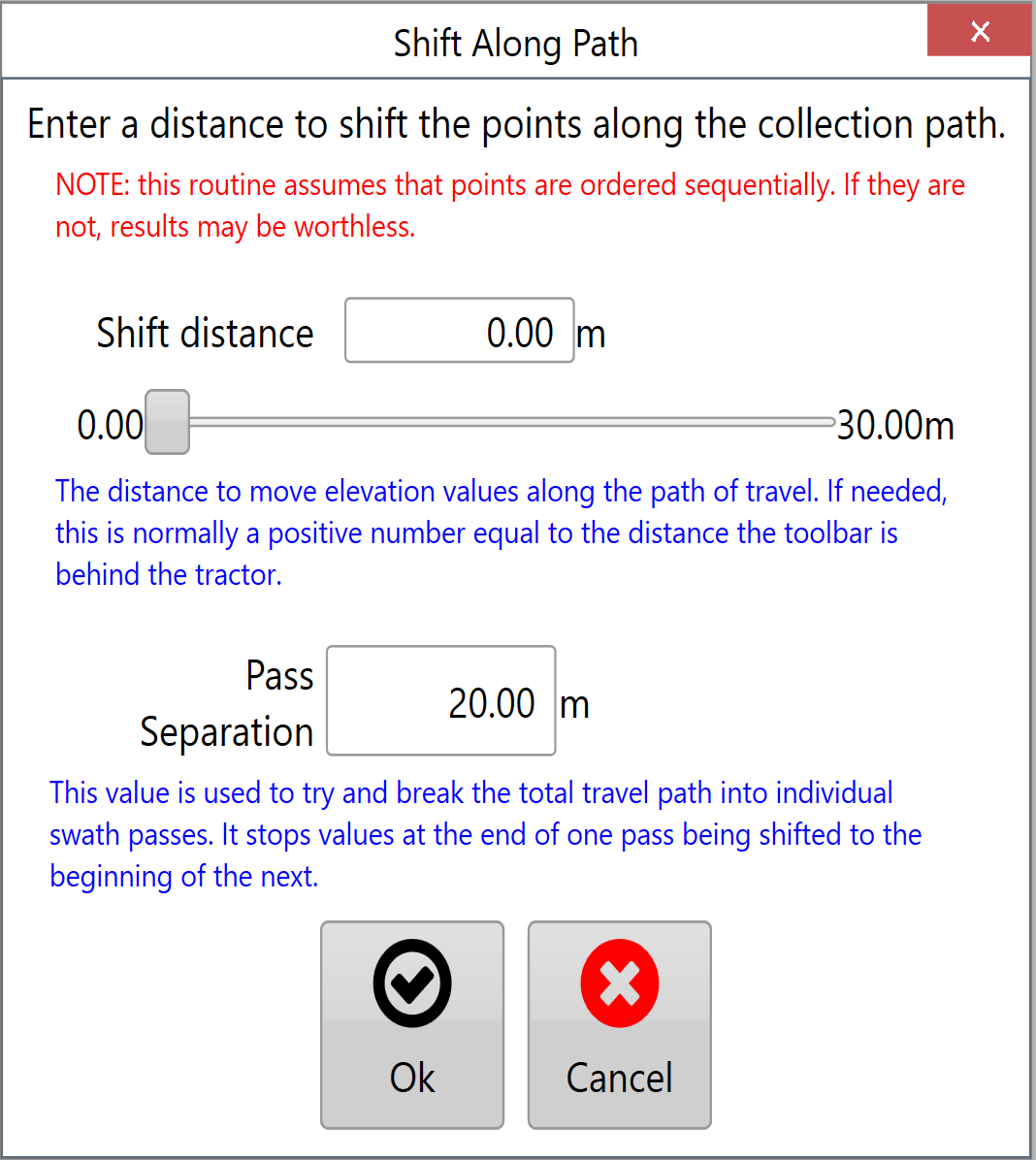
<span style="font-family: Helvetica,sans-serif;"><span dir="ltr" style="font-size: 14pt; color: rgb(0, 0, 0); font-weight: 300;">This will help to make sure that the changes you are making are correct before accepting them. </span></span><span style="font-family: Helvetica,sans-serif;"><span dir="ltr" style="font-size: 14pt; color: rgb(0, 0, 0); font-weight: 300;">![](https://docs.t3rra.com/uploads/images/gallery/2025-03/scaled-1680-/wiqu11ljb7vq6jntgsr11odwfeeqmm4kjnzya-png.png)There are 2 settings that control the correction of elevation data. </span></span>
<span style="font-family: Helvetica,sans-serif;">  
</span>

<span style="font-family: Helvetica,sans-serif;"><span dir="ltr" style="font-size: 14pt; color: rgb(0, 0, 0); font-weight: 300;">'**Shift distance**' moves the data points along the recorded path and can only adjust data to a maximum distance of 30m/100ft. The distance can be manually set or adjusted using the slider.</span></span>

<span style="font-family: Helvetica,sans-serif;">  
</span>

<span style="font-family: Helvetica,sans-serif;"><span dir="ltr" style="font-size: 14pt; color: rgb(0, 0, 0); font-weight: 300;">'**Pass Separation**' is how far must be between any point and the next point along before it is considered to be a new segment. There is no limit to this distance.</span></span>

<span style="font-family: Helvetica,sans-serif;"><span dir="ltr" style="font-size: 14pt; color: rgb(0, 0, 0); font-weight: 300;">When making changes to the data in the inline offset window they will be reflected on the surface on the map - Check that your change has the desired effect before accepting.</span></span>