# GPS Port Settings Tab

### <span dir="ltr" style="font-size: 18px; font-family: Oswald, sans-serif; color: rgb(0, 0, 0); font-weight: 400;">![](https://docs.t3rra.com/uploads/images/gallery/2025-03/scaled-1680-/oxWwhpjhelpanq-mroo7yent7py5w8ipoysaq-png.png)</span>
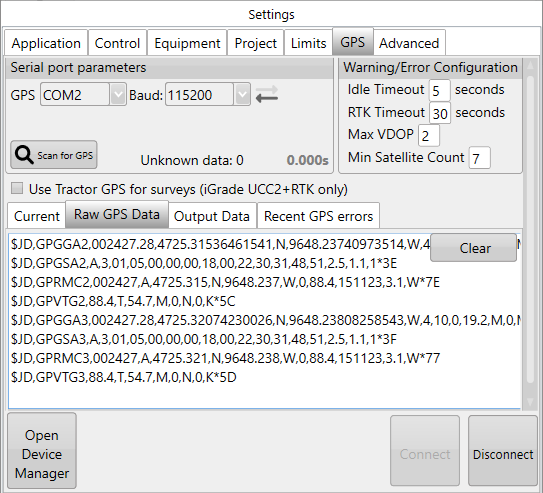
### <span style="font-size: 18px;"><span dir="ltr" style="font-family: Helvetica, sans-serif; color: rgb(0, 0, 0); font-weight: 400;">**GPS**</span><span style="font-family: Helvetica,sans-serif;"><span dir="ltr" style="color: rgb(0, 0, 0); font-weight: 300;"> - Displays the COM port that is used to communicate with the GPS. </span></span><span style="box-sizing: border-box; font-family: Helvetica, sans-serif;"><span dir="ltr" style="box-sizing: border-box; color: rgb(0, 0, 0); font-weight: 300;">Ensure you have selected the correct port with </span></span><span style="font-family: Helvetica,sans-serif;"><span dir="ltr" style="color: rgb(0, 0, 0); font-weight: 300;">the drop down menu.</span></span></span>

<span style="font-size: 18px;"><span style="font-family: Helvetica,sans-serif;">  
</span></span>

<span style="font-size: 18px;"><span style="font-family: Helvetica,sans-serif;"><span style="color: rgb(0, 0, 0); font-weight: 400;">**Baud (Rate)**</span><span dir="ltr" style="color: rgb(0, 0, 0); font-weight: 300;"> - The communication speed between the software and GPS (it should match the baud rate of the GPS).</span></span></span>

<span style="font-size: 18px;">  
</span>

<span dir="ltr" style="font-size: 18px;">**Scan for GPS** - Checks the available COM ports and usual baud rates for valid GPS data.</span>

<span style="font-family: Helvetica,sans-serif;"><span dir="ltr" style="font-size: 18px;">**Warning/Error Configuration** - Settings changed on this page will stay even after the system is turned off.</span></span>

<span style="font-size: 18px;"><span dir="ltr"><span dir="ltr" style="color: rgb(0, 0, 0); font-family: Helvetica, sans-serif; font-weight: 400;">**Current** </span><span dir="ltr"><span dir="ltr">- Displays the most recent GPS information received in a table.</span></span></span></span>

<span style="font-size: 18px;"><span style="font-family: Helvetica,sans-serif;">  
</span></span>

<span style="font-size: 18px;"><span style="font-family: Helvetica,sans-serif;"><span style="color: rgb(0, 0, 0); font-weight: 400;">**Raw GPS data** </span><span dir="ltr" style="color: rgb(0, 0, 0); font-weight: 300;">- Displays the most recent GPS data received. Primarily used for diagnostics, should support be required.</span></span></span>

<span dir="ltr" style="font-family: Helvetica, sans-serif; font-size: 18px;">**Output Data** - Displays the most recent outgoing communications. Primarily used for diagnostics, should support be required.</span>

<span style="font-size: 18px;"><span dir="ltr" style="font-family: Helvetica,sans-serif;">**Recent GPS errors** - A list of the most recent GPS errors, for review in case they are intermittent.</span></span>

<span style="font-size: 18px;"><span dir="ltr" style="font-family: Helvetica,sans-serif;">**Open Device Manager** - Used to investigate COM port issues if required.</span></span>

<span style="font-size: 18px;"><span dir="ltr" style="font-family: Helvetica,sans-serif;">**Connect and Disconnect** - Manually start or stop communication with the app controller.</span></span>

<span style="font-family: Helvetica, sans-serif; font-size: 18px;">  
</span>

<span style="font-size: 18px;"><span style="font-family: Helvetica,sans-serif;"><span style="color: rgb(255, 0, 0); font-weight: 400;">**NOTE**</span></span></span><span dir="ltr" style="font-size: 18px; font-family: Helvetica, sans-serif; color: rgb(255, 0, 0); font-weight: 300;">: T3RRA software and iGrade™ must have identical Com port and Baud Rate settings in order to communicate.</span>