# GPS Data

### <span dir="ltr" style="box-sizing: border-box; font-size: 14pt; font-family: Helvetica, sans-serif; color: rgb(0, 0, 0); font-weight: 300;">![](https://docs.t3rra.com/uploads/images/gallery/2025-03/scaled-1680-/tEF1ozxdksmzoi4wjnb7lccdo4dqiujumjpew-png.png)</span>

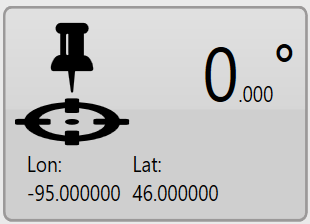
### <span dir="ltr" style="font-size: 14pt; font-family: Helvetica, sans-serif; color: rgb(0, 0, 0); font-weight: 300;">In the lower right corner of the screen is the GPS information button. It displays the latitude and longitude of your current position as well as your current heading.</span>

<span style="font-family: Helvetica,sans-serif;">  
</span>

<span style="font-family: Helvetica,sans-serif;"><span dir="ltr" style="font-size: 14pt; color: rgb(0, 0, 0); font-weight: 300;">TIP: Right clicking (press and hold) on this button will reveal a context menu with the option to display coordinates in UTM format.</span></span>

<span dir="ltr" style="font-family: Helvetica,sans-serif;">  
</span>

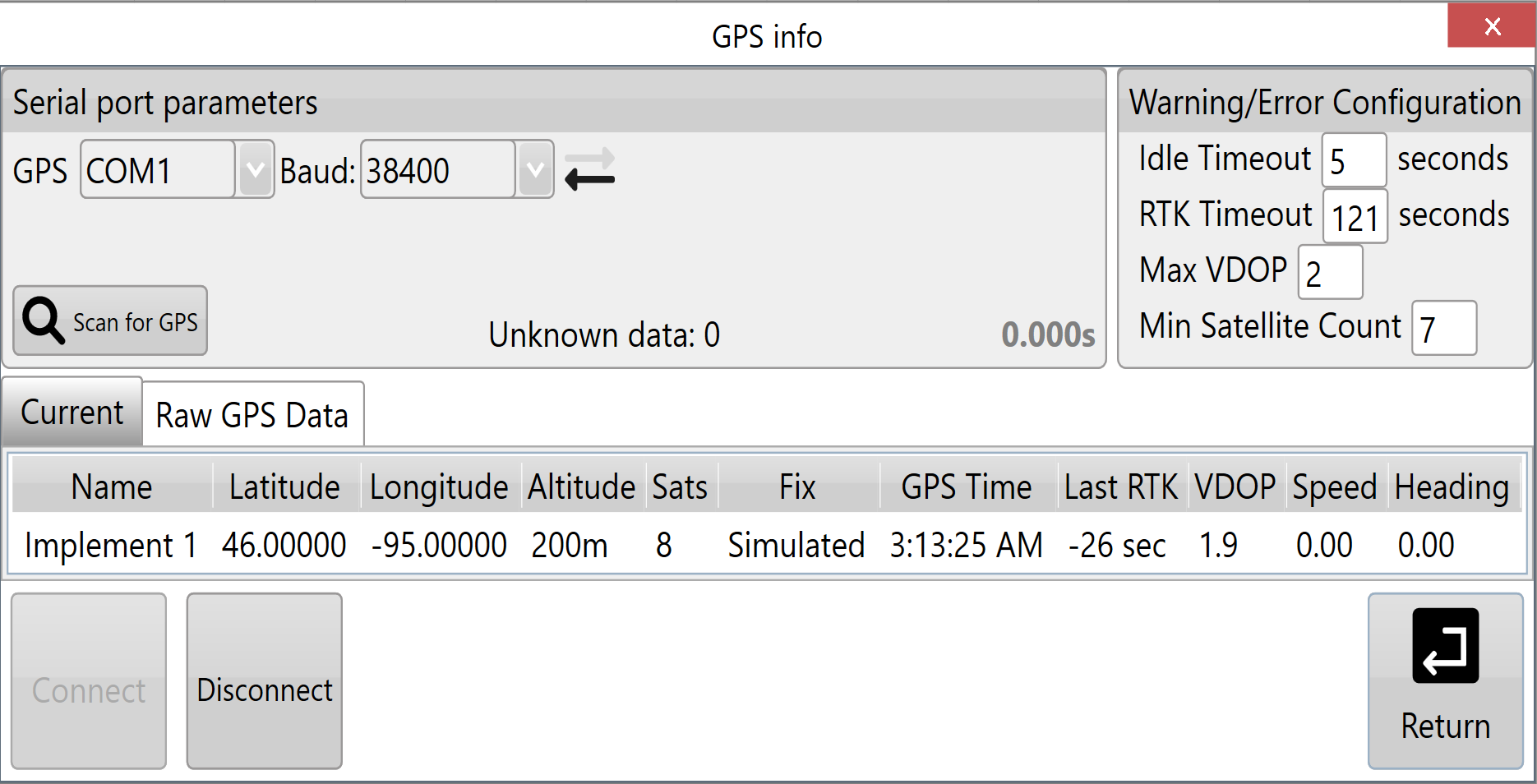
<span style="font-family: Helvetica,sans-serif;"><span style="font-size: 14pt; color: rgb(0, 0, 0); font-weight: 300;">When you press this button the ‘</span><span style="font-size: 14pt; color: rgb(0, 0, 0); font-weight: 400;">GPS Info</span><span style="font-size: 14pt; color: rgb(0, 0, 0); font-weight: 300;">’ window will open with more detailed GPS information.</span></span>

<span style="font-family: Helvetica,sans-serif;">![](https://docs.t3rra.com/uploads/images/gallery/2025-03/scaled-1680-/hwRf7r6qrru2iurxdcwgdfvze5kmemjijroda-png.png)</span>

<span style="font-family: Helvetica,sans-serif;">  
</span>

<span style="font-family: Helvetica,sans-serif;"><span style="font-size: 14pt; color: rgb(0, 0, 0); font-weight: 300;">This window provides the following information: </span></span>

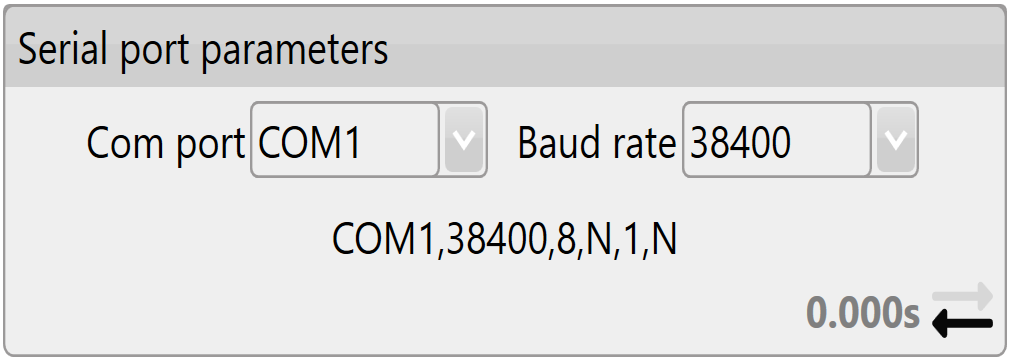
- <span style="font-family: Helvetica,sans-serif;"><span style="font-size: 14pt; color: rgb(0, 0, 0); font-weight: 400;">**Serial port parameters**:</span><span style="font-size: 14pt; color: rgb(0, 0, 0); font-weight: 300;"> displays the current settings for the com port and baud rate that is being used. There are flashing arrows which indicate that the software is sending and receiving information. </span></span>
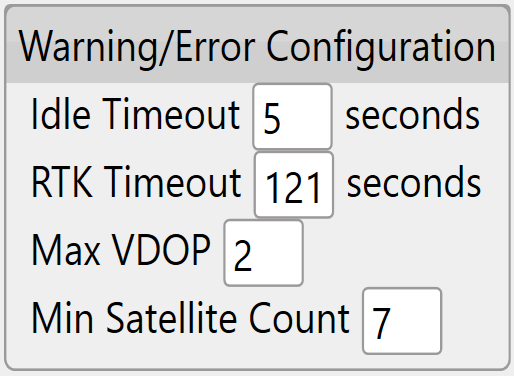
- <span style="font-family: Helvetica,sans-serif;"><span style="font-size: 14pt; color: rgb(0, 0, 0); font-weight: 400;">**Warning Thresholds**:</span><span style="font-size: 14pt; color: rgb(0, 0, 0); font-weight: 300;"> used to set limits for certain parameters. When these thresholds are being approached the borders of the screen will flash orange, once any of the thresholds have been exceeded or connection to GPS is cut the borders of the screen will flash red.</span></span>
- <span style="font-family: Helvetica,sans-serif;"><span style="font-size: 14pt; color: rgb(0, 0, 0); font-weight: 400;">**Output**:</span><span style="font-size: 14pt; color: rgb(0, 0, 0); font-weight: 300;"> shows all the GPS information currently being received.</span></span>

<span style="font-family: Helvetica,sans-serif;"><span style="font-size: 14pt; color: rgb(0, 0, 0); font-weight: 400;">**Serial port parameters**</span><span style="font-size: 14pt; color: rgb(0, 0, 0); font-weight: 300;">  
</span>  
</span>

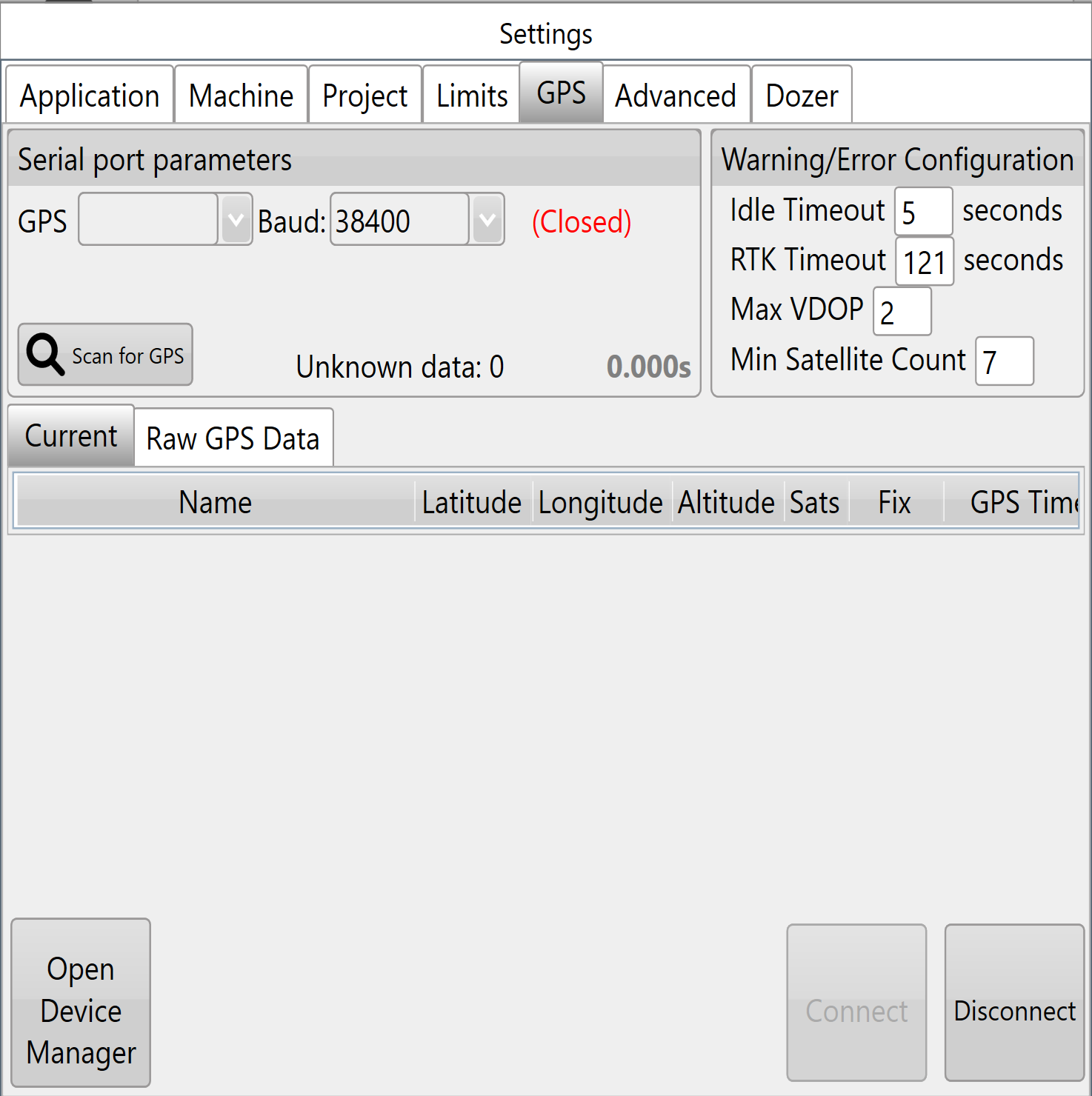
<span style="font-family: Helvetica,sans-serif;"><span dir="ltr" style="font-size: 14pt; color: rgb(0, 0, 0); font-weight: 400;">![](https://docs.t3rra.com/uploads/images/gallery/2025-03/scaled-1680-/PAhvfdrdmpoteveimu4p71tgyvjyoz51dnyva-png.png)**Com port**:</span><span dir="ltr" style="font-size: 14pt; color: rgb(0, 0, 0); font-weight: 300;"> The Com port # is assigned by the adapter. In the drop down box you can find all available com ports. It is important that this is set to the serial port that is physically attached via cable to the iGrade™ Application Controller. Diagnostic information about current serial ports can be found in the Windows Device Manager. One way of accessing this Windows tool is via the button in bottom left of ‘Settings &gt; GPS’ .</span></span>

![](https://docs.t3rra.com/uploads/images/gallery/2025-03/scaled-1680-/Cz6le-nvs-4a1gbrebuzup0nog5mfuckakr3w-png.png)

<span style="font-family: Helvetica,sans-serif;"><span style="font-size: 14pt; color: rgb(0, 0, 0); font-weight: 400;">**Baud rate**:</span><span style="font-size: 14pt; color: rgb(0, 0, 0); font-weight: 300;"> The speed at which the system talks to iGrade™. It is important that this matches the iGrade™ settings or the T3RRA software will not be able to talk to iGrade™. We recommend setting the baud rate to 38400 when connected to iGrade v1. If connected to iGrade™ v2 we recommend setting the baud rate to 115200 with </span><span style="font-size: 14pt; color: rgb(0, 0, 0); font-weight: 400;">**NMEA Message Type**</span><span style="font-size: 14pt; color: rgb(0, 0, 0); font-weight: 300;"> set to “All”. </span></span>

<span style="font-family: Helvetica,sans-serif;"><span style="font-size: 14pt; color: rgb(0, 0, 0); font-weight: 400;">**Warning Thresholds**</span></span>

<span style="font-family: Helvetica,sans-serif;"><span dir="ltr" style="font-size: 14pt; color: rgb(0, 0, 0); font-weight: 400;">![](https://docs.t3rra.com/uploads/images/gallery/2025-03/scaled-1680-/vdElc-g0gijblg1c-ep-b8l8ofkbkcwdy8f9g-png.png)**Idle timeout**:</span><span style="font-size: 14pt; color: rgb(0, 0, 0); font-weight: 300;"> If no GPS messages have been received in this time period an error warning will show.</span></span>

<span style="font-family: Helvetica,sans-serif;">  
</span>

<span style="font-family: Helvetica,sans-serif;"><span style="font-size: 14pt; color: rgb(0, 0, 0); font-weight: 400;">**RTK Timeout**:</span><span style="font-size: 14pt; color: rgb(0, 0, 0); font-weight: 300;"> This monitors the time since the last good RTK correction packet was received. It should not normally be set above 10-20sec.</span></span>

<span style="font-family: Helvetica,sans-serif;">  
</span>

<span style="font-family: Helvetica,sans-serif;"><span style="font-size: 14pt; color: rgb(0, 0, 0); font-weight: 400;">**Max VDOP**:</span><span style="font-size: 14pt; color: rgb(0, 0, 0); font-weight: 300;"> Vertical Dilution of Precision is a measure of the altitude accuracy. For the most accurate implementation you will want this value as low as possible however setting lower than 2 may cause interruptions in the use of T3RRA software.</span></span>

<span style="font-family: Helvetica,sans-serif;">  
</span>

<span style="font-family: Helvetica,sans-serif;"><span style="font-size: 14pt; color: rgb(0, 0, 0); font-weight: 400;">**Min Satellite Count**:</span><span style="font-size: 14pt; color: rgb(0, 0, 0); font-weight: 300;"> Sets how few satellites the GPS needs to see before a warning is shown.</span></span>

<span style="font-family: Helvetica,sans-serif;"><span style="font-size: 14pt; color: rgb(0, 0, 0); font-weight: 400;">**Output**</span></span>

![](https://docs.t3rra.com/uploads/images/gallery/2025-03/scaled-1680-/IWOtrcmdgum-qtiht66scjm0l85mpwbwk-kyw-png.png)

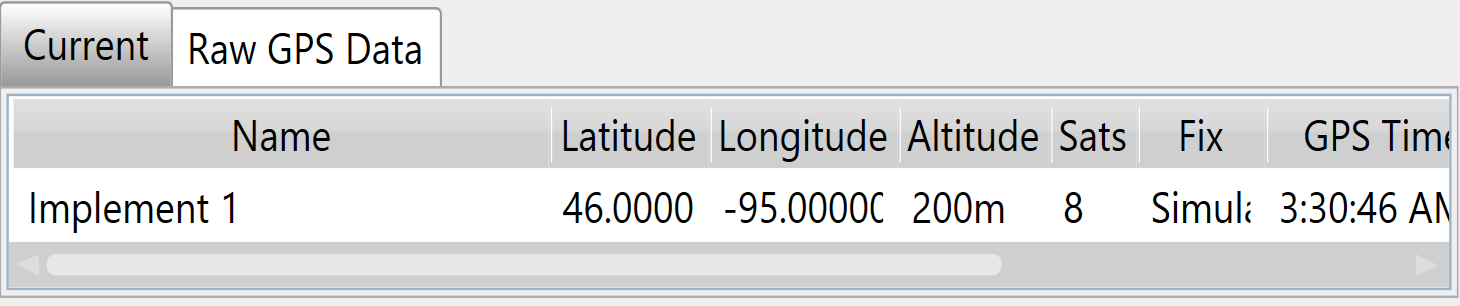
<span dir="ltr">**Current &amp; Raw GPS Data**<span style="color: rgb(0, 0, 0); font-family: Helvetica, sans-serif; font-size: 14pt; font-weight: 400;">:</span><span dir="ltr"><span><span style="font-size: 14pt;"> Current displays the current position data for the </span><span style="font-size: 18.6667px;">receiver</span><span style="font-size: 14pt;">, while Raw GPS Data will display all the </span><span style="font-size: 18.6667px;">messages</span></span><span style="color: rgb(0, 0, 0); font-family: Helvetica, sans-serif; font-size: 14pt; font-weight: 400;"> that are coming in.</span></span></span>

<span style="font-family: Helvetica,sans-serif;"><span style="font-size: 14pt; color: rgb(0, 0, 0); font-weight: 400;">**Lat &amp; Lon**:</span><span style="font-size: 14pt; color: rgb(0, 0, 0); font-weight: 300;"> Your current location coordinates (latitude and longitude).</span></span>

<span style="font-family: Helvetica,sans-serif;">  
</span>

<span style="font-family: Helvetica,sans-serif;"><span style="font-size: 14pt; color: rgb(0, 0, 0); font-weight: 400;">**Altitude**:</span><span style="font-size: 14pt; color: rgb(0, 0, 0); font-weight: 300;"> Your current height (Displayed in chosen measurement format) above sea level.</span></span>

<span style="font-family: Helvetica,sans-serif;">  
</span>

<span style="font-family: Helvetica,sans-serif;"><span style="font-size: 14pt; color: rgb(0, 0, 0); font-weight: 400;">**Num Sats**:</span><span style="font-size: 14pt; color: rgb(0, 0, 0); font-weight: 300;"> The number of satellites that your GPS is currently tracking. This is linked to the Min Satellite Count in Warning thresholds and provides an error if this number drops below what is set there.</span></span>

<span style="font-family: Helvetica,sans-serif;">  
</span>

<span style="font-family: Helvetica,sans-serif;"><span style="font-size: 14pt; color: rgb(0, 0, 0); font-weight: 400;">**Fix**:</span><span style="font-size: 14pt; color: rgb(0, 0, 0); font-weight: 300;"> The type of position solution calculated.</span></span>

<span style="font-family: Helvetica,sans-serif;">  
</span>

<span style="font-family: Helvetica,sans-serif;"><span style="font-size: 14pt; color: rgb(0, 0, 0); font-weight: 400;">**Time**:</span><span style="font-size: 14pt; color: rgb(0, 0, 0); font-weight: 300;"> The current GPS time.</span></span>

<span style="font-family: Helvetica,sans-serif;">  
</span>

<span style="font-family: Helvetica,sans-serif;"><span style="font-size: 14pt; color: rgb(0, 0, 0); font-weight: 400;">**Last Correction**</span><span style="font-size: 14pt; color: rgb(0, 0, 0); font-weight: 300;">: Time since receiving the last differential correction message from the base station. Should be as low as possible for the most accurate readings. It is linked to the RTK Timeout in Warning thresholds and will provide an error if it exceeds that time limit.</span></span>

<span style="font-family: Helvetica,sans-serif;">  
</span>

<span style="font-family: Helvetica,sans-serif;"><span style="font-size: 14pt; color: rgb(0, 0, 0); font-weight: 400;">**VDOP**:</span><span style="font-size: 14pt; color: rgb(0, 0, 0); font-weight: 300;"> Vertical Dilution of Precision. If this number exceeds the value in the Max VDOP in warning thresholds it will show an error.</span></span>

<span style="font-family: Helvetica,sans-serif;">  
</span>