# Earthworks information

<span style="font-family: Helvetica,sans-serif;">  
</span>

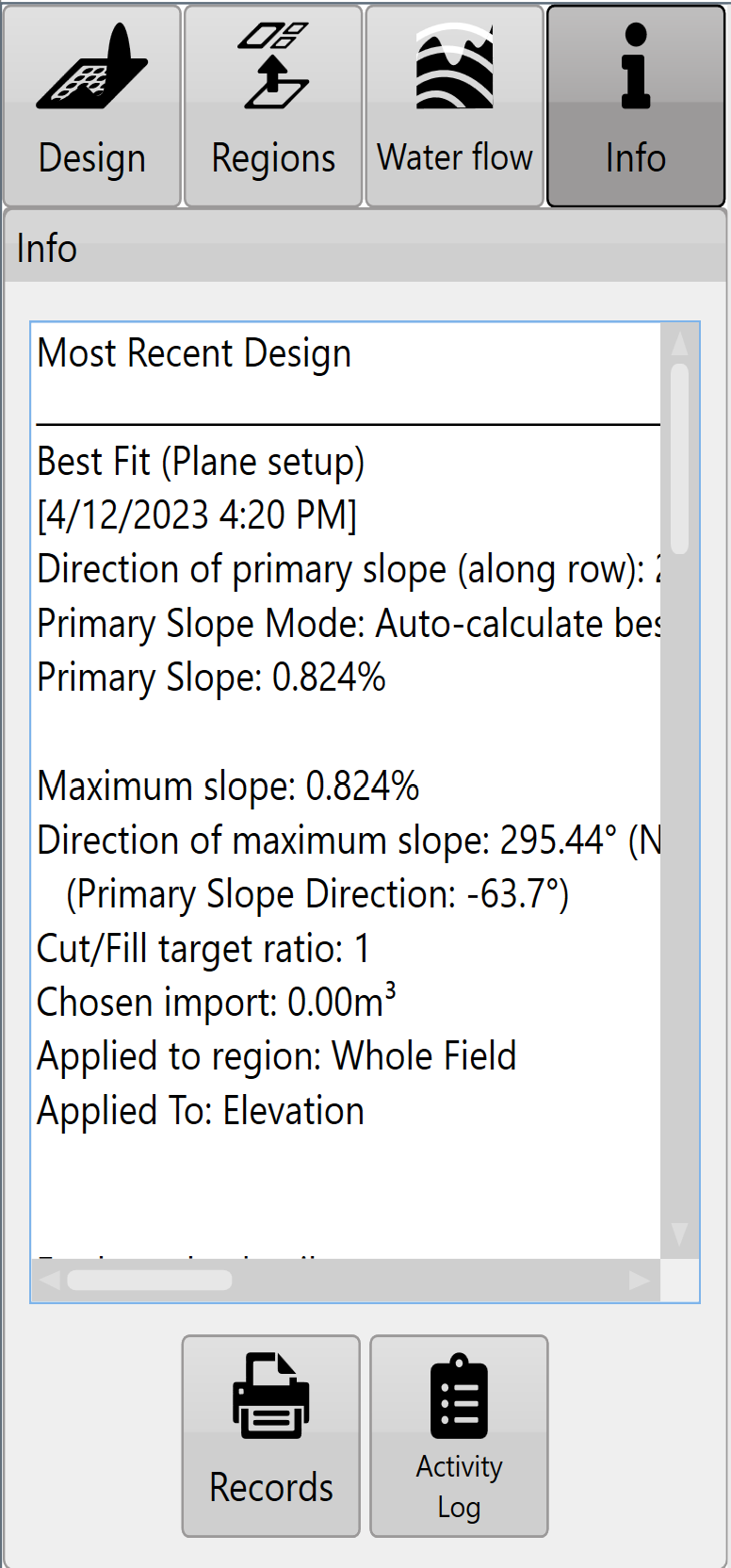
<span style="font-family: Helvetica,sans-serif;"><span dir="ltr" style="font-size: 14pt; color: rgb(0, 0, 0); font-weight: 300;">![](https://docs.t3rra.com/uploads/images/gallery/2025-03/scaled-1680-/PDG1howy8qmihjph78rvpzvggi8d0g42l3v0g-png.png)Press the '</span><span style="font-size: 14pt; color: rgb(0, 0, 0); font-weight: 400;">i</span><span dir="ltr" style="font-size: 14pt; color: rgb(0, 0, 0); font-weight: 300;">' button to view earthwork details.</span></span>

![](https://docs.t3rra.com/uploads/images/gallery/2025-03/scaled-1680-/xfTbpoebefvz0hjlyrmfrtqgz7zhsalbwtejw-png.png)<span style="font-family: Helvetica,sans-serif;"><span style="font-size: 14pt; color: rgb(0, 0, 0); font-weight: 300;">Note: pressing within the ‘</span><span style="font-size: 14pt; color: rgb(0, 0, 0); font-weight: 400;">**Info**</span><span style="font-size: 14pt; color: rgb(0, 0, 0); font-weight: 300;">’ text box will expand the view to full screen.</span></span>

<span style="font-family: Helvetica,sans-serif;">  
</span>

<span style="font-family: Helvetica,sans-serif;"><span style="font-size: 14pt; color: rgb(0, 0, 0); font-weight: 300;">Each region will have its own set of earthworks details and cut/fill summary.</span></span>

<span style="font-family: Helvetica,sans-serif;">  
</span>

<span style="font-family: Helvetica,sans-serif;"><span style="font-size: 14pt; color: rgb(0, 0, 0); font-weight: 300;">Press the '</span><span style="font-size: 14pt; color: rgb(0, 0, 0); font-weight: 400;">**Records**</span><span style="font-size: 14pt; color: rgb(0, 0, 0); font-weight: 300;">' button (shown as a printer) to save design details (in PDF format) to a folder for record keeping and documentation purposes.</span></span>

<span style="font-family: Helvetica,sans-serif;">  
</span>

<span style="font-family: Helvetica,sans-serif;"><span style="font-size: 14pt; color: rgb(0, 0, 0); font-weight: 300;">Press the '</span><span style="font-size: 14pt; color: rgb(0, 0, 0); font-weight: 400;">**Activity Log**</span><span dir="ltr" style="font-size: 14pt; color: rgb(0, 0, 0); font-weight: 300;">' button (shown as a clipboard) to view the activity that a file has undergone. This includes things like file save times and when/what design functions have been applied to a file.</span></span>

<span dir="ltr" style="font-family: Helvetica,sans-serif;">  
</span>

<div align="left" dir="ltr" id="bkmrk--15" style="margin-left: 0pt; font-family: Helvetica, sans-serif;"></div><div align="left" dir="ltr" id="bkmrk--16" style="margin-left: 0pt; font-family: Helvetica, sans-serif;">  
</div><div align="left" dir="ltr" id="bkmrk--5" style="margin-left: 0pt; font-family: Helvetica, sans-serif;"></div><div align="left" dir="ltr" id="bkmrk--6" style="margin-left: 0pt; font-family: Helvetica, sans-serif;"></div><div align="left" dir="ltr" id="bkmrk--17" style="margin-left: 0pt; font-family: Helvetica, sans-serif;"></div><div align="left" dir="ltr" id="bkmrk--18" style="margin-left: 0pt; font-family: Helvetica, sans-serif;"><span class="fr-video fr-deletable fr-fvc fr-dvb fr-draggable"><iframe allowfullscreen="allowfullscreen" class="fr-draggable align-center" frameborder="0" height="360" sandbox="allow-scripts allow-forms allow-same-origin allow-presentation" src="https://www.youtube.com/embed/U0RB2av-vow?&wmode=opaque" width="640"></iframe>

</span></div><div align="left" dir="ltr" id="bkmrk--20" style="margin-left: 0pt; font-family: Helvetica, sans-serif;"></div><span style="font-family: Helvetica,sans-serif;">  
</span>

##### <span style="font-family: Helvetica,sans-serif;"><span style="font-size: 20pt; color: rgb(0, 0, 0); font-weight: 400;">Notes on printing records</span></span>

<span style="font-family: Helvetica,sans-serif;">  
</span>

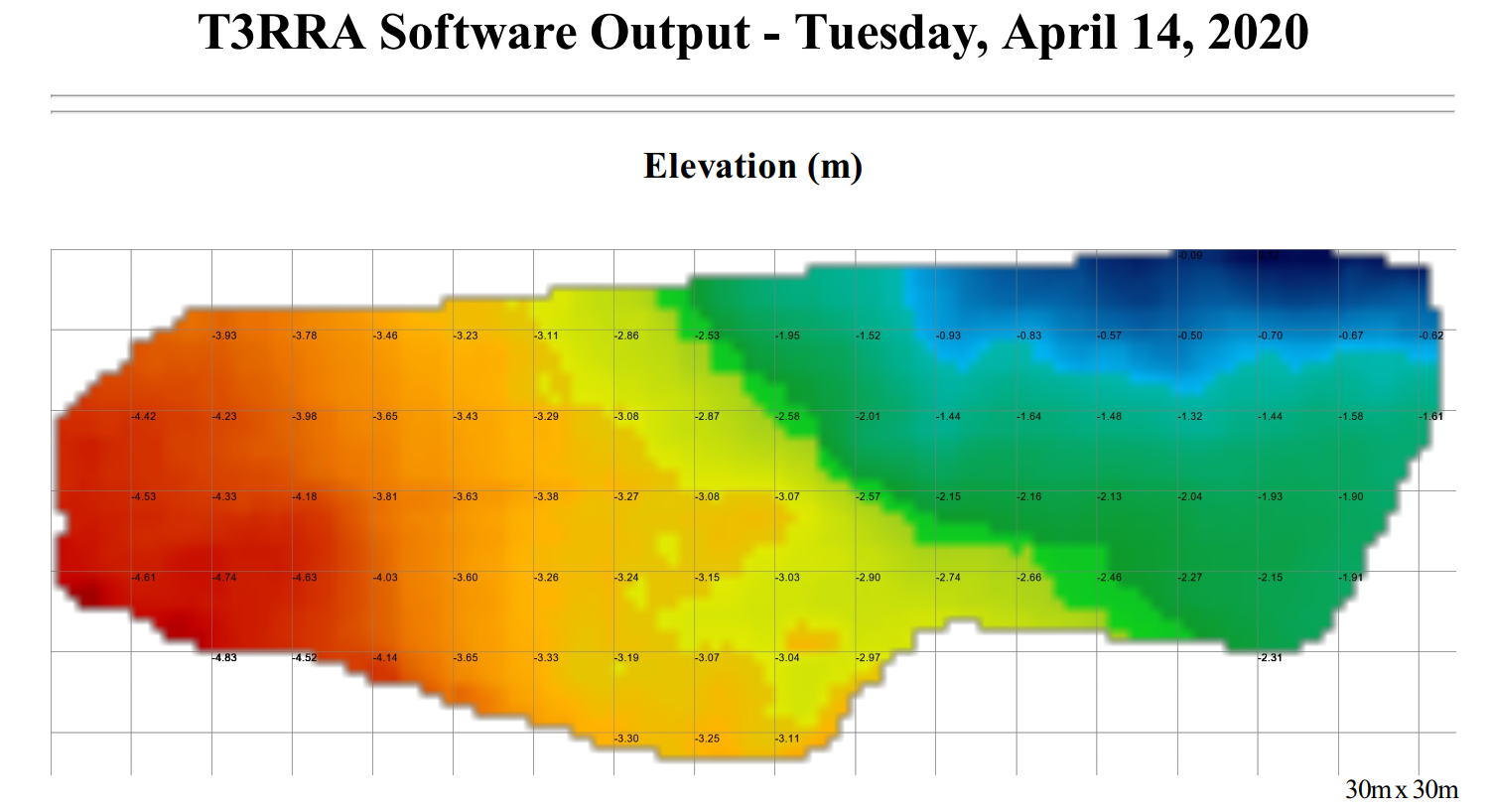
<span style="font-family: Helvetica,sans-serif;"><span style="font-size: 14pt; color: rgb(0, 0, 0); font-weight: 300;">The ‘</span><span style="font-size: 14pt; color: rgb(0, 0, 0); font-weight: 400;">**Records**</span><span style="font-size: 14pt; color: rgb(0, 0, 0); font-weight: 300;">’ feature in T3RRA software creates a PDF document and saves it to the hard drive. This document is meant to give an overview of the operation being performed by the software. It is suitable for record keeping purposes, or for supplying to field managers or clients.</span></span>

<span style="font-family: Helvetica,sans-serif;">  
</span>

<span style="font-family: Helvetica,sans-serif;"><span style="font-size: 14pt; color: rgb(0, 0, 0); font-weight: 300;">It includes the following:</span></span>

- <span style="font-family: Helvetica,sans-serif;"><span style="font-size: 14pt; color: rgb(0, 0, 0); font-weight: 300;">Map of the original surface</span></span>
- <span style="font-family: Helvetica,sans-serif;"><span style="font-size: 14pt; color: rgb(0, 0, 0); font-weight: 300;">Map of the design surface</span></span>
- <span style="font-family: Helvetica,sans-serif;"><span style="font-size: 14pt; color: rgb(0, 0, 0); font-weight: 300;">Map of Cut and Fill areas</span></span>
- <span style="font-family: Helvetica,sans-serif;"><span style="font-size: 14pt; color: rgb(0, 0, 0); font-weight: 300;">Statistics relating to the earthworks</span></span>

<span style="font-family: Helvetica,sans-serif;">  
</span>

<span style="font-family: Helvetica,sans-serif;"><span style="font-size: 14pt; color: rgb(0, 0, 0); font-weight: 300;">The maps created in the report will include a grid overlay showing data values.</span></span>

![](https://docs.t3rra.com/uploads/images/gallery/2025-03/scaled-1680-/ZEuzui0ohxlrydgnksetkmqu14r-ebpbznza-png.png)

<span dir="ltr" style="font-family: Helvetica,sans-serif;">  
</span>

<span style="font-family: Helvetica,sans-serif;"><span dir="ltr" style="font-size: 20pt; color: rgb(0, 0, 0); font-weight: 400;">Notes on the Activity Log</span></span>

##### <span style="font-family: Helvetica,sans-serif;"><span dir="ltr" style="font-size: 14pt; color: rgb(0, 0, 0); font-weight: 300;">![](https://docs.t3rra.com/uploads/images/gallery/2025-03/scaled-1680-/SyJlbuqdidmurx8xr7hot9xxumqfldajz71ta-png.png)The ‘</span><span style="font-size: 14pt; color: rgb(0, 0, 0); font-weight: 400;">**Activity Log**</span><span dir="ltr" style="font-size: 14pt; color: rgb(0, 0, 0); font-weight: 300;">’ is designed to provide a history of the user actions that were performed in a project. It keeps a sequential history of the design actions that have </span></span>

##### <span style="font-family: Helvetica,sans-serif;"><span dir="ltr" style="font-size: 14pt; color: rgb(0, 0, 0); font-weight: 300;">been performed. This is helpful in understanding what methods were used in order to go from the original design surface to the final design surface. Where possible a record of slopes, directions, and design tools utilized are kept. As we allow designs to be performed on existing designs and differently in different regions, the steps and actions taken to go from the original surface to the final design surface can be quite complicated. </span></span>

<span style="font-family: Helvetica,sans-serif;">  
</span>

<span style="font-family: Helvetica,sans-serif;"><span style="font-size: 14pt; color: rgb(0, 0, 0); font-weight: 300;">The ‘</span><span style="font-size: 14pt; color: rgb(0, 0, 0); font-weight: 400;">**Activity Log**</span><span style="font-size: 14pt; color: rgb(0, 0, 0); font-weight: 300;">’ also keeps a record of the results of a design action (in the form of the resulting dirt balance statistics).</span></span>

<span style="font-family: Helvetica,sans-serif;">  
</span>

<span style="font-family: Helvetica,sans-serif;"><span style="font-size: 14pt; color: rgb(0, 0, 0); font-weight: 300;">If the user is in doubt about steps taken or parameters used, they can refer back to this log. The log entries include a date and time in order to remove confusion about when the actions were performed.</span></span>

<span style="font-family: Helvetica,sans-serif;">  
</span>

<span style="font-family: Helvetica,sans-serif;"><span dir="ltr" style="font-size: 14pt; color: rgb(0, 0, 0); font-weight: 300;">The log can also be used to compare two or more design options. Because the results of each design operation are kept in the log it can be easier to simply compare them there rather than trying to remember them, or write down the results.</span></span>

<span style="font-family: Helvetica,sans-serif;">  
</span>

<span style="font-family: Helvetica,sans-serif;"><span dir="ltr" style="font-size: 14pt; color: rgb(0, 0, 0); font-weight: 300;">![](https://docs.t3rra.com/uploads/images/gallery/2025-03/scaled-1680-/7dUvmfxxuiu5e41vckyum9crj6z1y9kqajfsw-png.png)If you want to save or email the log you can copy it into the clipboard using the ‘</span><span style="font-size: 14pt; color: rgb(0, 0, 0); font-weight: 400;">**Copy**</span></span><span style="font-size: 14pt; font-family: Helvetica, sans-serif; color: rgb(0, 0, 0); font-weight: 300;">’ button. Then paste it into any other application.</span>