# Application Tab

[![image.png](https://docs.t3rra.com/uploads/images/gallery/2026-04/scaled-1680-/WVrhitnIetJgBcHn-image.png)](https://docs.t3rra.com/uploads/images/gallery/2026-04/WVrhitnIetJgBcHn-image.png)

### <span dir="ltr" style="font-size: 14pt; font-family: Oswald, sans-serif; color: rgb(0, 0, 0); font-weight: 400;">![](https://docs.t3rra.com/uploads/images/gallery/2025-03/scaled-1680-/uWQvk3y0dyfoxcrj77578endsudgemv6p28ra-png.png)</span>

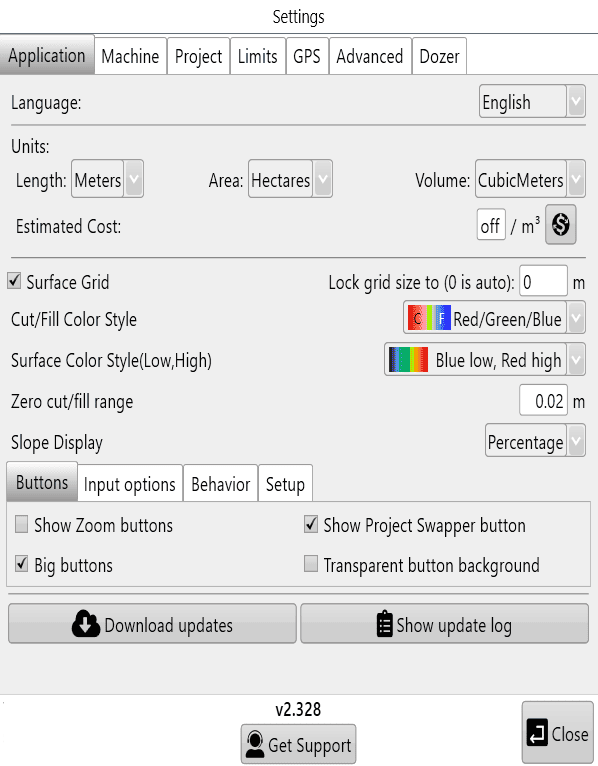
### <span dir="ltr" style="font-size: 14pt; font-family: Helvetica, sans-serif; color: rgb(0, 0, 0); font-weight: 400;">**Units:**</span>

### <span dir="ltr" style="font-size: 14pt; font-family: Helvetica, sans-serif; color: rgb(0, 0, 0); font-weight: 400;">‘**Language**’ -</span><span style="font-family: Helvetica,sans-serif;"><span dir="ltr" style="font-size: 14pt; color: rgb(0, 0, 0); font-weight: 300;"> Changes the language</span></span>

<span style="font-family: Helvetica,sans-serif;"><span style="font-size: 14pt; color: rgb(0, 0, 0); font-weight: 400;">‘**Length**’</span><span style="font-size: 14pt; color: rgb(0, 0, 0); font-weight: 300;"> - Changes unit of distance measurement.</span></span>

<span style="font-family: Helvetica,sans-serif;"><span style="font-size: 14pt; color: rgb(0, 0, 0); font-weight: 400;">‘**Area**’</span><span style="font-size: 14pt; color: rgb(0, 0, 0); font-weight: 300;"> - Changes unit of area measurement.</span></span>

<span style="font-family: Helvetica,sans-serif;"><span style="font-size: 14pt; color: rgb(0, 0, 0); font-weight: 400;">‘**Volume**’</span><span style="font-size: 14pt; color: rgb(0, 0, 0); font-weight: 300;"> - Changes unit of volume measurement.</span></span>

<span style="font-family: Helvetica,sans-serif;">  
</span>

<span style="font-family: Helvetica,sans-serif;"><span style="font-size: 14pt; color: rgb(0, 0, 0); font-weight: 400;">‘**Estimated Cost**’</span><span style="font-size: 14pt; color: rgb(0, 0, 0); font-weight: 300;"> - Set an estimated cost per volume of dirt moved. To customize the currency format, click the button to the right. You can enter custom text before and after the amount. An example is shown on the right. This allows you to put your currency code and other information before and/or after the value.</span></span>

<span style="font-family: Helvetica,sans-serif;"><span dir="ltr" style="font-size: 14pt; color: rgb(0, 0, 0); font-weight: 300;"><span style="color: rgb(0, 0, 0); font-family: Helvetica, sans-serif; font-size: 18.6667px; font-style: normal; font-variant-ligatures: normal; font-variant-caps: normal; font-weight: 300; letter-spacing: normal; orphans: 2; text-align: left; text-indent: 0px; text-transform: none; widows: 2; word-spacing: 0px; -webkit-text-stroke-width: 0px; white-space: normal; text-decoration-thickness: initial; text-decoration-style: initial; text-decoration-color: initial; display: inline !important; float: none;">Cost per cubic meter, or cubic yard (this is calculated for cuts only).</span> </span></span>
<span style="font-family: Helvetica,sans-serif;">  
</span>

<span dir="ltr" style="font-family: Helvetica,sans-serif;">  
</span>

<span style="font-family: Helvetica,sans-serif;"><span dir="ltr" style="font-size: 14pt; color: rgb(0, 0, 0); font-weight: 400;">![](https://docs.t3rra.com/uploads/images/gallery/2025-03/scaled-1680-/LvL6j5gqrficvfuafr-3thc515e7xd9fnjnbg-png.png)</span></span>

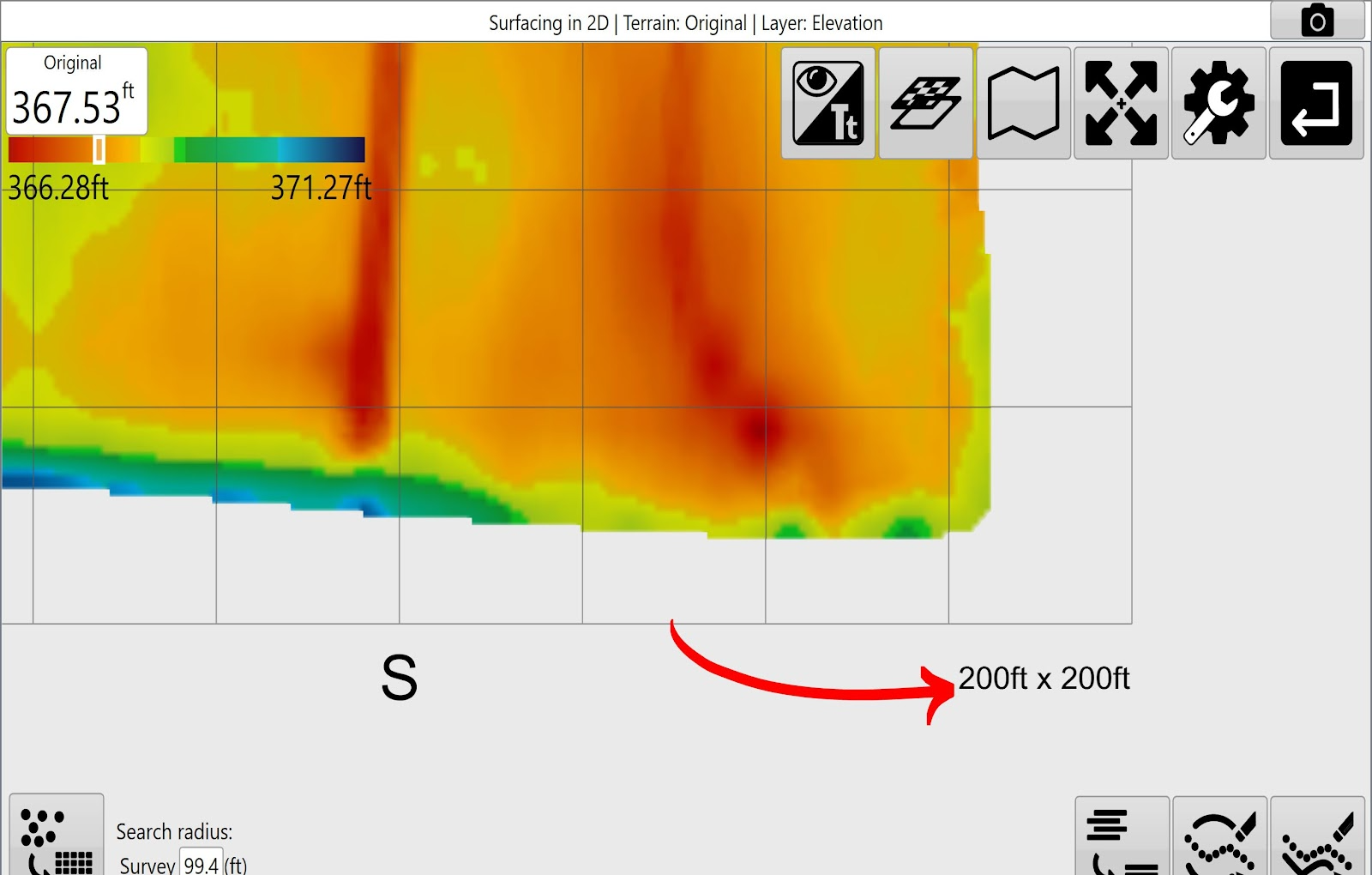
‘**Surface Grid**’<span dir="ltr" id="bkmrk-%C2%A0--determines-whethe" style="font-size: 14pt; color: rgb(0, 0, 0); font-weight: 300;"> - Determines whether or not to show the grid lines on the map. By default the grid changes size to best fit the size of the field. Dimensions for the grid size are displayed in the lower right corner of the scanned area. </span>

<span dir="ltr" style="font-family: Helvetica,sans-serif;"><span dir="ltr" style="font-size: 14pt; color: rgb(0, 0, 0); font-weight: 400;">‘**Lock grid size to:**’ -</span><span dir="ltr" style="font-size: 14pt; color: rgb(0, 0, 0); font-weight: 300;"> Users can adjust grid size manually. set to 0 for auto-size.</span>  
</span>

<span style="font-family: Helvetica,sans-serif;"><span dir="ltr" style="font-size: 14pt; color: rgb(0, 0, 0); font-weight: 300;"><span class="fr-video fr-deletable fr-fvc fr-dvb fr-draggable"><iframe allowfullscreen="allowfullscreen" class="fr-draggable" frameborder="0" height="360" sandbox="allow-scripts allow-forms allow-same-origin allow-presentation" src="https://www.youtube.com/embed/9fSbZdnzvh0?&wmode=opaque" width="640"></iframe>

</span></span>  
</span>

<span style="font-family: Helvetica,sans-serif;"><span dir="ltr" style="font-size: 14pt; color: rgb(0, 0, 0); font-weight: 400;">‘**Cut/Fill Color Style**’ -</span><span dir="ltr" style="font-size: 14pt; color: rgb(0, 0, 0); font-weight: 300;"> Set colors used for Cut/Fill to Magenta/Green or Red/Green/Blue. (Magenta as cuts/Green as fills, or Red as cuts/Green as neutral/Blue as fills)</span></span>

<span style="font-family: Helvetica,sans-serif;"><span dir="ltr" style="font-size: 14pt; color: rgb(0, 0, 0); font-weight: 400;">‘**Surface Color Style (Low,High)**’ -</span><span dir="ltr" style="font-size: 14pt; color: rgb(0, 0, 0); font-weight: 300;"> The surface color style allows you to change which colors represent your highs and lows. (this is limited to selecting from a drop down menu)</span></span>

<span style="font-family: Helvetica,sans-serif;"><span dir="ltr" style="font-size: 14pt; color: rgb(0, 0, 0); font-weight: 400;">‘**Zero Cut/Fill Range**’ -</span><span dir="ltr" style="font-size: 14pt; color: rgb(0, 0, 0); font-weight: 300;"> Adjusting this number allows you to set a vertical range that will be considered as “on-grade”. This is a great tool for quickly identifying parts of a field with heavy earth moving. This option will not change the design height or the height of the scraper blade. </span></span>

<span style="font-family: Helvetica,sans-serif;"><span style="font-size: 14pt; color: rgb(0, 0, 0); font-weight: 400;">‘**Slope Display**’</span><span dir="ltr" style="font-size: 14pt; color: rgb(0, 0, 0); font-weight: 300;"> - Show slope as a *Percentage* or as a *Ratio*. (0.1% or 1/1000)</span></span>

<span style="font-family: Helvetica,sans-serif;"><span dir="ltr" style="font-size: 14pt; color: rgb(0, 0, 0); font-weight: 300;">**Buttons:**</span></span>

<span style="font-family: Helvetica,sans-serif;"><span dir="ltr" style="font-size: 14pt; color: rgb(0, 0, 0); font-weight: 400;">‘**Show zoom buttons**’</span><span style="font-size: 14pt; color: rgb(0, 0, 0); font-weight: 300;"> - Choose to use zoom buttons for zooming in and out instead of ‘two-finger touch zoom’.</span></span>

<span style="font-family: Helvetica,sans-serif;"><span dir="ltr" style="font-size: 14pt; color: rgb(0, 0, 0); font-weight: 300;"><span style="font-size: 14pt; color: rgb(0, 0, 0); font-weight: 400;">‘**Big buttons**’</span><span dir="ltr" style="font-size: 14pt; color: rgb(0, 0, 0); font-weight: 300;"> - Check this option to increase the size of the menu buttons.</span></span></span>

<span style="font-family: Helvetica,sans-serif;"><span dir="ltr" style="font-size: 14pt; color: rgb(0, 0, 0); font-weight: 300;"><span style="font-size: 14pt; color: rgb(0, 0, 0); font-weight: 400;">‘**Show Project Swapper button**’</span><span dir="ltr" style="font-size: 14pt; color: rgb(0, 0, 0); font-weight: 300;"> - Choose to display the project swapper button.</span></span></span>

<span style="font-family: Helvetica,sans-serif;"><span dir="ltr" style="font-size: 14pt; color: rgb(0, 0, 0); font-weight: 300;"><span style="font-size: 14pt; color: rgb(0, 0, 0); font-weight: 400;">‘**Transparent button background**’ -</span><span dir="ltr" style="font-size: 14pt; color: rgb(0, 0, 0); font-weight: 300;"> This setting will change the button backgrounds between gray and transparent when in design or implementation screens.</span></span></span>

<span style="font-family: Helvetica,sans-serif;"><span dir="ltr" style="font-size: 14pt; color: rgb(0, 0, 0); font-weight: 300;"><span dir="ltr" style="font-size: 14pt; color: rgb(0, 0, 0); font-weight: 300;">**Input options:**</span></span></span>

<span style="font-family: Helvetica,sans-serif;"><span dir="ltr" style="font-size: 14pt; color: rgb(0, 0, 0); font-weight: 300;"><span dir="ltr" style="font-size: 14pt; color: rgb(0, 0, 0); font-weight: 300;"><span style="font-size: 14pt; color: rgb(0, 0, 0); font-weight: 400;">‘**Show screen keyboard**’</span><span dir="ltr" style="font-size: 14pt; color: rgb(0, 0, 0); font-weight: 300;"> - Choose to have the keyboard automatically open when needed.</span></span></span></span>

<span style="font-family: Helvetica,sans-serif;"><span dir="ltr" style="font-size: 14pt; color: rgb(0, 0, 0); font-weight: 300;"><span dir="ltr" style="font-size: 14pt; color: rgb(0, 0, 0); font-weight: 300;"><span dir="ltr" style="font-size: 14pt; color: rgb(0, 0, 0); font-weight: 300;"><span style="font-size: 14pt; color: rgb(0, 0, 0); font-weight: 400;">‘**Show Calculator**’</span><span dir="ltr" style="font-size: 14pt; color: rgb(0, 0, 0); font-weight: 300;"> - Choose to display a calculator when inputting values when needed.</span></span></span></span></span>

<span style="background-color: initial; font-size: 18.6667px;"><span style="font-family: Helvetica, sans-serif;">**Behaviour**</span></span><span style="font-family: Helvetica, sans-serif;"><span dir="ltr" style="font-size: 14pt; color: rgb(0, 0, 0); font-weight: 300;"><span dir="ltr" style="font-size: 14pt; color: rgb(0, 0, 0); font-weight: 300;"><span dir="ltr" style="font-size: 14pt; color: rgb(0, 0, 0); font-weight: 300;"><span dir="ltr" style="font-size: 14pt; color: rgb(0, 0, 0); font-weight: 300;">**:**</span></span></span></span></span>

<span style="font-family: Helvetica,sans-serif;"><span dir="ltr" style="font-size: 14pt; color: rgb(0, 0, 0); font-weight: 400;"><span style="font-size: 14pt; color: rgb(0, 0, 0); font-weight: 400;">‘**Hide buttons after delay**’</span><span dir="ltr" style="font-size: 14pt; color: rgb(0, 0, 0); font-weight: 300;"> - If checked buttons will fade after 15 seconds on the implementation screen. Touch screen to retrieve.</span></span></span>

<span style="font-family: Helvetica,sans-serif;"><span style="font-size: 14pt; color: rgb(0, 0, 0); font-weight: 400;">‘**Collection Beep**’ </span><span style="font-size: 14pt; color: rgb(0, 0, 0); font-weight: 300;">- Choose to enable audible notifications of collection of elevation points.</span></span>

<span style="font-family: Helvetica,sans-serif;"><span style="font-size: 14pt; color: rgb(0, 0, 0); font-weight: 400;">**Download Updates -**</span><span dir="ltr" style="font-size: 14pt; color: rgb(0, 0, 0); font-weight: 300;"> Choose to update to the latest version when connected to the internet.</span></span>

<span style="font-family: Helvetica,sans-serif;"><span style="font-size: 14pt; color: rgb(0, 0, 0); font-weight: 400;">**Show update log**</span><span dir="ltr" style="font-size: 14pt; color: rgb(0, 0, 0); font-weight: 300;"> - Lists software update details.</span></span>

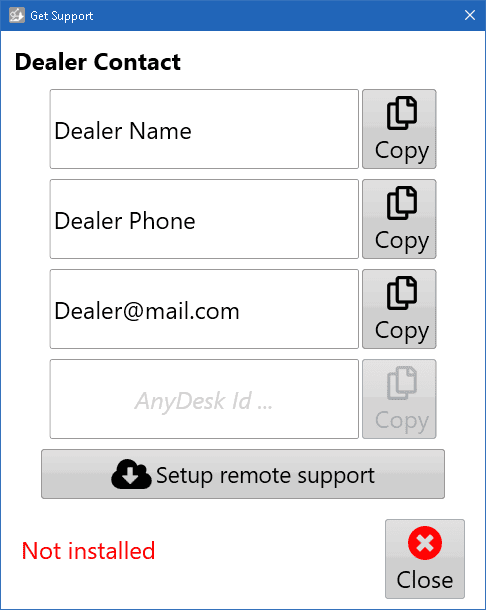
<span style="font-family: Helvetica,sans-serif;"><span dir="ltr" style="font-size: 14pt; color: rgb(0, 0, 0); font-weight: 300;"><span style="font-size: 14pt; color: rgb(0, 0, 0); font-weight: 400;">**Set Support** - helps your dealer give you remote support. You must be connected to the Internet for this to work.</span></span></span>

[![T3C_GetSupport_NotInstalled.png](https://docs.t3rra.com/uploads/images/gallery/2026-04/scaled-1680-/hYXigd3FRkGauaKN-image.png)](https://docs.t3rra.com/uploads/images/gallery/2026-04/hYXigd3FRkGauaKN-image.png)  
Click "Setup remote support" button.

[![T3C_GetSupport_Installed.png](https://docs.t3rra.com/uploads/images/gallery/2026-04/scaled-1680-/H3oPomaDUkr3drzj-image.png)](https://docs.t3rra.com/uploads/images/gallery/2026-04/H3oPomaDUkr3drzj-image.png)
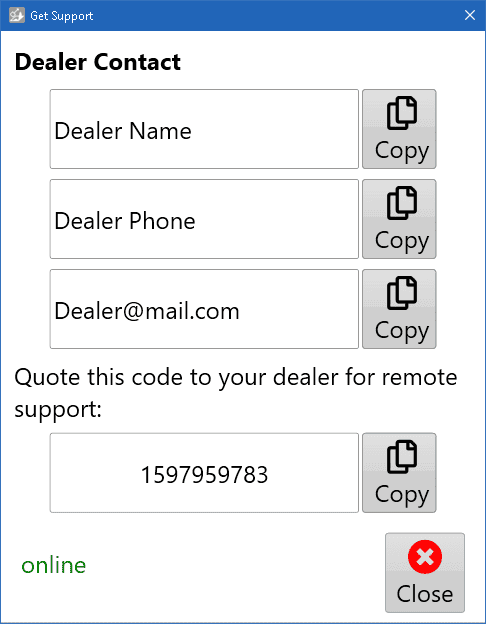
After installation, It will show a code. Your support person can use the code to connect to your computer and help get you going again. When they do, AnyDesk will open a confirmation window. Click the green \[Accept\] button to accept their help.

<span style="font-family: Helvetica,sans-serif;"><span style="font-size: 14pt; color: rgb(0, 0, 0); font-weight: 400;">**Close**</span><span dir="ltr" style="font-size: 14pt; color: rgb(0, 0, 0); font-weight: 300;"> - Choose to save settings and exit this settings dialog.</span></span>

<span style="font-family: Helvetica,sans-serif;">  
</span>

<span style="font-family: Helvetica,sans-serif;"><span class="fr-video fr-deletable fr-fvc fr-dvb fr-draggable"><iframe allowfullscreen="allowfullscreen" class="fr-draggable" frameborder="0" height="360" sandbox="allow-scripts allow-forms allow-same-origin allow-presentation" src="https://www.youtube.com/embed/9rlCn1VuGlo?&wmode=opaque" width="640"></iframe>

</span>  
</span>