# Advanced Settings Tab
![](https://docs.t3rra.com/uploads/images/gallery/2025-03/scaled-1680-/Rvrfyqwcei-ebcdj1mmeztjspdye7tiguue4q-png.png)

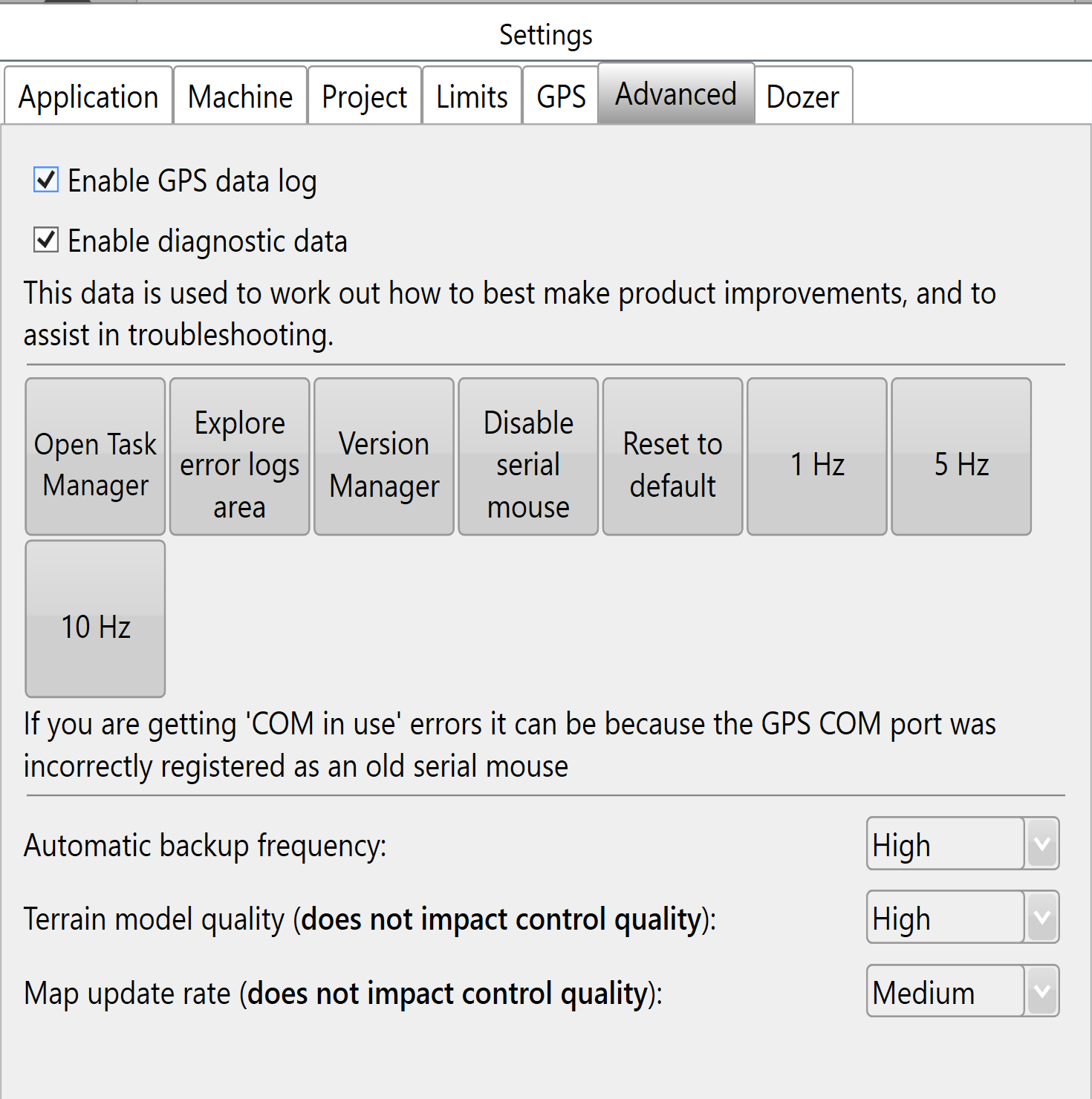
### <span style="font-family: Helvetica,sans-serif;"><span dir="ltr" style="font-size: 14pt; color: rgb(0, 0, 0); font-weight: 400;">'**Enable GPS data log**</span><span style="font-size: 14pt; color: rgb(0, 0, 0); font-weight: 300;">’ </span></span>

<span style="font-family: Helvetica,sans-serif;"><span style="font-size: 14pt; color: rgb(0, 0, 0); font-weight: 300;">It is highly recommended to keep this enabled. The GPS data log is sent along with error reports to assist in finding a solution.</span></span>

<span style="font-family: Helvetica,sans-serif;">  
</span>

<span style="font-family: Helvetica,sans-serif;"><span style="font-size: 14pt; color: rgb(0, 0, 0); font-weight: 300;">‘</span><span style="font-size: 14pt; color: rgb(0, 0, 0); font-weight: 400;">**Enable diagnostic data**</span><span style="font-size: 14pt; color: rgb(0, 0, 0); font-weight: 300;">’ </span></span>

<span style="font-family: Helvetica,sans-serif;"><span style="font-size: 14pt; color: rgb(0, 0, 0); font-weight: 300;">It is highly recommended to keep this enabled because the data collected is valuable for us in assisting you if any issues should occur.</span></span>

<span style="font-family: Helvetica,sans-serif;">  
</span>

<span style="font-family: Helvetica,sans-serif;"><span style="font-size: 14pt; color: rgb(0, 0, 0); font-weight: 300;">‘</span><span style="font-size: 14pt; color: rgb(0, 0, 0); font-weight: 400;">**Open Task Manager**</span><span style="font-size: 14pt; color: rgb(0, 0, 0); font-weight: 300;">’ will open the computer's task manager tool. This will display all current systems running on the computer.</span></span>

<span style="font-family: Helvetica,sans-serif;">  
</span>

<span style="font-family: Helvetica,sans-serif;"><span style="font-size: 14pt; color: rgb(0, 0, 0); font-weight: 300;">‘</span><span style="font-size: 14pt; color: rgb(0, 0, 0); font-weight: 400;">**Explore error logs area**</span><span dir="ltr" style="font-size: 14pt; color: rgb(0, 0, 0); font-weight: 300;">’ will open the windows folder on the tablet that contains all error log files. If you encounter an issue we recommend you send us the latest file so we can find the cause and correct it quickly.</span></span>

<span style="font-family: Helvetica,sans-serif;"><span style="font-size: 14pt; color: rgb(0, 0, 0); font-weight: 300;">‘</span><span style="font-size: 14pt; color: rgb(0, 0, 0); font-weight: 400;">**Version Manager**</span><span style="font-size: 14pt; color: rgb(0, 0, 0); font-weight: 300;">’</span></span>

<span style="font-family: Helvetica,sans-serif;"><span dir="ltr" style="font-size: 14pt; color: rgb(0, 0, 0); font-weight: 300;">Allows the software version to be downgraded if you are experiencing a particularly bad error. It is highly recommended that a support request be added if you use this.</span></span>

<span style="font-family: Helvetica,sans-serif;">  
</span>

<span style="font-family: Helvetica,sans-serif;"><span dir="ltr" style="font-size: 14pt; color: rgb(0, 0, 0); font-weight: 300;">‘</span><span style="font-size: 14pt; color: rgb(0, 0, 0); font-weight: 400;">**Disable serial mouse**</span><span style="font-size: 14pt; color: rgb(0, 0, 0); font-weight: 300;">’</span></span>

<span style="font-family: Helvetica,sans-serif;"><span style="font-size: 14pt; color: rgb(0, 0, 0); font-weight: 300;">If your cursor is jumping around the screen or you are getting “COM in use” errors it can be corrected by disabling the serial mouse.</span></span>

<span style="font-family: Helvetica,sans-serif;">  
</span>

<span style="font-family: Helvetica,sans-serif;"><span dir="ltr" style="font-size: 14pt; color: rgb(0, 0, 0); font-weight: 400;">‘**Reset to Default**’</span><span style="font-size: 14pt; color: rgb(0, 0, 0); font-weight: 300;"> This will reset all settings to Default.</span></span>

<span style="font-family: Helvetica,sans-serif;"><span dir="ltr" style="font-size: 14pt; color: rgb(0, 0, 0); font-weight: 300;"><span style="font-size: 14pt; color: rgb(0, 0, 0); font-weight: 400;">‘**1Hz, 5Hz, 10Hz**’</span><span dir="ltr" style="font-size: 14pt; color: rgb(0, 0, 0); font-weight: 300;"> Send Messages to iGrade to control the output rate of GPS NMEA data. </span></span><span dir="ltr" style="font-size: 14pt; color: rgb(226, 80, 65); font-weight: 300;"><span dir="ltr" style="font-size: 14pt; font-weight: 300;">This function is experimental and should only be used if you accept that the system may not behave as expected, these button may also be removed in future versions.</span></span></span>

<span style="font-family: Helvetica,sans-serif;">  
</span>

<span style="font-family: Helvetica,sans-serif;"><span style="font-size: 14pt; color: rgb(0, 0, 0); font-weight: 300;">‘</span><span style="font-size: 14pt; color: rgb(0, 0, 0); font-weight: 400;">**Automatic backup frequency**</span><span dir="ltr" style="font-size: 14pt; color: rgb(0, 0, 0); font-weight: 300;">’ This drop down menu allows you to change the frequency at which the T3RRA Software backs up your work. The available options are Never, Low, Medium, High.</span></span>

<span style="font-family: Helvetica,sans-serif;">  
</span>

<span style="font-family: Helvetica,sans-serif;"><span style="font-size: 14pt; color: rgb(0, 0, 0); font-weight: 300;">‘</span><span style="font-size: 14pt; color: rgb(0, 0, 0); font-weight: 400;">**Terrain model Quality**</span><span dir="ltr" style="font-size: 14pt; color: rgb(0, 0, 0); font-weight: 300;">’ This setting is set to High by default and most visible when looking at surfaces in 3D. Lowering the setting some details may appear to smooth out, details and depressions are still there but are not represented in the 3d display.</span></span>

<span style="font-family: Helvetica,sans-serif;">  
</span>

<span style="font-family: Helvetica,sans-serif;"><span style="font-size: 14pt; color: rgb(0, 0, 0); font-weight: 400;">‘**Map update rate**’</span></span><span dir="ltr" style="font-size: 14pt; font-family: Helvetica, sans-serif; color: rgb(0, 0, 0); font-weight: 300;"> This will alter the rate of the map updates during Surveying and Implementation.</span>