# Updating your Software
There are three options for updating your software which will ensure T3RRA Design Plus stays updated.
NOTE: You will need to restart your T3RRA Design Plus program for updates to take effect.
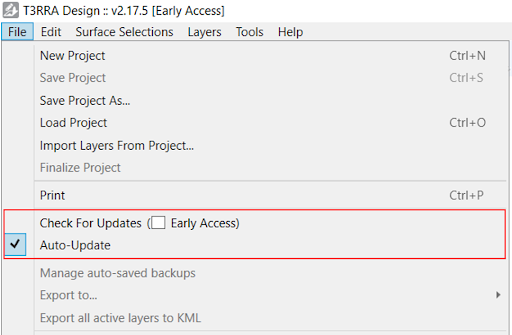To update your T3RRA Design Plus software, go to the File Menu in the top left of the screen:
1. **(Recommended)** Select ‘Auto-Update’ - this will automatically update your software when updates become available.
2. Select ‘Early Access’ - this will automatically update your software to the latest code which is available.
NOTE: Be aware that this will be test code and is subject to bugs.
3. Click on the ‘Check For Updates’ - this will run a check at that point in time and will not automatically update without your knowledge.