# Show landscape change
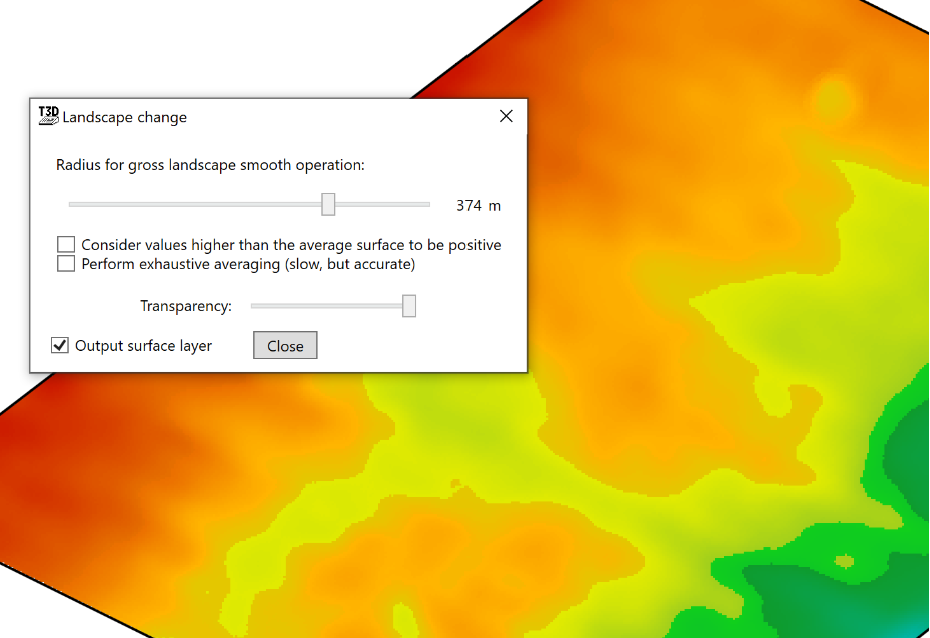
Landscape change is a large-scale smoothing operation for finding generalized high points.
- ‘Radius for gross landscape smooth operation’ this slider changes the radius for how far the system will look around each point to find the average height to be displayed.
- ‘Consider values higher than the average surface to be positive’ this option controls the color scheme of the display. If left unchecked, high points will be coloured red and low points will be dark blue and vice versa if the option is checked.
- ‘Perform exhaustive averaging (slow, but accurate)’ This slows down the averaging process but more closely analyses the information for more accurate adjustments.
- ‘Transparency’ controls how visible the changes of the tool are.
- ‘Output surface layer’ will create a surface layer upon closing the tool.