# Show directional depressions
‘Show directional depression’ allows you to select a direction and display any depressions that would affect water flow in that specific direction that would otherwise not.
- 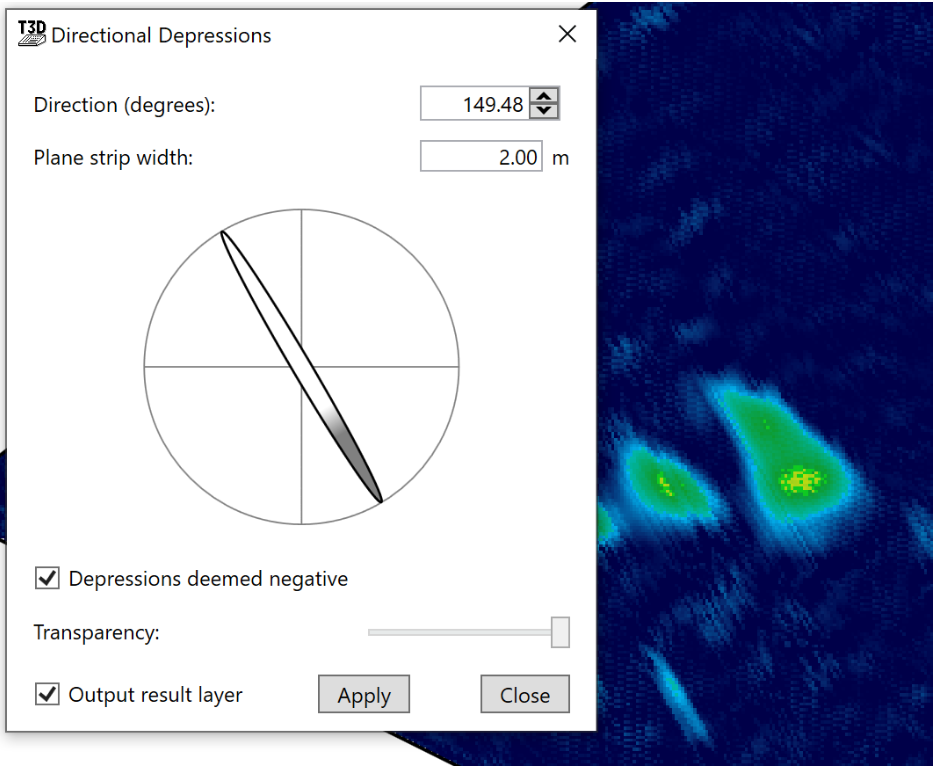‘Direction (degrees)’ this setting will rotate the simulated water flow direction to help isolate depressions that would affect the water flow.
- ‘Plane strip width’ this tool performs its calculations in strips following the set direction, small strip sizes allow for a more detailed result but it takes longer to process.
- The Compass is a visual method for controlling the direction that is used to calculate depressions.
- ‘Depressions deemed negative’ checking this option will tell the tool to display depressions as red on the surface.
- ‘Transparency’ controls how visible this information will be.
- ‘Output result layer’ will create an output layer upon closing the tool.
- ‘Apply’ this button must be pressed each time a change is made in order for it to be correctly displayed.