# Layer Type Selection
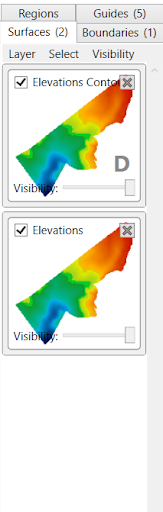On the right side of the screen is the layer type selection panel. This panel allows you to select any layer to view it in the working area, as well as change which layers are currently visible. Four different types of layers are available:
- Surfaces
- Boundaries
- Regions
- Guides
Each layer type has specific tools relating to them, which can be found in two separate places. Firstly, the tools displayed in the toolbar will update and change to match the selected layer type.
Secondly, located under the tab there are three other menu options: Layer, Select and Visibility.
The Layer menu offers various tools and changes depending on the layer type selected. See more here.
The Select and Visibility menus have similar options for each layer type, these are:
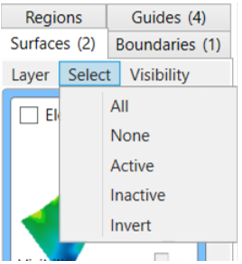Select Menu:
- All - selects all listed layers.
- None - deselects all listed layers.
- Active - selects all layers which are active (checkbox selected).
- Inactive - selects all layers which are inactive (checkbox not selected).
- Invert - selects just the layers that are not selected.
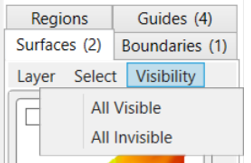Visibility Menu:
- All Visible - will make all listed layers visible
- All Invisible - will make all listed layers invisible
NOTE: The toggle bar on each individual listed layer square can be used to make layers visible/invisible also