# Edit Menu

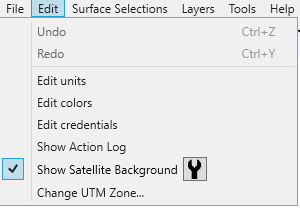
<span dir="ltr" style="font-size: 16px;">Under the Edit menu you will find the following options:</span>

![](https://docs.t3rra.com/uploads/images/gallery/2025-03/scaled-1680-/9gCeszjfnxwdioyuz7djeudgopuyqvxsi6abq-png.png)

- <span style="font-size: 16px;">Undo (Ctrl + Z) - undoes the last change made.</span>
- <span style="font-size: 16px;">Redo (Ctrl + Y) - redoes the last undo.</span>
- <span style="font-size: 16px;">Edit units - this allows you to change various units of measurement.</span>  
    <span dir="ltr" style="font-size: 16px; color: rgb(226, 80, 65);">NOTE: You should restart T3RRA Design Plus after making any changes to the units.</span>
- <span style="font-size: 16px;">Edit credentials - user credentials are the same details used to access your users.t3rra.com account. These details can be obtained by contacting your T3RRA Representative.</span>
- <span dir="ltr" style="font-size: 16px;">Show Action Log - catalogs all steps taken to create the current design/project</span>
- Show Satellite Background - this will load a small section of satellite imagery around the design area.
- <span dir="ltr" style="color: rgb(0, 0, 0); font-family: -apple-system, BlinkMacSystemFont, "Segoe UI", Roboto, "Helvetica Neue", Arial, sans-serif; font-size: 16px; font-style: normal; font-variant-ligatures: normal; font-variant-caps: normal; font-weight: 400; letter-spacing: normal; orphans: 2; text-align: left; text-indent: 0px; text-transform: none; widows: 2; word-spacing: 0px; -webkit-text-stroke-width: 0px; white-space: normal;  text-decoration-thickness: initial; text-decoration-style: initial; text-decoration-color: initial; display: inline !important; float: none;">Show Satellite Background Button - </span>allows you to edit storage size or empty it.
- Change UTM Zone - allows you to change the UTM (Universal Transverse Mercator) of the project.