# Autodrains Tool

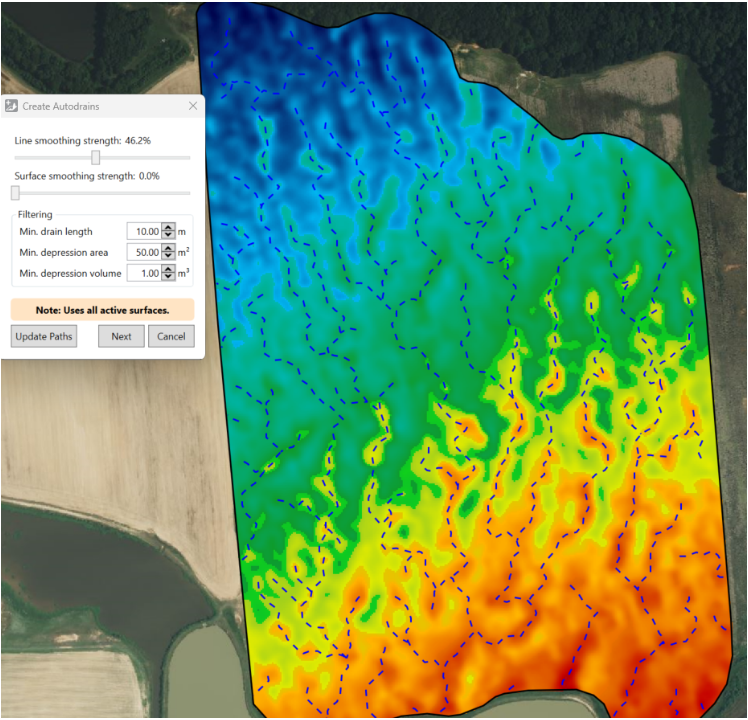
<span style="font-size: 16px;">![](https://docs.t3rra.com/uploads/images/gallery/2025-03/scaled-1680-/FtOipejasxsoodpgzqwnflw-8-54zgp5cfjow-png.png)![](https://docs.t3rra.com/uploads/images/gallery/2025-03/scaled-1680-/JVMm1qd-83mektbw8wbaa5uptczisdao42xha-png.png)This tool is used to quickly place drains that will ensure water doesn’t stay on the field for long. Once you’ve placed the drains, you can design them as normal with the Drains and Banks Tool.</span>

<span style="font-size: 16px;">There are a few options when creating auto drains:</span>

- <span style="font-size: 16px;">‘Line smoothing strength’ smooths small kinks from the paths created.</span>
- <span style="font-size: 16px;">‘Surface smoothing strength’ …</span>
- <span style="font-size: 16px;">‘Min drain length’ …</span>
- <span style="font-size: 16px;">…</span>

<span style="font-size: 16px;">After making changes, click ‘Update Paths’ to view the effect, and click ‘Next’ when you’re happy with the results.</span>

<table class="fr-no-borders" id="bkmrk--1" style="width: 100%;"><tbody><tr><td style="width: 50.0000%;">![](https://docs.t3rra.com/uploads/images/gallery/2025-03/scaled-1680-/j17yctnktmx2fuzdqo3gk8ecyr-ta9loh0rnw-png.png)</td><td style="width: 50.0000%;">![](https://docs.t3rra.com/uploads/images/gallery/2025-03/scaled-1680-/APGqbxuajxffb-hq4ny-t39xollua8xrzhabw-png.png)</td></tr></tbody></table>