# Region Blending

<span dir="ltr" style="font-size: 18px; font-family: Arial, Helvetica, sans-serif; color: rgb(0, 0, 0); font-weight: 300;">Region blending allows you to “feather” the edges of [regions](https://t3rra.freshdesk.com/en/support/solutions/articles/51000399103-regions-in-t3cd) to allow for smooth transitions between regions.</span>

<span style="font-size: 18px;"><span style="font-family: Arial,Helvetica,sans-serif;">  
</span></span>

<span style="font-size: 18px;"><span style="font-family: Arial,Helvetica,sans-serif;"><span style="color: rgb(0, 0, 0); font-weight: 400;">'Max Allowable slope'</span><span style="color: rgb(0, 0, 0); font-weight: 300;"> lets you set the maximum steepness that can be used to achieve a region blend.</span></span></span>

<span style="font-size: 18px;"><span style="font-family: Arial,Helvetica,sans-serif;">  
</span></span>

<span style="font-size: 18px;"><span style="font-family: Arial,Helvetica,sans-serif;"><span style="color: rgb(0, 0, 0); font-weight: 400;">'Distance from Region line' </span><span dir="ltr" style="color: rgb(0, 0, 0); font-weight: 300;">limits how far into each region the blend can go, in order to help make sure that other design elements are not affected.</span></span></span>

<span style="font-size: 18px;"><span style="font-family: Arial,Helvetica,sans-serif;">  
</span></span>

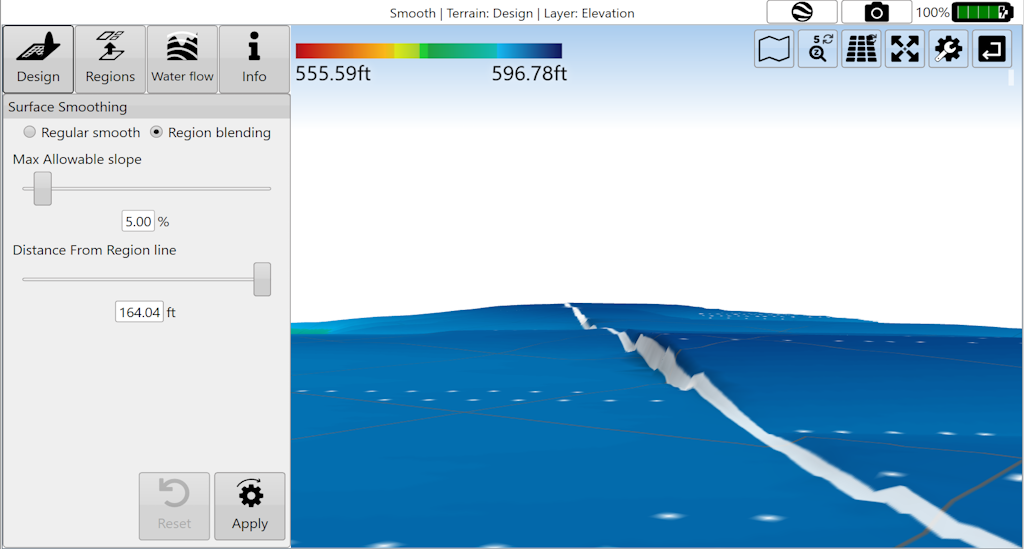
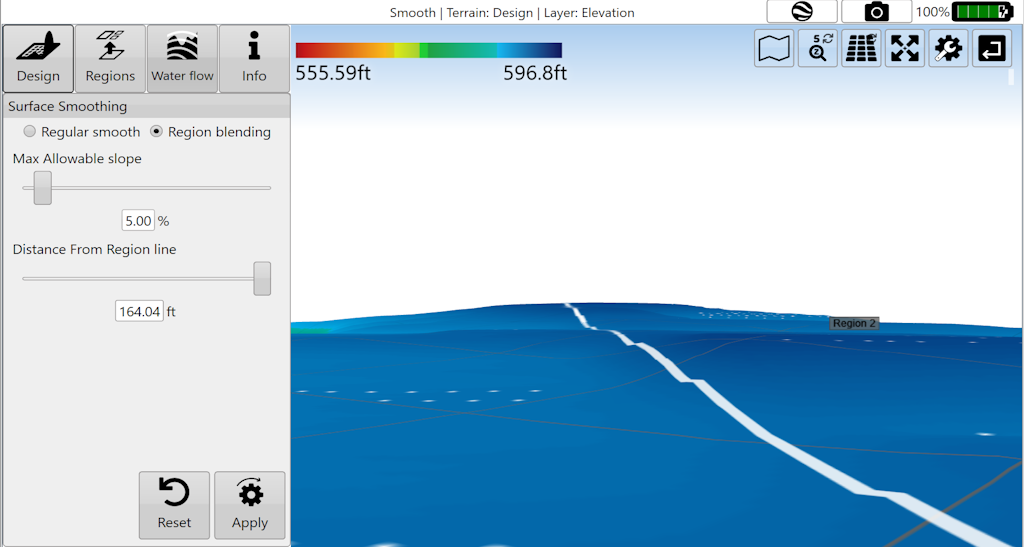
<span style="font-size: 18px;"><span style="font-family: Arial,Helvetica,sans-serif;"><span dir="ltr" style="color: rgb(0, 0, 0); font-weight: 300;">NOTE: changes made with region blending may not be obvious in 2D view but can be much more prominent in 3D view, or in the cut/fill map.</span></span></span>

<span style="font-size: 18px;"><span style="font-family: Arial,Helvetica,sans-serif;">  
</span></span>

<span style="font-size: 18px;"><span style="font-family: Arial,Helvetica,sans-serif;"><span style="color: rgb(0, 0, 0); font-weight: 300;">Press '</span><span style="color: rgb(0, 0, 0); font-weight: 400;">Apply</span><span style="color: rgb(0, 0, 0); font-weight: 300;">' after parameters are entered in order to see effects.</span></span></span>

<span style="font-size: 18px;"><span style="font-family: Arial,Helvetica,sans-serif;">  
</span></span>

<span dir="ltr" style="font-size: 18px; font-family: Arial, Helvetica, sans-serif; color: rgb(0, 0, 0); font-weight: 300;">Before</span>

<span dir="ltr" style="font-size: 14pt; font-family: Oswald, sans-serif; color: rgb(0, 0, 0); font-weight: 300;">![](https://docs.t3rra.com/uploads/images/gallery/2025-03/scaled-1680-/D6ebvsf166wfyoebj0ijdiin0sl0e0eij9r6g-png.png)</span>

<span style="font-size: 18px;">After</span>

![](https://docs.t3rra.com/uploads/images/gallery/2025-03/scaled-1680-/ss6k7crvzdthcx2bt2a4wzquiqdgdul6x9bkg-png.png)