# Pattern Drain Design

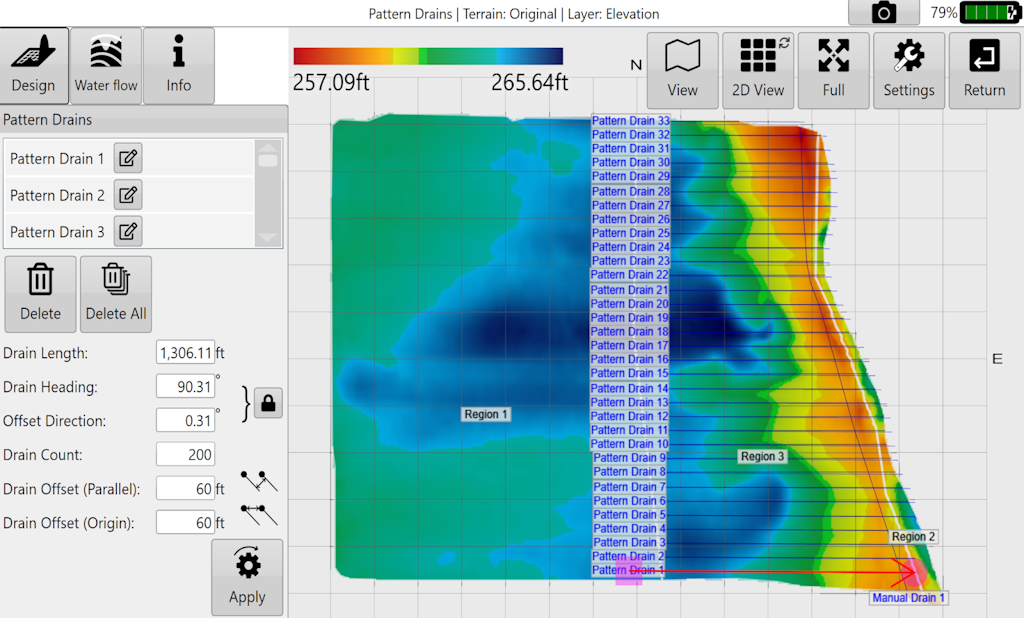
<span style="font-size: 18px; font-family: Arial, Helvetica, sans-serif; color: rgb(35, 31, 32); font-weight: 300;">This design tool allows for simple design of many parallel drains at once.</span><span style="font-size: 18px; font-family: Arial, Helvetica, sans-serif; color: rgb(0, 0, 0); font-weight: 300;"></span>

<span style="font-size: 14pt; font-family: Oswald, sans-serif; color: rgb(0, 0, 0); font-weight: 300;"><span style="border:1pt solid #000000;display:inline-block;overflow:hidden;width:624px;height:376px;">![](https://docs.t3rra.com/uploads/images/gallery/2025-03/scaled-1680-/KwHd33udgt82ji4rgaww5uustxqve6vkk4j8w-png.png)</span></span>

<span style="border:none;display:inline-block;overflow:hidden;width:300px;height:546px;">![](https://docs.t3rra.com/uploads/images/gallery/2025-03/scaled-1680-/5s3xuj0jtxb8ero6btizofod1nrbomd2vrnzq-png.png)</span>

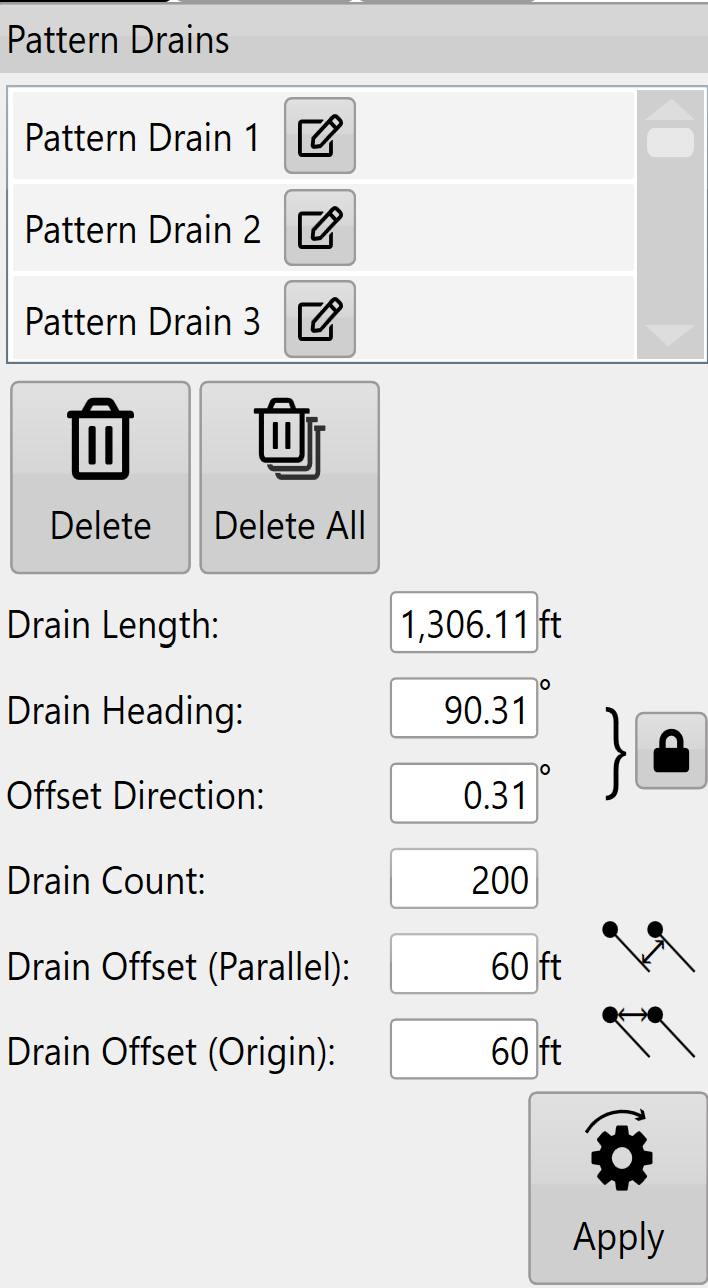
<span style="font-size: 18px; font-family: Arial, Helvetica, sans-serif; color: rgb(0, 0, 0); font-weight: 300;">The pattern drain window allows you to select specific drains to delete.</span>

<span style="font-size: 18px;"><span style="font-family: Arial,Helvetica,sans-serif;">  
</span></span>

<span style="font-size: 18px;"><span style="font-family: Arial,Helvetica,sans-serif;"><span style="color: rgb(0, 0, 0); font-weight: 300;">The '</span><span style="color: rgb(0, 0, 0); font-weight: 400;">Delete</span><span style="color: rgb(0, 0, 0); font-weight: 300;">' and '</span><span style="color: rgb(0, 0, 0); font-weight: 400;">Clear All</span><span style="color: rgb(0, 0, 0); font-weight: 300;">' buttons allow you to either delete selected drains or all pattern drains.</span></span></span>

<span style="font-size: 18px;"><span style="font-family: Arial,Helvetica,sans-serif;">  
</span></span>

<span style="font-size: 18px;"><span style="font-family: Arial,Helvetica,sans-serif;"><span style="color: rgb(0, 0, 0); font-weight: 300;">'</span><span style="color: rgb(0, 0, 0); font-weight: 400;">Drain length</span><span style="color: rgb(0, 0, 0); font-weight: 300;">' can either be set here or by moving the red circle on the design map.</span></span></span>

<span style="font-size: 18px;"><span style="font-family: Arial,Helvetica,sans-serif;">  
</span></span>

<span style="font-size: 18px;"><span style="font-family: Arial,Helvetica,sans-serif;"><span style="color: rgb(0, 0, 0); font-weight: 300;">'</span><span style="color: rgb(0, 0, 0); font-weight: 400;">Drain Heading</span><span style="color: rgb(0, 0, 0); font-weight: 300;">' is the direction that the drains run (represented as degrees).</span></span></span>

<span style="font-size: 18px;"><span style="font-family: Arial,Helvetica,sans-serif;">  
</span></span>

<span style="font-size: 18px;"><span style="font-family: Arial,Helvetica,sans-serif;"><span style="color: rgb(0, 0, 0); font-weight: 300;">‘</span><span style="color: rgb(0, 0, 0); font-weight: 400;">Padlock</span><span style="color: rgb(0, 0, 0); font-weight: 300;">’ button changes the behavior of the copied drains in relation to the original.</span></span></span>

<span style="font-size: 18px;"><span style="font-family: Arial,Helvetica,sans-serif;"><span style="color: rgb(0, 0, 0); font-weight: 300;">locked - This locks ‘Drain Heading’ to ‘Offset Direction’ so if either are adjusted the other will change to match.</span></span></span>

<span style="font-size: 18px;"><span style="font-family: Arial,Helvetica,sans-serif;"><span style="color: rgb(0, 0, 0); font-weight: 300;">Unlocked - ‘Drain Heading’ and ‘Offset Direction’ can be set independently of each other.</span></span></span>

<span style="font-size: 18px;"><span style="font-family: Arial,Helvetica,sans-serif;">  
</span></span>

<span style="font-size: 18px;"><span style="font-family: Arial,Helvetica,sans-serif;"><span style="color: rgb(0, 0, 0); font-weight: 300;">'</span><span style="color: rgb(0, 0, 0); font-weight: 400;">Offset Direction</span><span style="color: rgb(0, 0, 0); font-weight: 300;">' sets the direction in which copy drains will be created from the original.</span></span></span>

<span style="font-size: 18px;"><span style="font-family: Arial,Helvetica,sans-serif;">  
</span></span>

<span style="font-size: 18px;"><span style="font-family: Arial,Helvetica,sans-serif;"><span style="color: rgb(0, 0, 0); font-weight: 300;">'</span><span style="color: rgb(0, 0, 0); font-weight: 400;">Drain Count</span><span style="color: rgb(0, 0, 0); font-weight: 300;">' is the number of drain copies you want to add (not including the original drain).</span></span></span>

<span style="font-size: 18px;"><span style="font-family: Arial,Helvetica,sans-serif;">  
</span></span>

<span style="font-size: 18px;"><span style="font-family: Arial,Helvetica,sans-serif;"><span style="color: rgb(0, 0, 0); font-weight: 300;">'</span><span style="color: rgb(0, 0, 0); font-weight: 400;">Drain Offset (Parallel)</span><span style="color: rgb(0, 0, 0); font-weight: 300;">' is the distance between each line of the copies. (if the padlock is unlocked this will not show in the example until it is manually updated.)</span></span></span>

<span style="font-size: 18px;"><span style="font-family: Arial,Helvetica,sans-serif;">  
</span></span>

<span style="font-size: 18px;"><span style="font-family: Arial,Helvetica,sans-serif;"><span style="color: rgb(0, 0, 0); font-weight: 300;">‘</span><span style="color: rgb(0, 0, 0); font-weight: 400;">Drain Offset (Origin)</span><span style="color: rgb(0, 0, 0); font-weight: 300;">’ is the set distance between the origin point of each copy.</span></span></span>

<span style="font-size: 18px;"><span style="font-family: Arial,Helvetica,sans-serif;">  
</span></span>

<span style="font-size: 18px;"><span style="font-family: Arial,Helvetica,sans-serif;"><span style="color: rgb(0, 0, 0); font-weight: 300;">Press '</span><span style="color: rgb(0, 0, 0); font-weight: 400;">Apply</span><span style="color: rgb(0, 0, 0); font-weight: 300;">' (shown as the pattern drain icon) after parameters are entered.</span></span></span>

<span style="font-size: 18px;"><span style="font-family: Arial,Helvetica,sans-serif;">  
</span></span>

<span style="font-size: 18px;"><span style="font-family: Arial,Helvetica,sans-serif;"><span style="color: rgb(35, 31, 32); font-weight: 300;">Once you are happy with the drain paths use the ‘</span><span style="color: rgb(35, 31, 32); font-weight: 400;">Drain Design</span></span></span><span style="font-size: 18px; font-family: Arial, Helvetica, sans-serif; color: rgb(35, 31, 32); font-weight: 300;">’ function to design the profile and cross section of the drains.</span>