# Flow Paths

![](https://docs.t3rra.com/uploads/images/gallery/2025-03/scaled-1680-/pelzbzks-6y9kjq6y0e-m3vmdaujs5y1pbxq-png.png)

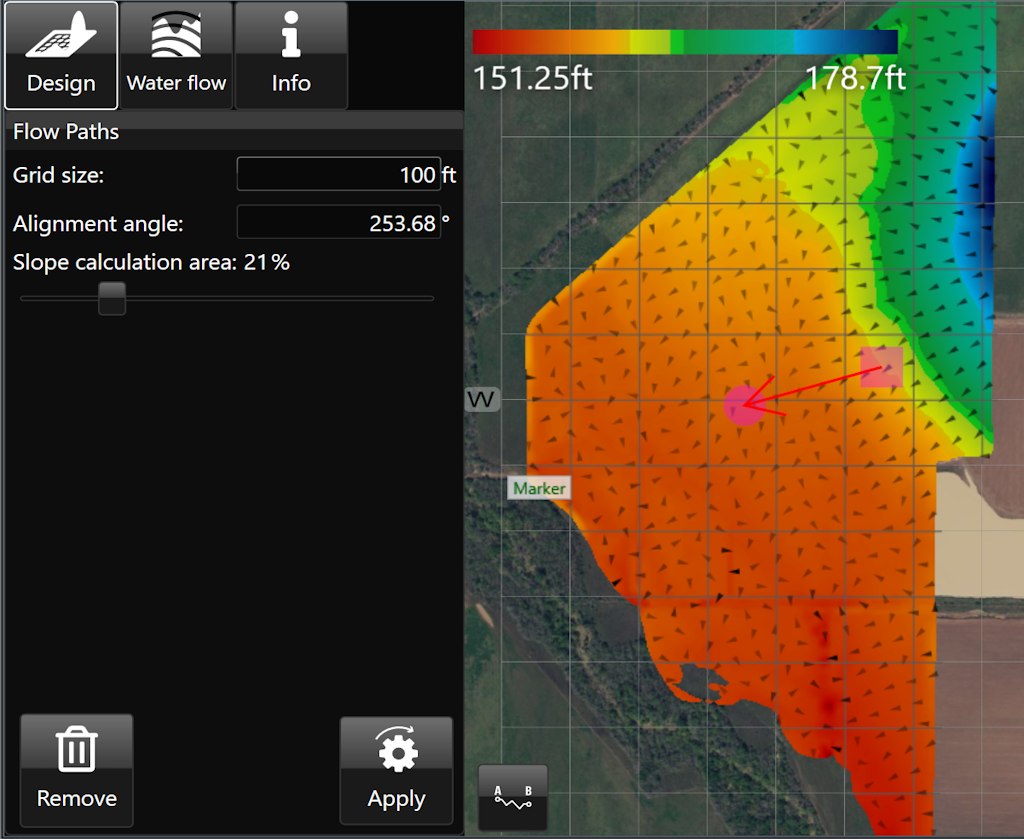
<span dir="ltr" style="box-sizing: border-box; font-size: 16px; font-family: Arial, Helvetica, sans-serif;">‘Flow Paths’ creates a grid on the field with arrows at each junction that point in the direction that water is expected to flow. </span>

- <span style="font-family: Arial,Helvetica,sans-serif;"><span dir="ltr" style="box-sizing: border-box; font-size: 16px;">‘Grid size’. Adjusting this value will make the individual squares of the grid larger or smaller. </span></span>
- <span style="font-family: Arial,Helvetica,sans-serif;"><span dir="ltr" style="box-sizing: border-box; font-size: 16px;">‘Alignment angle’. This option allows you to change the direction of the grid. The direction is set as the position of the yellow circle in relation to the yellow square.</span></span>
- <span style="font-family: Arial,Helvetica,sans-serif;"><span dir="ltr" style="box-sizing: border-box; font-size: 16px;">‘Slope calculation area’. The further to the right that the slider is, the larger the area that T3RRA Cutta Desktop takes as a sample to find the water flow direction.</span></span>

<span dir="ltr" style="box-sizing: border-box; font-size: 16px;">![](https://docs.t3rra.com/uploads/images/gallery/2025-03/scaled-1680-/ytDuuamvvxnk5muw8bcoyqzitxb7wile5sfrg-png.png)</span>

<span dir="ltr" style="font-family: Arial, Helvetica, sans-serif; font-size: 18px;">Here is a video on the **[<span style="color: rgb(0, 0, 0);">Flow Paths Tool.</span>](https://youtu.be/CotcDrDcMF8?feature=shared)**</span>