# Edit Drains

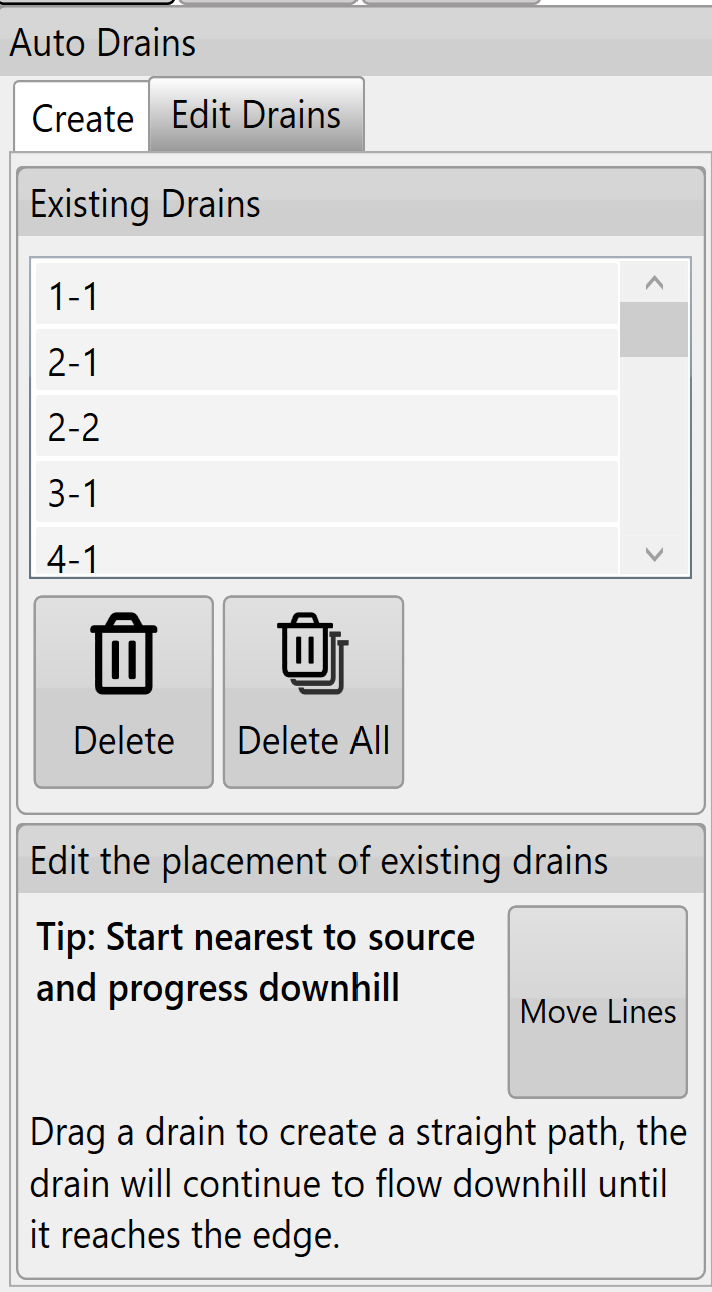
<span style="font-size: 18px; font-family: Arial, Helvetica, sans-serif; color: rgb(0, 0, 0); font-weight: 300;">The ‘</span><span style="font-size: 18px;"><span style="font-family: Arial,Helvetica,sans-serif;"><span style="color: rgb(0, 0, 0); font-weight: 400;">Existing Drains</span></span></span><span dir="ltr" style="font-size: 18px; font-family: Arial, Helvetica, sans-serif; color: rgb(0, 0, 0); font-weight: 300;">’ list will show all drains in the current project.</span>

<span style="border:none;display:inline-block;overflow:hidden;width:314px;height:571px;">![](https://docs.t3rra.com/uploads/images/gallery/2025-03/scaled-1680-/ztrw3-buyykza7gls3ih6ny7xqar2knlmps8g-png.png)</span>

- <span style="font-size: 18px; font-family: Arial, Helvetica, sans-serif; color: rgb(0, 0, 0); font-weight: 300;">Tapping on any of the drains in the list will select or unselect it. Multiple drains can be selected.</span>
- <span style="font-size: 18px;"><span style="font-family: Arial,Helvetica,sans-serif;"><span style="color: rgb(0, 0, 0); font-weight: 300;">Pressing the ‘</span><span style="color: rgb(0, 0, 0); font-weight: 400;">Delete</span><span style="color: rgb(0, 0, 0); font-weight: 300;">’ button while drains are selected will delete all of the selected drains.</span></span></span>
- <span style="font-size: 18px;"><span style="font-family: Arial,Helvetica,sans-serif;"><span style="color: rgb(0, 0, 0); font-weight: 300;">The ‘</span><span style="color: rgb(0, 0, 0); font-weight: 400;">Delete All</span><span style="color: rgb(0, 0, 0); font-weight: 300;">’ button will delete all drains in the list (even if they have not been selected).</span></span></span>
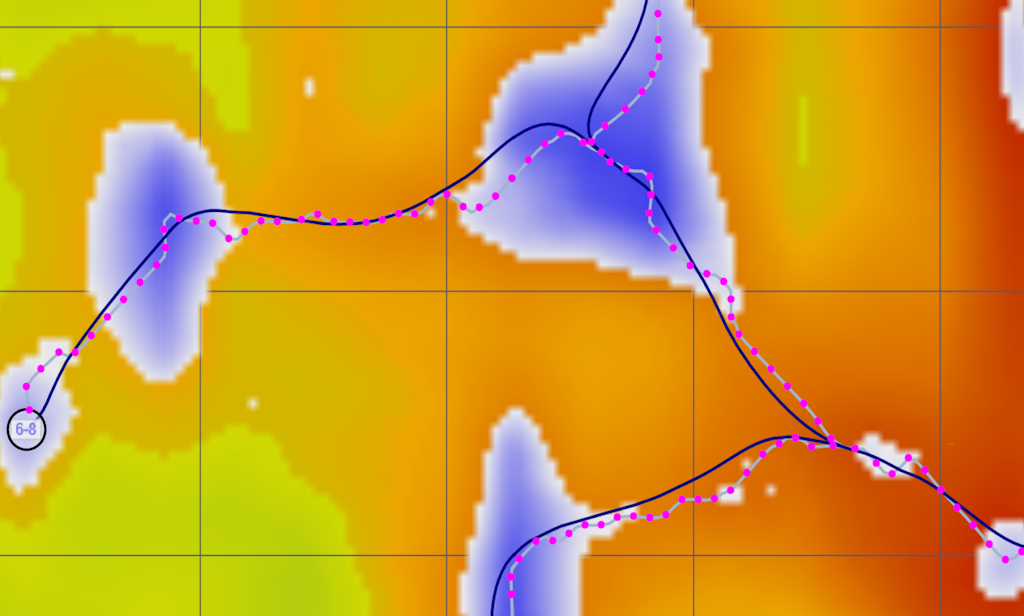
- <span style="font-size: 18px;"><span style="font-family: Arial,Helvetica,sans-serif;"><span style="color: rgb(0, 0, 0); font-weight: 300;">The ‘</span><span style="color: rgb(0, 0, 0); font-weight: 400;">Move Lines</span><span style="color: rgb(0, 0, 0); font-weight: 300;">’ button will change all the drain lines on the surface (shown in bottom image).</span></span></span>
- <span style="font-size: 18px;"><span style="font-family: Arial,Helvetica,sans-serif;"><span style="color: rgb(0, 0, 0); font-weight: 300;">Drain lines will have blue dots along them to indicate they can be moved to adjust the drain path.</span></span></span>
- <span style="font-size: 18px;"><span style="font-family: Arial,Helvetica,sans-serif;"><span style="color: rgb(0, 0, 0); font-weight: 300;">When moving drain lines always start at the origin point (which can also be moved) and move downhill. </span></span></span>
- <span style="font-size: 18px;"><span style="font-family: Arial,Helvetica,sans-serif;"><span style="color: rgb(0, 0, 0); font-weight: 300;">The drain lines will automatically adjust their paths according to your changes to ensure they flow off the edge of the surface.</span></span></span>
- <span style="font-size: 18px;"><span style="font-family: Arial,Helvetica,sans-serif;"><span style="color: rgb(0, 0, 0); font-weight: 300;">Press '</span><span style="color: rgb(0, 0, 0); font-weight: 400;">Save Changes</span><span style="color: rgb(0, 0, 0); font-weight: 300;">' to keep changes or ‘</span><span style="color: rgb(0, 0, 0); font-weight: 400;">Discard Changes</span><span dir="ltr" style="color: rgb(0, 0, 0); font-weight: 300;">’ to revert to the original paths.</span></span></span>

<span style="font-size: 14pt; font-family: Oswald, sans-serif; color: rgb(0, 0, 0); font-weight: 300;"><span style="border:none;display:inline-block;overflow:hidden;width:624px;height:376px;">![](https://docs.t3rra.com/uploads/images/gallery/2025-03/scaled-1680-/er5faorw-mkhjewaz1jgldyy1lcnhgeo0njow-png.png)</span></span>

<span style="font-size: 14pt; font-family: Arial, Helvetica, sans-serif; color: rgb(255, 0, 0); font-weight: 300;">NOTE: If you make an adjustment on a drain line and make a second adjustment closer to the origin point the first adjustment will revert to the line's original state. Auto-drains ALWAYS flow downhill from the point of the last change.</span>

<span style="font-family: Arial,Helvetica,sans-serif;">  
</span>

<span style="font-family: Arial,Helvetica,sans-serif;"><span style="font-size: 14pt; color: rgb(0, 0, 0); font-weight: 300;">Once you are happy with the drains go back to the wizard page and use the ‘</span><span style="font-size: 14pt; color: rgb(0, 0, 0); font-weight: 400;">Drain Design</span><span style="font-size: 14pt; color: rgb(0, 0, 0); font-weight: 300;">’ function to set their profiles and cross sections.</span></span>