# Auto-Drains Design
![](https://docs.t3rra.com/uploads/images/gallery/2025-03/scaled-1680-/ec12xrpbmh5-qticpthcjpoduttm7bf8ykokg-png.png)

<span style="font-size: 18px; font-family: Arial, Helvetica, sans-serif; color: rgb(35, 31, 32); font-weight: 300;">You can use Auto-Drains to </span><span style="font-size: 18px;"><span style="font-family: Arial,Helvetica,sans-serif;"><span dir="ltr" style="color: rgb(0, 0, 0); font-weight: 300;">automatically generate drain paths for wet areas in your field. It will calculate optimal ditch lines to drain depressions. </span></span></span>

<span style="font-size: 18px;"><span style="font-family: Arial,Helvetica,sans-serif;">  
</span></span>

<span style="font-size: 18px;"><span style="font-family: Arial,Helvetica,sans-serif;"><span dir="ltr" style="color: rgb(0, 0, 0); font-weight: 300;">There are two tab pages present in Auto-Drains:</span></span></span>

<span style="font-size: 18px;"><span style="font-family: Arial,Helvetica,sans-serif;">  
</span></span>

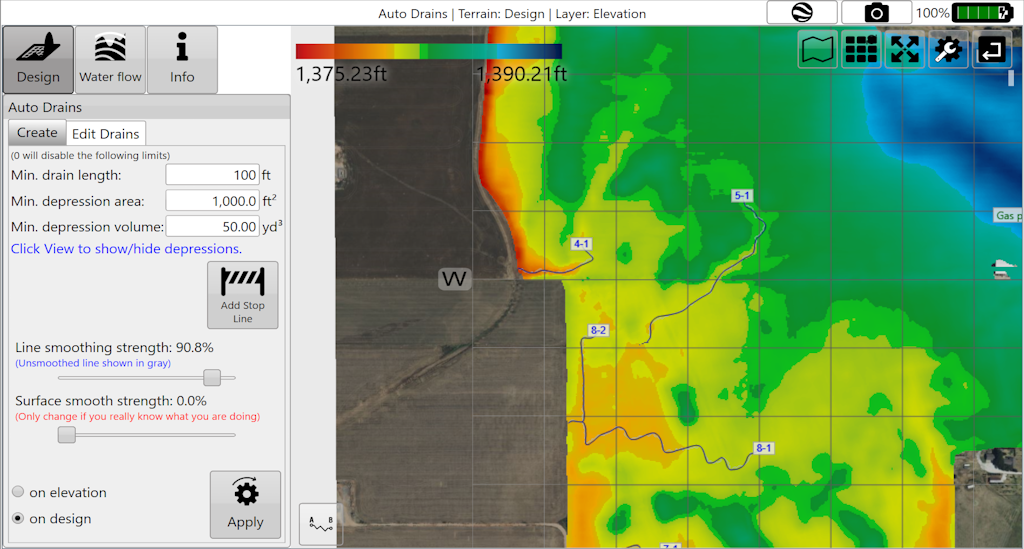
1. <span style="font-size: 18px;"><span style="font-family: Arial,Helvetica,sans-serif;"><span style="color: rgb(0, 0, 0); font-weight: 300;">‘</span><span style="color: rgb(0, 0, 0); font-weight: 400;">Create</span><span style="color: rgb(0, 0, 0); font-weight: 300;">’ controls the parameters that must be met before drains are applied to the surface.</span></span></span>
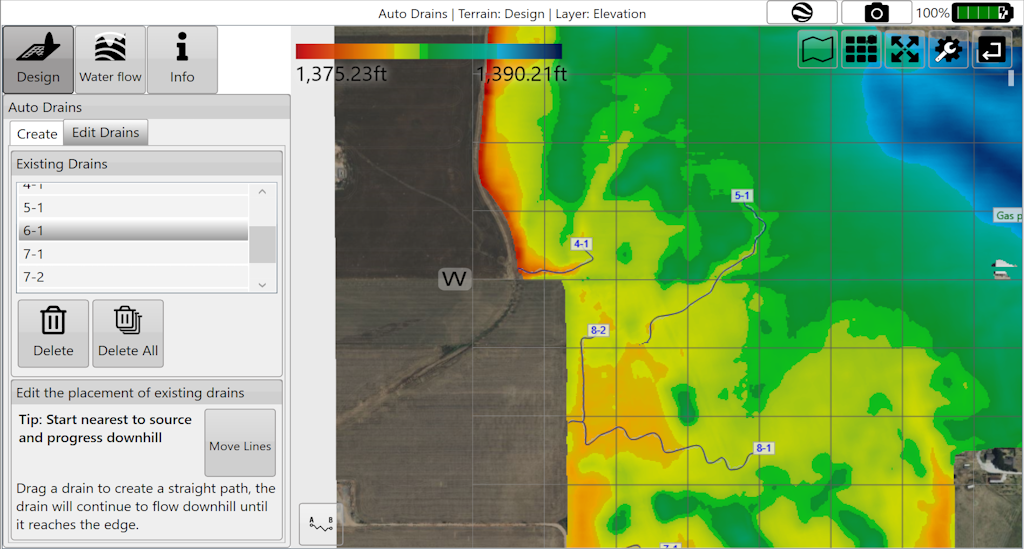
2. <span style="font-size: 18px;"><span style="font-family: Arial,Helvetica,sans-serif;"><span style="color: rgb(0, 0, 0); font-weight: 300;">‘</span><span style="color: rgb(0, 0, 0); font-weight: 400;">Edit Drains</span><span dir="ltr" style="color: rgb(0, 0, 0); font-weight: 300;">’ allows for editing of the drain paths.</span></span></span>

<span style="font-size: 18px;"><span style="font-family: Arial,Helvetica,sans-serif;">  
</span></span>

<span style="font-size: 18px;"><span style="font-family: Arial,Helvetica,sans-serif;">  
</span></span>

<span dir="ltr" style="font-size: 18px; font-family: Arial, Helvetica, sans-serif; color: rgb(0, 0, 0); font-weight: 300;">'Create"</span>

<span dir="ltr" style="font-size: 14pt; font-family: Oswald, sans-serif; color: rgb(0, 0, 0); font-weight: 300;">![](https://docs.t3rra.com/uploads/images/gallery/2025-03/scaled-1680-/eyent5i0a863-ttcociybrekzxx0pemczbtkq-png.png)</span>

<span dir="ltr" style="font-size: 18px; font-family: Arial, Helvetica, sans-serif; color: rgb(0, 0, 0); font-weight: 300;">'Edit'</span>

<span dir="ltr" style="font-size: 14pt; font-family: Oswald, sans-serif; color: rgb(0, 0, 0); font-weight: 300;">![](https://docs.t3rra.com/uploads/images/gallery/2025-03/scaled-1680-/5icpv0a5hxk2vpthfvdq34mnblpvmn1lnwtyw-png.png)</span>

<span dir="ltr" style="font-size: 14pt; font-family: Oswald, sans-serif; color: rgb(0, 0, 0); font-weight: 300;">  
</span>