# Common Design Tools

# Regions in T3CD

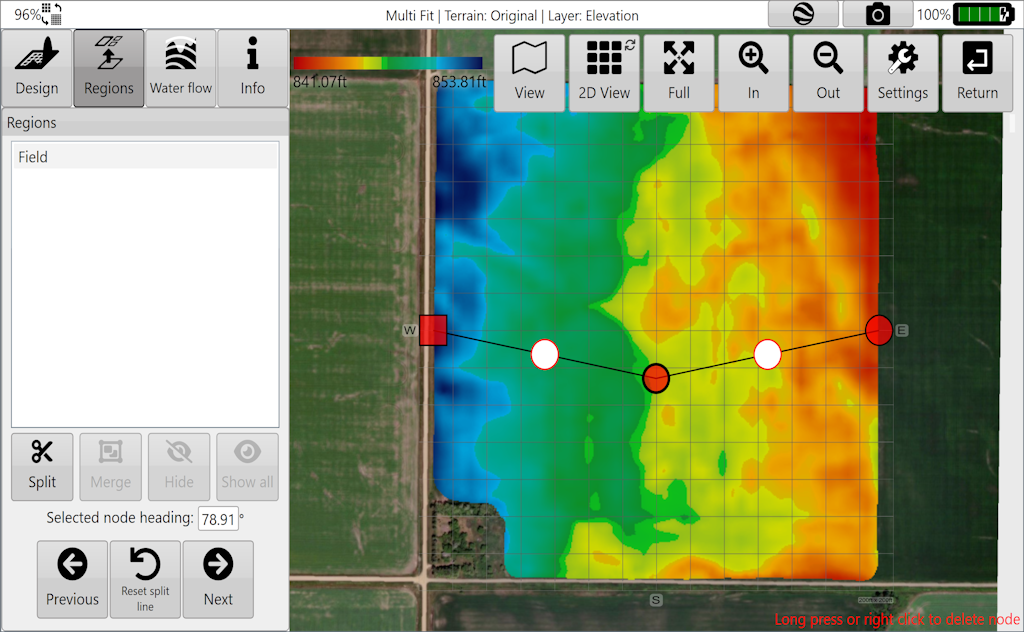
<span style="font-family: Helvetica, sans-serif;"><span dir="ltr" style="font-size: 14pt; color: rgb(35,31,32); font-weight: 300;">![Xx18kms2p0bkynvj5d4gdropbc009sydzh8qq-png.png](https://docs.t3rra.com/uploads/images/gallery/2025-03/scaled-1680-/Xx18kms2p0bkynvj5d4gdropbc009sydzh8qq-png.png)</span></span><span style="font-family: Arial, Helvetica, sans-serif;"><span dir="ltr" style="font-size: 14pt; color: rgb(35,31,32); font-weight: 300;">To create regions, press the ‘</span><span style="font-size: 14pt; color: rgb(35,31,32); font-weight: 400;">**Regions**</span><span style="font-size: 14pt; color: rgb(35,31,32); font-weight: 300;">’ button </span><span dir="ltr" style="font-size: 14pt; color: rgb(32,32,32); font-weight: 300;">(regions are not available</span></span><span style="font-family: Arial, Helvetica, sans-serif;"><span dir="ltr" style="font-size: 14pt; color: rgb(32,32,32); font-weight: 300;"> in drain related functions). </span></span><span style="font-family: Arial, Helvetica, sans-serif;"><span style="font-size: 14pt; color: rgb(0,0,0); font-weight: 300;">The </span><span style="font-size: 14pt; color: rgb(35,31,32); font-weight: 300;">‘</span><span style="font-size: 14pt; color: rgb(35,31,32); font-weight: 400;">**Regions**</span><span style="font-size: 14pt; color: rgb(35,31,32); font-weight: 300;">’ </span><span dir="ltr" style="font-size: 14pt; color: rgb(0,0,0); font-weight: 300;">tool is used to split a field into multiple workable areas. Different design options can be applied to multiple different regions. For example, you can apply different primary and secondary slopes, or different levee designs in each region.</span></span>

<p class="callout danger"><span style="font-family: Arial, Helvetica, sans-serif; color: rgb(107, 0, 0);"><span dir="ltr" style="font-size: 14pt; font-weight: 300;">NOTE: It is possible to create different design types in different regions. You can have a best-fit plane in one region, and a multi-fit surface in another, for instance.</span></span></p>

![E92bbmbohvp-wea74lngrw0mpgckgvuckrhlq-png.png](https://docs.t3rra.com/uploads/images/gallery/2025-03/scaled-1680-/E92bbmbohvp-wea74lngrw0mpgckgvuckrhlq-png.png)

<span style="font-family: Arial, Helvetica, sans-serif;"><span dir="ltr" style="font-size: 14pt; color: rgb(0,0,0); font-weight: 300;">Regions are created by moving a splitting line across two edges of an existing region, or whole field if no regions exist. The split line is set by moving </span><span style="font-size: 14pt; color: rgb(0,0,0); font-weight: 400;">**Point A**</span><span style="font-size: 14pt; color: rgb(0,0,0); font-weight: 300;"> and </span><span style="font-size: 14pt; color: rgb(0,0,0); font-weight: 400;">**Point B**</span><span dir="ltr" style="font-size: 14pt; color: rgb(0,0,0); font-weight: 300;"> into position. T<span dir="ltr" style="color: rgb(0,0,0); font-family: Arial, Helvetica, sans-serif; text-align: left; text-indent: 0px; font-size: 14pt; font-weight: 300;">he line can be positioned by</span></span><span dir="ltr" style="font-size: 14pt; color: rgb(0,0,0); font-weight: 300;"> moving the points directly using the touchscreen or mouse. The split line is straight, but tapping and dragging the white nodes let you create multi-segment splits. In addition, you can split multiple times, then merge regions to make complex region shapes.</span></span>

<span style="font-size: 8px;">![E6gabmfpiqfitzsj8hczm-9yn0nlzptb2vndw-png.png](https://docs.t3rra.com/uploads/images/gallery/2025-03/scaled-1680-/E6gabmfpiqfitzsj8hczm-9yn0nlzptb2vndw-png.png)</span>

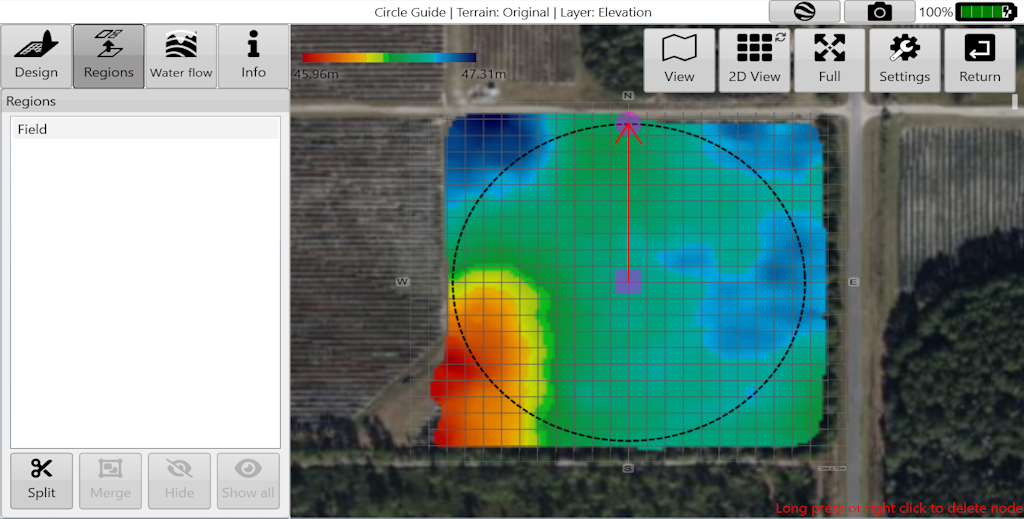
<p class="callout success"><span style="font-family: Arial, Helvetica, sans-serif; color: rgb(0, 75, 5);"><span dir="ltr" style="font-size: 14pt; font-weight: 300;">In the Circle Guide and Levee design tools, the region split uses the circle/levees instead of a line. This is great for creating custom region splits for things like pivot irrigation fields and rounded corners.</span></span></p>

<span style="font-family: Arial, Helvetica, sans-serif;">  
<span dir="ltr" style="font-size: 14pt; color: rgb(0,0,0); font-weight: 300;"><span dir="ltr" style="font-size: 14pt; color: rgb(0,0,0); font-weight: 300;">The '</span><span style="font-size: 14pt; color: rgb(0,0,0); font-weight: 400;">**Split**</span><span dir="ltr" style="font-size: 14pt; color: rgb(0,0,0); font-weight: 300;">' button confirms the “split” on the selected area.</span> </span></span>

<span style="font-family: Arial, Helvetica, sans-serif;">  
</span>

<span style="font-family: Arial, Helvetica, sans-serif;"><span dir="ltr" style="font-size: 14pt; color: rgb(0,0,0); font-weight: 300;">The '</span><span style="font-size: 14pt; color: rgb(0,0,0); font-weight: 400;">**Merge**</span><span dir="ltr" style="font-size: 14pt; color: rgb(0,0,0); font-weight: 300;">' button will merge regions selected in the list into one region.</span></span>

<p class="callout warning"><span style="font-family: Arial, Helvetica, sans-serif;"><span dir="ltr" style="font-size: 14pt; color: rgb(0,0,0); font-weight: 300;">You can merge regions that are far apart. Also, if you find a region that has two separate areas, you can split it by positioning the split line between the two parts and pressing the '**Split**' button.</span></span></p>

<span style="font-family: Arial, Helvetica, sans-serif;"><span style="font-size: 14pt; color: rgb(0,0,0); font-weight: 300;">The ‘</span><span style="font-size: 14pt; color: rgb(0,0,0); font-weight: 400;">**Hide**</span><span dir="ltr" style="font-size: 14pt; color: rgb(0,0,0); font-weight: 300;">’ button will delete whatever design exists with the selected region(s). At this point the region will not exist as a separate area that can accept designs. It can, however, still have full-field designs applied to it.</span></span>

<span style="font-family: Arial, Helvetica, sans-serif;">  
</span>

<span style="font-family: Arial, Helvetica, sans-serif;"><span style="font-size: 14pt; color: rgb(0,0,0); font-weight: 300;">The ‘</span><span style="font-size: 14pt; color: rgb(0,0,0); font-weight: 400;">**Show all**</span><span style="font-size: 14pt; color: rgb(0,0,0); font-weight: 300;">’ button will restore all hidden/deleted regions.</span></span>

<span dir="ltr" style="font-size: 14pt; font-family: Arial, Helvetica, sans-serif; color: rgb(0,0,0); font-weight: 300;">![ivXx3kynlmltuqkmxq8teofcsyx4qfw6i63fa-png.png](https://docs.t3rra.com/uploads/images/gallery/2025-03/scaled-1680-/ivXx3kynlmltuqkmxq8teofcsyx4qfw6i63fa-png.png)<span dir="ltr" style="font-size: 14pt; font-family: Arial, Helvetica, sans-serif; color: rgb(0,0,0); font-weight: 300;">Press the '</span><span style="font-size: 14pt; font-family: Arial, Helvetica, sans-serif; color: rgb(0,0,0); font-weight: 400;">**Design**</span><span dir="ltr" style="font-size: 14pt; font-family: Arial, Helvetica, sans-serif; color: rgb(0,0,0); font-weight: 300;">' button when you have finished adding your regions. </span></span>

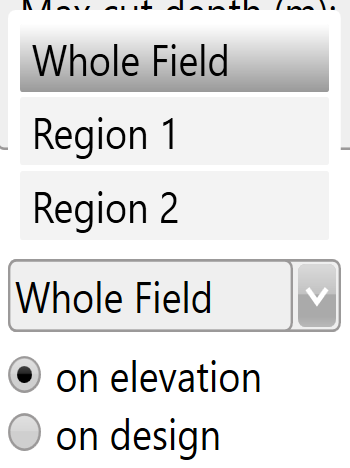
<span style="font-size: 14pt; font-family: Arial, Helvetica, sans-serif; color: rgb(0,0,0); font-weight: 300;">In certain design functions (multi-fit, best-fit, smoothing, and levees) different regions can be selected from a drop down menu allowing you to make design changes to only the selected region.</span>

![Ty5ijqsn6pmfnfgk6misxkzxv5ajc2nbv-eya-png.png](https://docs.t3rra.com/uploads/images/gallery/2025-03/scaled-1680-/Ty5ijqsn6pmfnfgk6misxkzxv5ajc2nbv-eya-png.png) <span dir="ltr" style="font-size: 14pt; font-family: Helvetica, sans-serif; color: rgb(0,0,0); font-weight: 300;">Choose to apply your design to the original elevation surface or to the design surface.</span>

# Rainfall Simulator

#### ![](https://docs.t3rra.com/uploads/images/gallery/2025-03/scaled-1680-/nnWf1b-bdtbjpdnbkrdjgxtlqb8r4izrjqccw-png.png)

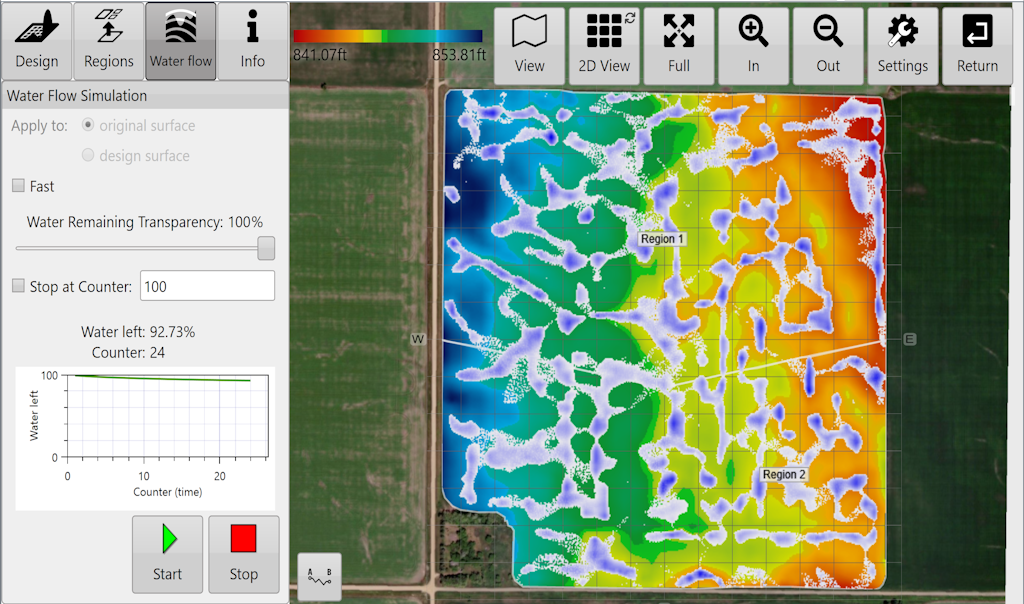
<span style="font-size: 14pt; font-family: Arial, Helvetica, sans-serif; color: rgb(0, 0, 0); font-weight: 300;">One of the many unique features of the T3RRA product suite is our inclusion of a rainfall simulation tool. This allows a very visual and easily relatable analysis of how a field surface affects water runoff and ponding.</span>

<span style="font-family: Arial,Helvetica,sans-serif;"><span style="font-size: 14pt; color: rgb(0, 0, 0); font-weight: 300;">It should first be used after a survey and prior to any design being placed on the field. The intent of this is twofold:</span></span>

1. <span style="font-family: Arial,Helvetica,sans-serif;"><span style="font-size: 14pt; color: rgb(0, 0, 0); font-weight: 300;">To verify that the created surface does in fact truly represent the field. By looking at the water flow, a person familiar with the field will usually be able to say “Yes, that is the normal pattern of water runoff I would see”. In this case the operator can be confident that the survey has created an accurate model of the field. On the other hand, if the simulation produces results that are not expected it may be wise to critically revisit the survey and perhaps collect more data.</span></span>
2. <span style="font-family: Arial,Helvetica,sans-serif;"><span style="font-size: 14pt; color: rgb(0, 0, 0); font-weight: 300;">To compare the design with the original surface. It is expected that the design will result in a pattern of drainage different to the original. Analyzing the design will quickly tell you if the new surface is going to have the effect on drainage that you expect.</span></span>

<span style="font-family: Arial,Helvetica,sans-serif;">![](https://docs.t3rra.com/uploads/images/gallery/2025-03/scaled-1680-/pQJ9qu28otec9ztfbmm4tustbu-hk75p9n0bg-png.png)</span>

<span style="font-family: Arial,Helvetica,sans-serif;"><span style="font-size: 14pt; color: rgb(0, 0, 0); font-weight: 300;">The rainfall simulator </span><span style="font-size: 14pt; color: rgb(0, 0, 0); font-weight: 400;">cannot </span><span style="font-size: 14pt; color: rgb(0, 0, 0); font-weight: 300;">tell you how long a field will take to drain. There are simply too many variables, such as the soil type, the soil moisture level and the soil depth before reaching hardpan. Such a calculation is beyond the scope of this software. It can however provide you with an indication of how much faster one design will be over another. You can do this by comparing the iteration counter value of two different designs at a given drainage % value. Even so, be aware that the timing information of the simulation is qualitative in nature, not quantitative.</span></span>

<span style="font-family: Arial,Helvetica,sans-serif;">  
</span>

<div align="left" dir="ltr" id="bkmrk-for-a-youtube-video-" style="margin-left: 0pt; font-family: Arial, Helvetica, sans-serif;"><table style="border: none; border-collapse: collapse;"><colgroup><col width="490"></col><col width="134"></col></colgroup><tbody><tr style="height: 106.5pt;"><td style="padding: 5pt; overflow: hidden; overflow-wrap: break-word; border: 1pt solid rgb(241, 194, 50);"><span style="font-family: Arial,Helvetica,sans-serif;"><span style="font-size: 14pt; color: rgb(0, 0, 0); font-weight: 300;">For a youtube video tutorial on the rainfall simulator visit </span>[<span style="font-size: 14pt; color: rgb(17, 85, 204); font-weight: 300; text-decoration-skip-ink: none;">https://youtu.be/LJ5Vw9Q7tqA</span>](https://youtu.be/LJ5Vw9Q7tqA)<span style="font-size: 14pt; color: rgb(0, 0, 0); font-weight: 300;"> or use your phone to scan this barcode </span></span>

</td><td style="padding: 5pt; overflow: hidden; overflow-wrap: break-word; border: 1pt solid rgb(241, 194, 50);"><span style="font-family: Arial,Helvetica,sans-serif;"><span style="font-size: 14pt; color: rgb(0, 0, 0); font-weight: 300;"><span style="border: none; display: inline-block; overflow: hidden; width: 120px; height: 120px;">![](https://docs.t3rra.com/uploads/images/gallery/2025-03/scaled-1680-/vILkkm4rl1yka6mohgy-ouicsv-hjzlv47skg-png.png)</span></span></span>

</td></tr></tbody></table>

</div><span style="font-family: Arial,Helvetica,sans-serif;"><span style="font-size: 14pt; color: rgb(0, 0, 0); font-weight: 300;">When the water simulation is stopped, you can switch between the design and original surfaces to compare changes in water flow.</span></span>

<span style="font-family: Arial,Helvetica,sans-serif;"><span style="font-size: 14pt; color: rgb(0, 0, 0); font-weight: 300;">The '**Stop at counter**' is useful if you want to compare the remaining water at a specific counter value between design and original surfaces.</span></span>

<p class="callout info"><span style="font-size: 14pt; font-family: Arial, Helvetica, sans-serif; color: rgb(0, 0, 0); font-weight: 300;">The water simulation can be viewed in 2D or 3D just like when examining elevation and design surfaces normally.</span></p>

# Earthworks Information

<span dir="ltr" style="font-size: 14pt; font-family: Arial, Helvetica, sans-serif; color: rgb(0, 0, 0); font-weight: 300;">Press the '</span><span style="font-family: Arial,Helvetica,sans-serif;"><span style="font-size: 14pt; color: rgb(0, 0, 0); font-weight: 400;">i</span><span dir="ltr" style="font-size: 14pt; color: rgb(0, 0, 0); font-weight: 300;">' button to view earthwork details.</span></span>

<span style="font-family: Arial,Helvetica,sans-serif;">  
</span>

<span style="font-family: Arial,Helvetica,sans-serif;"><span style="font-size: 14pt; color: rgb(0, 0, 0); font-weight: 300;">Note: pressing within the ‘</span><span style="font-size: 14pt; color: rgb(0, 0, 0); font-weight: 400;">Info</span><span style="font-size: 14pt; color: rgb(0, 0, 0); font-weight: 300;">’ text box will expand the view to full screen.</span></span>

<span style="font-family: Arial,Helvetica,sans-serif;">  
</span>

<span style="font-family: Arial,Helvetica,sans-serif;"><span style="font-size: 14pt; color: rgb(0, 0, 0); font-weight: 300;">Each region will have its own set of earthworks details and cut/fill summary.</span></span>

<span style="font-family: Arial,Helvetica,sans-serif;">  
</span>

<span style="font-family: Arial,Helvetica,sans-serif;"><span style="font-size: 14pt; color: rgb(0, 0, 0); font-weight: 300;">Press the '</span><span style="font-size: 14pt; color: rgb(0, 0, 0); font-weight: 400;">Records</span><span style="font-size: 14pt; color: rgb(0, 0, 0); font-weight: 300;">' button (shown as a printer) to save design details (in PDF format) to a folder for record keeping and documentation purposes.</span></span>

<span style="font-family: Arial,Helvetica,sans-serif;">  
</span>

<span style="font-family: Arial,Helvetica,sans-serif;"><span style="font-size: 14pt; color: rgb(0, 0, 0); font-weight: 300;">Press the '</span><span style="font-size: 14pt; color: rgb(0, 0, 0); font-weight: 400;">Activity Log</span><span style="font-size: 14pt; color: rgb(0, 0, 0); font-weight: 300;">' button (shown as a clipboard) to view the activity that a file has undergone. This includes things like file save times and when/what design functions have been applied to a file.</span></span>

<span style="font-family: Arial,Helvetica,sans-serif;">  
</span>

<span style="font-family: Arial,Helvetica,sans-serif;"><span dir="ltr" style="font-size: 14pt; color: rgb(0, 0, 0); font-weight: 300;">Note: formerly there was a KMZ and Upload to John Deere button on this screen. These have been moved to the [Export step](https://t3rra.freshdesk.com/support/solutions/articles/51000404051-exporting-data).</span></span>

<span style="font-family: Arial,Helvetica,sans-serif;">  
</span>

<div align="left" dir="ltr" id="bkmrk-for-a-youtube-video-" style="margin-left: 0pt; font-family: Arial, Helvetica, sans-serif;"><table style="border:none;border-collapse:collapse;"><colgroup><col width="490"></col><col width="134"></col></colgroup><tbody><tr style="height:106.5pt;"><td style="border-width: 1pt; border-style: solid; border-color: rgb(241, 194, 50); padding: 5pt; overflow: hidden; overflow-wrap: break-word;"><span style="font-family: Arial,Helvetica,sans-serif;"><span style="font-size: 14pt; color: rgb(0, 0, 0); font-weight: 300;">For a youtube video tutorial on Earthwork information visit </span>[<span style="font-size: 14pt; color: rgb(17, 85, 204); font-weight: 300; text-decoration-skip-ink: none;">https://youtu.be/U0RB2av-vow</span>](https://youtu.be/U0RB2av-vow)<span style="font-size: 14pt; color: rgb(0, 0, 0); font-weight: 300;"> or use your phone to scan this barcode </span></span>

</td><td style="border-width: 1pt; border-style: solid; border-color: rgb(241, 194, 50); padding: 5pt; overflow: hidden; overflow-wrap: break-word;"><span style="font-family: Arial,Helvetica,sans-serif;"><span style="font-size: 14pt; color: rgb(0, 0, 0); font-weight: 300;"><span style="border:none;display:inline-block;overflow:hidden;width:120px;height:120px;">![](https://docs.t3rra.com/uploads/images/gallery/2025-03/scaled-1680-/EQ3mzachaq6pdufggjyfduvswj0dnicgwq2eq-png.png)</span></span></span>

</td></tr></tbody></table>

</div><span style="font-family: Arial,Helvetica,sans-serif;">  
</span>

<span style="font-family: Arial,Helvetica,sans-serif;"><span style="border:none;display:inline-block;overflow:hidden;width:103px;height:121px;">![](https://docs.t3rra.com/uploads/images/gallery/2025-03/scaled-1680-/YDUhir-hk-rrbvncknnoyubty78utq-8rqxpg-png.png)</span></span>

##### <span style="font-family: Arial,Helvetica,sans-serif;"><span style="font-size: 20pt; color: rgb(0, 0, 0); font-weight: 400;">Notes on printing records</span></span>

<span style="font-family: Arial,Helvetica,sans-serif;">  
</span>

<span style="font-family: Arial,Helvetica,sans-serif;"><span style="font-size: 14pt; color: rgb(0, 0, 0); font-weight: 300;">The ‘</span><span style="font-size: 14pt; color: rgb(0, 0, 0); font-weight: 400;">Records</span><span style="font-size: 14pt; color: rgb(0, 0, 0); font-weight: 300;">’ feature in T3RRA software creates a PDF document and saves it to the hard drive. This document is meant to give an overview of the operation being performed by the software. It is suitable for record keeping purposes, or for supplying to field managers or clients.</span></span>

<span style="font-family: Arial,Helvetica,sans-serif;">  
</span>

<span style="font-family: Arial,Helvetica,sans-serif;"><span style="font-size: 14pt; color: rgb(0, 0, 0); font-weight: 300;">It includes the following:</span></span>

- <span style="font-family: Arial,Helvetica,sans-serif;"><span style="font-size: 14pt; color: rgb(0, 0, 0); font-weight: 300;">Map of the original surface</span></span>
- <span style="font-family: Arial,Helvetica,sans-serif;"><span style="font-size: 14pt; color: rgb(0, 0, 0); font-weight: 300;">Map of the design surface</span></span>
- <span style="font-family: Arial,Helvetica,sans-serif;"><span style="font-size: 14pt; color: rgb(0, 0, 0); font-weight: 300;">Map of Cut and Fill areas</span></span>
- <span style="font-family: Arial,Helvetica,sans-serif;"><span style="font-size: 14pt; color: rgb(0, 0, 0); font-weight: 300;">Statistics relating to the earthworks</span></span>

<span style="font-family: Arial,Helvetica,sans-serif;">  
</span>

<span style="font-family: Arial,Helvetica,sans-serif;"><span style="font-size: 14pt; color: rgb(0, 0, 0); font-weight: 300;">The maps created in the report will include a grid overlay showing data values.</span></span>

<span style="font-family: Arial,Helvetica,sans-serif;">  
</span>

<span style="font-family: Arial,Helvetica,sans-serif;"><span style="font-size: 14pt; color: rgb(0, 0, 0); font-weight: 300;"><span style="border:none;display:inline-block;overflow:hidden;width:597px;height:326px;">![](https://docs.t3rra.com/uploads/images/gallery/2025-03/scaled-1680-/XBfx3yzip4kwyopzydhxdusl8chjgzzy50srg-png.png)</span></span></span>

#####   


##### ![](https://docs.t3rra.com/uploads/images/gallery/2025-03/scaled-1680-/OySwxbb9ikfwjvkag0yd628vujnfcfeb7j7dw-png.png)

#####   


##### <span style="font-family: Arial,Helvetica,sans-serif;"><span style="font-size: 20pt; color: rgb(0, 0, 0); font-weight: 400;">Notes on the Activity Log</span></span>

<span style="font-family: Arial,Helvetica,sans-serif;">  
</span>

<span style="font-family: Arial,Helvetica,sans-serif;"><span style="font-size: 14pt; color: rgb(0, 0, 0); font-weight: 300;">The ‘</span><span style="font-size: 14pt; color: rgb(0, 0, 0); font-weight: 400;">Activity Log</span><span style="font-size: 14pt; color: rgb(0, 0, 0); font-weight: 300;">’ is designed to provide a history of the user actions that were performed in a project. It keeps a sequential history of the design actions that have been performed. This is helpful in understanding what methods were used in order to go from the original design surface to the final design surface. Where possible a record of slopes, directions, and design tools utilized are kept. As we allow designs to be performed on existing designs and differently in different regions, the steps and actions taken to go from the original surface to the final design surface can be quite complicated. </span></span>

<span style="font-family: Arial,Helvetica,sans-serif;">  
</span>

<span style="font-family: Arial,Helvetica,sans-serif;"><span style="font-size: 14pt; color: rgb(0, 0, 0); font-weight: 300;">The ‘</span><span style="font-size: 14pt; color: rgb(0, 0, 0); font-weight: 400;">Activity Log</span><span style="font-size: 14pt; color: rgb(0, 0, 0); font-weight: 300;">’ also keeps a record of the results of a design action (in the form of the resulting dirt balance statistics).</span></span>

<span style="font-family: Arial,Helvetica,sans-serif;">  
</span>

<span style="font-family: Arial,Helvetica,sans-serif;"><span style="font-size: 14pt; color: rgb(0, 0, 0); font-weight: 300;">If the user is in doubt about steps taken or parameters used, they can refer back to this log. The log entries include a date and time in order to remove confusion about when the actions were performed.</span></span>

<span style="font-family: Arial,Helvetica,sans-serif;">  
</span>

<span style="font-family: Arial,Helvetica,sans-serif;"><span style="font-size: 14pt; color: rgb(0, 0, 0); font-weight: 300;">The log can also be used to compare two or more design options. Because the results of each design operation are kept in the log it can be easier to simply compare them there rather than trying to remember them, or write down the results.</span></span>

<span style="font-family: Arial,Helvetica,sans-serif;"><span style="border:none;display:inline-block;overflow:hidden;width:103px;height:100px;">![](https://docs.t3rra.com/uploads/images/gallery/2025-03/scaled-1680-/G4A85rm5ri3ngjgucx7el-ecopqwqrqb3azoq-png.png)</span></span>

<span style="font-family: Arial,Helvetica,sans-serif;">  
</span>

<span style="font-family: Arial,Helvetica,sans-serif;"><span style="font-size: 14pt; color: rgb(0, 0, 0); font-weight: 300;">If you want to save or email the log you can copy it into the clipboard using the ‘</span><span style="font-size: 14pt; color: rgb(0, 0, 0); font-weight: 400;">Copy</span></span><span style="font-size: 14pt; font-family: Arial, Helvetica, sans-serif; color: rgb(0, 0, 0); font-weight: 300;">’ button. Then paste it into any other application.</span>

# Calculator

#### <span style="border:none;display:inline-block;overflow:hidden;width:118px;height:120px;">![](https://docs.t3rra.com/uploads/images/gallery/2025-03/scaled-1680-/Uj7wcfa2bniiyxfq1tocoltohnbwkwfk1cyvw-png.png)</span>

<span style="font-size: 14pt; font-family: Arial, Helvetica, sans-serif; color: rgb(0, 0, 0); font-weight: 300;">In some tools that require a value to be input a calculator will be available.</span>

<span style="font-family: Arial,Helvetica,sans-serif;"><span style="font-size: 14pt; color: rgb(0, 0, 0); font-weight: 300;">The purpose of the calculator is to take some of the stress away from creating field and drain designs.</span></span>

<span style="font-family: Arial,Helvetica,sans-serif;">  
</span>

<span style="font-family: Arial,Helvetica,sans-serif;"><span style="font-size: 14pt; color: rgb(0, 0, 0); font-weight: 300;">In addition to being able to calculate, the calculator comes with a function to add quick values.</span></span>

<span style="font-family: Arial,Helvetica,sans-serif;"><span style="font-size: 14pt; color: rgb(0, 0, 0); font-weight: 300;">These are helpful if you are not wanting to find the exact value and just want to get moving as quickly as possible.</span></span>

<span style="border:none;display:inline-block;overflow:hidden;width:308px;height:203px;">![](https://docs.t3rra.com/uploads/images/gallery/2025-03/scaled-1680-/Gee0mhfqxyaje-lapgl5ciuzbrhvsglsljxka-png.png)</span>

<span style="border:none;display:inline-block;overflow:hidden;width:345px;height:272px;">![](https://docs.t3rra.com/uploads/images/gallery/2025-03/scaled-1680-/zdTg1llwq6mtvnnmnleoyg375rykfb85qu7jq-png.png)</span>