# 6.7 | Look Ahead
[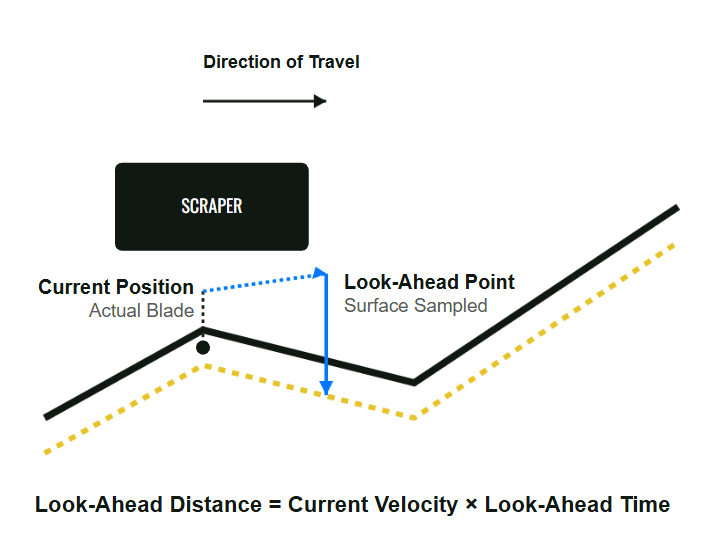](https://docs.t3rra.com/uploads/images/gallery/2026-06/64z4b3mNwZb7hRoD-image.png)
Hydraulic systems require a short amount of time to respond after a control command is issued. Oil must flow, hydraulic cylinders must move and the implement must physically react before the blade reaches its new position.
To compensate for this delay, **Level COMMAND** uses **Look Ahead**.
Rather than waiting until the implement reaches a change in the Design, **Level COMMAND** begins commanding hydraulic movement slightly in advance so the implement reaches the correct position at the appropriate time.
This predictive behaviour helps produce smoother, more accurate grading, particularly when operating at higher travel speeds or over changing terrain.
## How Look Ahead Affects Grading
The amount of Look Ahead determines how early **Automatic Control** begins responding to upcoming changes in the Design.
### Too Little Look Ahead
If the **Look Ahead** value is too small, the hydraulic system may respond too late.
Typical symptoms include:
- The implement reacts after reaching changes in the Design.
- Rounded crests or delayed transitions.
- Persistent tracking error.
- Reduced grading accuracy at higher travel speeds.
### Too Much Look Ahead
If the **Look Ahead** value is too large, the hydraulic system may respond earlier than necessary.
Typical symptoms include:
- The implement begins lifting or lowering too early.
- Overcorrection approaching changes in terrain.
- Reduced grading accuracy around abrupt transitions.
## Adjusting Look Ahead
The **Look Ahead** setting can be accessed from:
**More → Diagnostics/Advanced**
For most machines, the default value provides good performance and should not normally require adjustment.
Changes should only be made after confirming:
- Reliable RTK positioning.
- Correct Zero.
- Correct valve calibration.
- Appropriate Tracking Sensitivity.
Adjusting **Look Ahead** before these items have been verified may make diagnosing control performance more difficult.
**Operator Tip:** Treat **Look Ahead** as an advanced tuning parameter. If **Automatic Control** is performing well, leave the default setting unchanged. Adjust it only when there is a clear reason to do so and after the rest of the control system has been verified.
Continue to **6.8 | Tandem & Multi-Blade Behaviour** to understand how **Level COMMAND** manages machines with multiple control points and implements.